
Software Comparison
Onsite vs Powerplay
Powerplay places its emphasis on coordination — field updates, team communication, and daily activity tracking to keep tasks visible and teams connected. Onsite treats on-site activity as structured financial input. BOQs, budgets, labour entries, material usage, billing, and approvals operate within one linked flow. Daily updates translate directly into measurable commercial impact.
BOQ-linked cost control — site activity updates budget and billing in real time
Onsite
Multi-level approvals that prevent cost overruns at the point of commitment
Onsite
Integrated subcontractor work orders, running bills, and retention tracking
Onsite
Face recognition and GPS attendance — payroll from verified site presence
Onsite
Mobile-first daily coordination — DPR generation, task tracking, free version available
Powerplay
Execution Control Score
Onsite vs Powerplay — Execution Benchmark
Live
Onsite
Execution-First
9.2
Execution Score
Powerplay
Coordination-First
7.3
Execution Score
Recommended for Execution Teams · Contractors, builders, and EPC firms managing BOQ-based projects
Platform Overview
Two Different Approaches to Construction Software
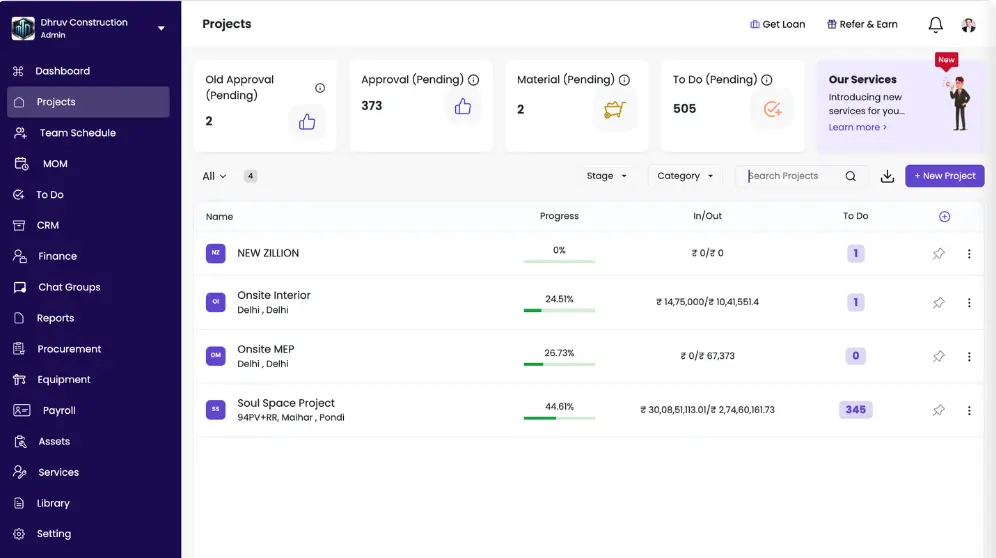
Powerplay is built for daily site coordination and team communication. Onsite is built around BOQ-linked execution where every field update drives a financial outcome.
● Onsite
What is Onsite
Onsite is a construction management software built specifically around BOQ-driven execution, cost control, and live site visibility. It connects scope definition, installed quantities, labour attendance, material usage, subcontractor billing, and project finances into one continuous workflow.
Onsite is best suited for construction companies that want:
- BOQ-linked budgeting, progress tracking, and billing
- Real-time capture of labour, material, and site activity
- Integrated subcontractor work orders and running bills
- Budget vs actual dashboards aligned with execution
- Native integration with commonly used accounting systems
Why construction teams choose Onsite:
- Designed primarily for execution-centric control rather than enterprise documentation governance
- Works best for contractors managing multiple active projects with BOQ-based scope
- Focuses on live commercial clarity instead of post-execution reporting
- Requires site teams to consistently update daily activity for maximum visibility
Pricing: Onsite follows a project-friendly software pricing model designed for construction teams of different sizes.
● Powerplay
What is Powerplay
Powerplay is a construction project management software built for daily site coordination, team communication, and project visibility. It connects site teams and office teams through a mobile app and desktop dashboard, replacing WhatsApp-based communication and manual Excel tracking with a centralized platform for progress updates, material tracking, and task management.
Powerplay is best suited for construction companies that want:
- Daily progress reporting with one-click DPR generation
- Task assignment and tracking from mobile for site and office teams
- Labour attendance recording across all active sites
- Material request management with GRN and inventory tracking
- Portfolio dashboards giving owners and managers visibility across all active projects
Why construction teams choose Powerplay:
- Designed primarily for site communication and daily reporting rather than BOQ-linked cost control
- Works best for small and mid-size contractors managing residential, interior, and commercial projects
- Requires minimal training for field teams with fast onboarding typically within seven days
- Built specifically for Indian construction teams at the field level
Pricing: Powerplay offers a free version with limited features available on mobile. Paid plans include web dashboard access, dedicated account management.
Key Differentiators
Key Differences That Matter in Practice: Onsite vs Powerplay
Four operational areas where the platforms diverge — each with direct impact on cost visibility, labour accuracy, and execution control on your live projects.
Site Work vs Financial Data
Comparison
✓ Onsite
With Onsite, you can get a view of site activity against budgeting and profitability. Installed quantities, labor attendance, and material consumption is not looked at separately. Everything is connected and influences cost position and project margins immediately. Progress becomes an analytical input rather than a descriptive update.
● Powerplay
Powerplay helps in capturing field activity effectively. Yet its public messaging places greater emphasis on coordination and reporting rather than continuous commercial recalculation.
✓ Onsite
Onsite brings finance reflection in operational workflows. It helps in ensuring that purchasing and expense decisions reflect a planned execution by linking site activity with budget and multi-level approvals. This causes a reduction in the chance of overruns at project closure. It alerts you about a loss immediately.
● Powerplay
Powerplay provides budget monitoring and cost reporting. However, it focuses more on transparency than on preventive financial gating tied strictly to BOQ quantities.
✓ Onsite
Onsite links geotagging attendance and face-based validation options. This helps in accurate workforce verification, and it also links attendance directly with payroll calculations.
● Powerplay
Powerplay supports labour attendance and workforce reporting. However, facial recognition is not emphasized in Powerplay. Its documentation highlights tracking and insight features.
✓ Onsite
In Onsite, the BOQ acts as the backbone of execution. Budgets, procurement decisions, progress updates, billing, and margin analysis all trace back to defined BOQ line items. This keeps planning, site activity, and financial tracking aligned throughout the project.
● Powerplay
Powerplay highlights planning and budget management as part of its offering, but its positioning does not centre the BOQ as the primary control layer for all workflows. Alignment between execution and cost tracking depends more on user discipline than on structural linkage within the platform.
Detailed Comparison
Onsite vs Powerplay — Feature Wise Comparison
A module-by-module breakdown across 8 construction software categories.
Feature
Onsite
Powerplay
Core Planning and Budgeting5 features
BOQ Creation and Structuring
BOQ is central and drives budgets, tasks, billing, and cost control
Project planning supported; BOQ as core execution baseline not prominently highlighted
Budget Generation
Budget generated from BOQ and tracked live
Budget planning and monitoring supported
Margin and Cost Visibility
Item-level margin visibility and project-level cost analytics
Budget monitoring and cost reports available
Budget vs Actual Tracking
Live tracking tied to execution quantities and labour
Real-time budget tracking mentioned; execution linkage not emphasized
Cost Forecasting
Execution-driven forecasting
Budget and cost visibility provided; forecasting depth not detailed publicly
Field Execution and Progress5 features
Daily Progress Reports
Structured DPR with quantities, labour, material, and financial linkage
Detailed progress reports and real-time status tracking
Progress Linked to Cost
Yes — execution updates budgets automatically
Progress tracking available; cost binding not described in detail
Geo-Tagged Photos
Yes, with timestamp verification
Field photo sharing supported
Automated Reconciliation (Progress to Billing)
Yes — BOQ-linked billing automation
Billing supported; automated BOQ reconciliation not highlighted
Delay Detection
Execution-based insights tied to task quantities
Timeline and schedule tracking supported
Labour Management and Payroll5 features
Attendance Tracking
Geo-tagged attendance with structured tracking
Labour attendance tracking supported
Face Recognition
Yes — face validation option available
Not publicly highlighted
Labour Productivity Reports
Labour output linked to activities and cost
Productivity insights and workforce reports available
Payroll Calculation
Attendance integrated with wage calculation
Labour payroll management supported
Labour Cost Visibility
Linked to project budgets and activities
Labour cost reports available
Material, Inventory and Procurement5 features
Material Requests
Budget and BOQ-linked requests
Material request and tracking supported
Inventory Tracking
Site-level stock and warehouse management
Real-time stock visibility promoted
RFQ and Vendor Comparison
RFQ, vendor comparison, PO generation
Procurement and PO workflows promoted
Bill Validation vs Delivery
Automated matching of bills against delivery
Material cost tracking available; automated validation not detailed
Budget Integration
Every purchase linked to project budget
Budget tracking available; BOQ linkage not emphasized
Subcontractor and Work Orders4 features
Digital Work Orders
Structured work orders linked to BOQ
Task and work tracking supported
Progress-Based Billing
Milestone billing with retention tracking
Billing and cost tracking supported; retention not prominently detailed
Retention Tracking
Built-in retention management
Not publicly highlighted
Performance Analytics
Subcontractor productivity analytics
Task and performance insights provided
Reporting and Dashboards4 features
Real-Time Dashboards
Execution and cost dashboards across modules
Real-time dashboards and customizable visualizations
Project P&L
Live project-level profitability view
Budget and cost reports available; named P&L module not emphasized
Custom Reports
50+ structured reports
Custom reports and visual dashboards promoted
Exportable Reports
PDF and Excel exports
Report exports supported
Billing and Finance4 features
Client Invoicing
Auto-generated from BOQ progress
Billing and invoice tracking supported
Vendor Billing
Material, subcontractor, and equipment bills
Cost and vendor billing supported
Budget vs Billing Linkage
Automatic linkage to budget and progress
Billing available; automated BOQ linkage not detailed
Accounting Integration
Native sync options available
Data export and reporting supported; named integrations not prominently highlighted
Approvals and Controls3 features
Multi-Level Approval Workflow
Custom approval chains across modules
Approval workflows supported
Cross-Module Control
Approvals tied to budgets, materials, labour, and billing
Task and workflow approvals supported; cross-module enforcement not emphasized
Audit Trails
Full tracking of actions and approvals
Reporting and data visibility promoted
Make Your Decision
Which Platform Fits Your Workflow?
The right choice depends on whether you need fast daily coordination or structured financial control tied to BOQ execution.
Powerplay
May suit you if
Powerplay may suit you if your priority is simplifying daily coordination and field reporting across multiple sites.
- Simplifying daily field reporting across multiple sites
- Enabling quick team coordination and task updates
- Using a mobile-first platform that field engineers can adopt easily
- Capturing photos, site progress, and activity logs without complexity
- Improving day-to-day visibility without building heavy financial workflows
- Implementing software that focuses on speed and ease of reporting
Onsite
May suit you if
Onsite may suit you if your priority is BOQ-driven execution control where every field update has a direct commercial outcome.
- Using the BOQ as the operational backbone for execution and cost control
- Keeping the expenses within budget
- Keeping track of budget versus actual cost
- Keeping a look at labor activity with the help of geo-tagged attendance and face recognition
- Automated client invoice generation
- Managing subcontractors with built-in milestone and retention controls
- Tracking materials at site level with structured delivery and bill verification
- Managing the whole project on mobile and web platforms
FAQ
Questions About Onsite vs Powerplay
Common questions when comparing both platforms for Indian construction teams.
Powerplay is built for daily site coordination — it replaces WhatsApp-based communication and manual Excel tracking with a centralized platform for progress updates, task management, and material tracking. Onsite treats every field activity as a structured financial input. Installed quantities, labour attendance, material consumption, and procurement decisions all connect directly to BOQ budget positions and billing readiness in real time. Powerplay prioritizes coordination speed and ease of adoption. Onsite prioritizes commercial control where daily execution determines margin outcomes.
Powerplay provides budget planning, monitoring, and cost reporting as part of its offering. However, its positioning does not centre the BOQ as the primary structural control layer for all workflows. Budget alignment depends more on how consistently users maintain data entry discipline than on structural platform linkage. Onsite builds the BOQ as the backbone of execution — budgets, procurement, progress updates, billing, and margin analysis all trace back to defined BOQ line items automatically, without relying on manual discipline.
Onsite offers geo-tagged attendance combined with face-based validation, directly linking confirmed attendance to payroll calculations. This makes proxy attendance and ghost worker entries structurally difficult. Powerplay supports labour attendance tracking and workforce reporting, but facial recognition is not publicly highlighted in its documentation. For construction workforces where payroll accuracy is tied directly to site presence, Onsite’s attendance-to-payroll chain provides stronger built-in controls.
Onsite provides structured subcontractor management that includes digital work orders linked to BOQ scope, progress-based milestone billing, built-in retention tracking, and subcontractor productivity analytics. Powerplay supports task and work tracking, and billing is available, but retention tracking is not publicly highlighted as a structured feature. For contractors managing multiple subcontractors on BOQ-based contracts where retention management and milestone billing are standard requirements, Onsite’s structured approach prevents payment disputes and ensures retention releases are tied to verified completion.
Onsite covers daily field coordination through structured DPR generation, task management, geo-tagged photo capture with timestamp verification, and team communication — but these features are built around execution data that flows into cost and billing positions rather than being standalone coordination tools. Powerplay is purpose-built for coordination-first use cases where ease of daily reporting and fast team adoption are the primary requirements. Teams that currently rely on WhatsApp and Excel and want a lightweight coordination upgrade may find Powerplay’s onboarding faster. Teams that need daily updates to drive financial visibility should choose Onsite.
Onsite links every material request to a specific BOQ budget line before it enters the procurement workflow. Multi-level approval chains check budget availability at the moment a request is raised, not at the reporting stage. Delivery receipts are automatically matched against purchase orders for bill validation. Powerplay promotes material request tracking, GRN, inventory visibility, and procurement workflows, but automated bill-vs-delivery matching and strict BOQ purchase linkage are not detailed in its public documentation. For contractors where material cost leakage is a significant margin risk, Onsite’s structured approach provides stronger preventive controls.
Powerplay offers a free version with limited features available on mobile. Paid plans include web dashboard access and dedicated account management. Onsite follows a project-friendly pricing model designed for construction teams of different sizes — there is no permanently free tier, but pricing is structured around operational usage rather than project value. The relevant comparison is not cost alone but what each tier delivers: Powerplay’s free version provides daily reporting and coordination. Onsite’s paid plans provide BOQ-linked cost control, face recognition attendance, subcontractor retention, three-way bill matching, and live P&L visibility.
Choose Powerplay if your immediate goal is to replace WhatsApp group updates and Excel sheets with a structured mobile coordination platform — and where your team values fast onboarding and simple daily reporting over financial depth. Choose Onsite if your projects run on BOQ-based contracts where daily site activity must directly drive cost visibility, billing readiness, and margin control. Onsite is the better fit for contractors, builders, EPC firms, and interior companies where the gap between what happens on site and what the finance team sees is costing money.