
Product updatesShipped regularly
What’s new in Onsite Construction ERP
See what we have added to Onsite for your site, office and accounts teams, with a screenshot and where to find each update in the app.

2026
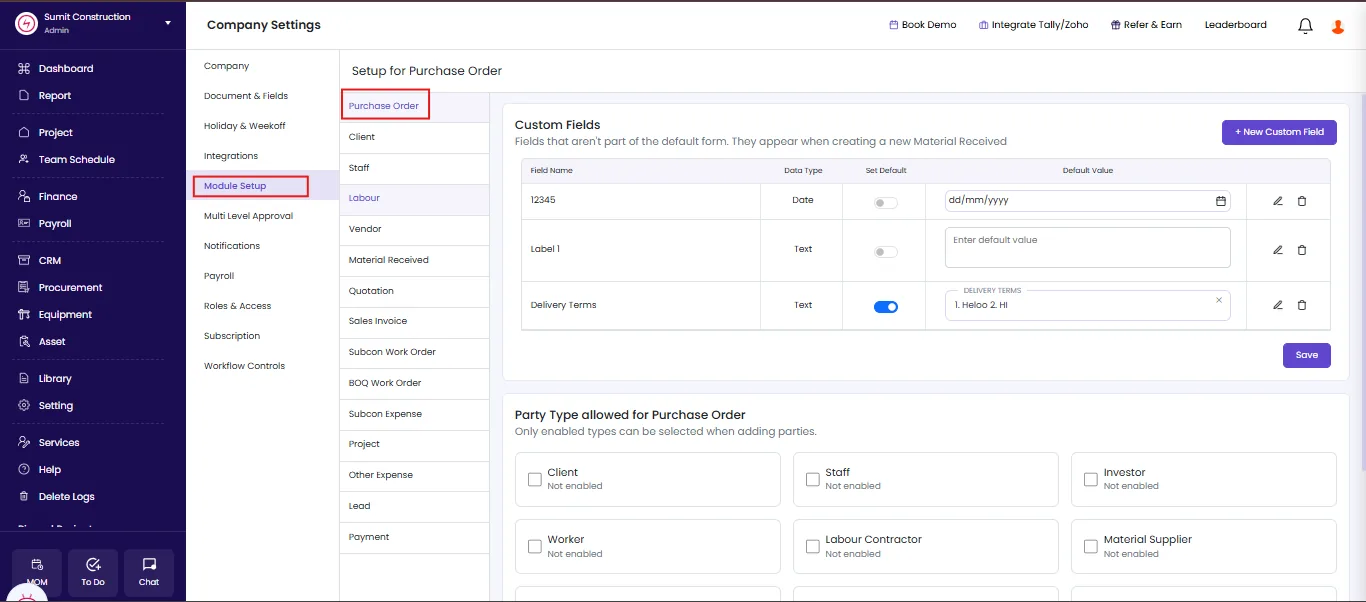
Control Which Party Types Appear on a Purchase Order
Every party type showed up when raising a purchase order, whether or not it belonged there. Admins and superadmins now choose which party types a purchase order accepts, and only the enabled types appear when adding a party.
What’s new
- Select the party types allowed on a purchase order
- Only enabled types appear when a user adds a party
- Available to admins and superadmins
Where to find it
Settings, Module Setup, Purchase Order
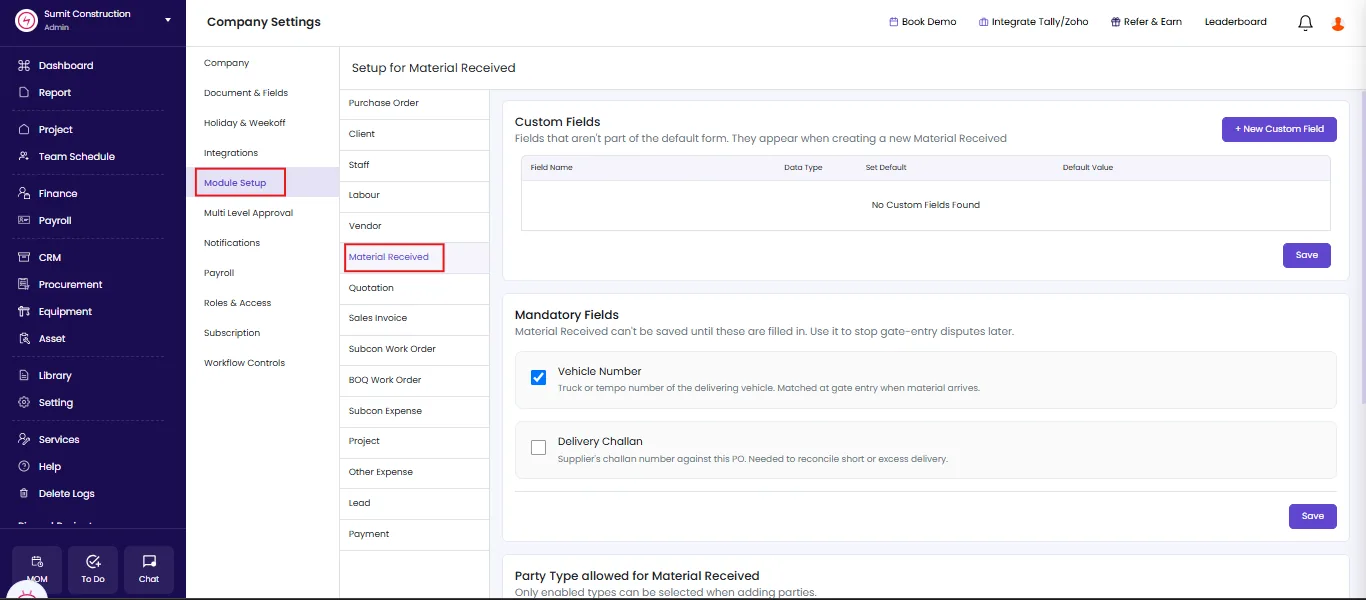
Make Vehicle Number and Delivery Challan Mandatory on Material Received
A material receipt saved without a vehicle number or a delivery challan number, leaving nothing on record when a gate entry came into question weeks later. Admins and superadmins now make both fields mandatory.
What’s new
- Set Vehicle Number and Delivery Challan Number as mandatory fields
- Material Received does not save until both are filled in
- Closes the record gap that gate entry disputes rely on
Where to find it
Settings, Module Setup, Material Received
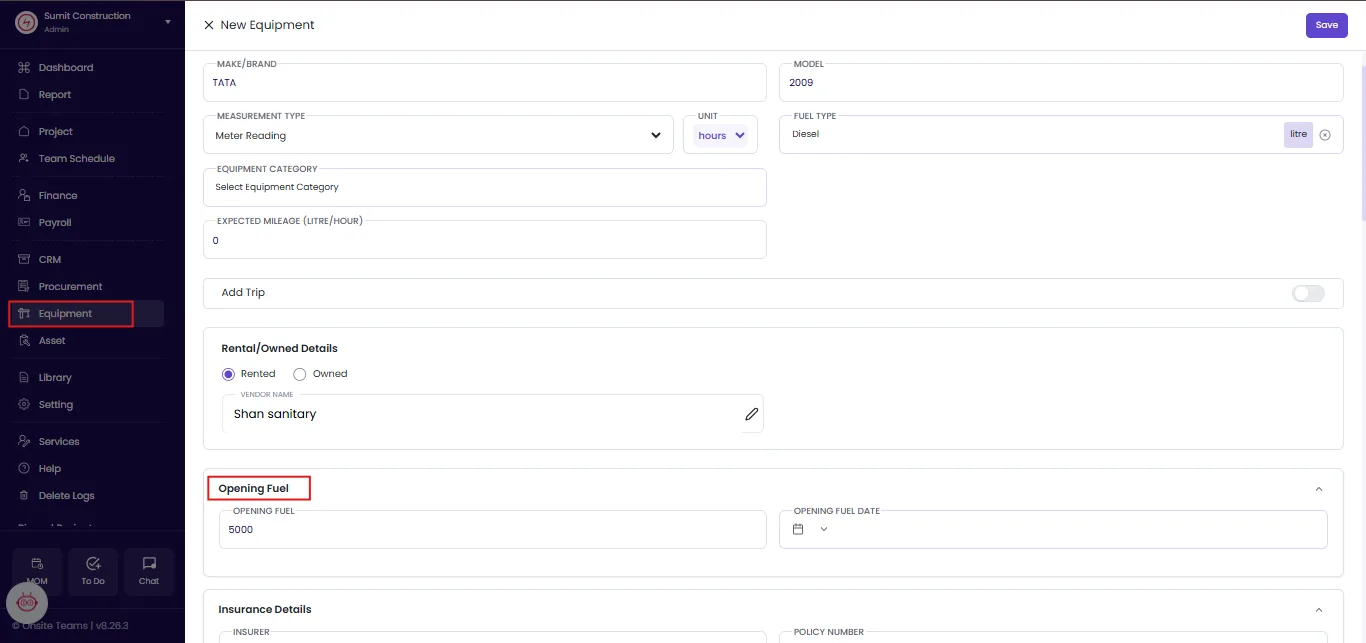
Set an Opening Fuel Stock Against Every Piece of Equipment
Admins now record opening fuel stock for a piece of equipment. As that equipment runs across projects, Onsite deducts consumption against duration and shows the litres still available to use.
What’s new
- Update opening fuel stock against any equipment record
- Consumption calculates from recorded duration and usage
- Available litres carry across every project the equipment works on
Where to find it
Equipment
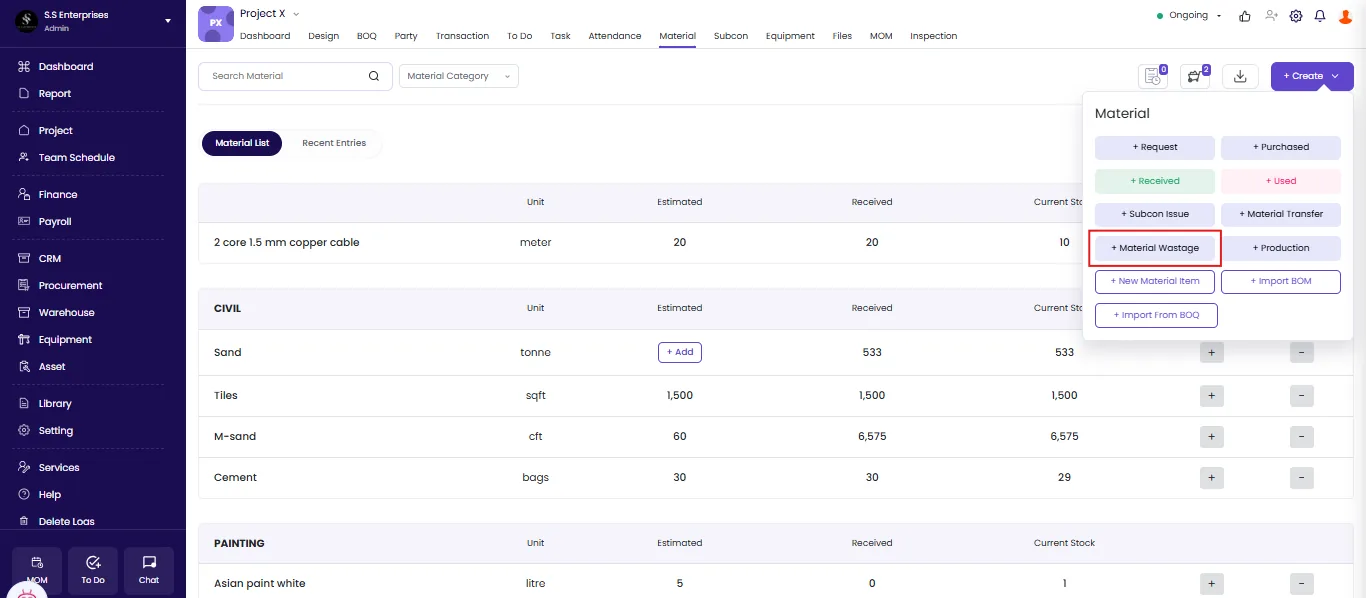
Record Material Wastage Against a Project
Material consumed and material wasted looked the same in inventory, so nobody could say how much a project actually lost. Users now log wastage as its own entry, with a reason recorded against it.
What’s new
- Record material wastage within any project
- State the reason so the cause is traceable
- The entry posts against that material as a stock out, so inventory stays accurate
Where to find it
Project, Material, Create, Material Wastage
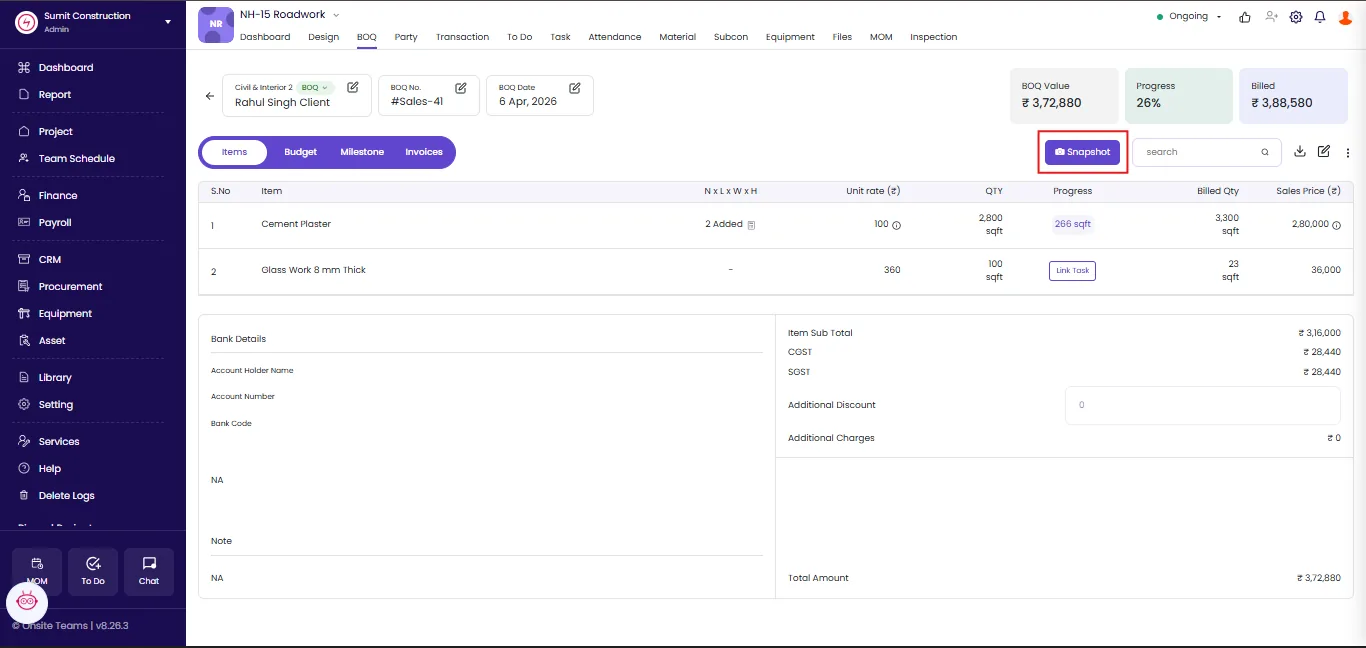
Save a Snapshot of a BOQ Before You Change It
A BOQ carried only its current state, so the version a client approved disappeared the moment someone revised it. Users now take a snapshot before making changes and keep every version the BOQ has ever had.
What’s new
- Take a snapshot before revising any BOQ
- Keep every previous version within the project
- Snapshots stay read only and cannot be edited
Where to find it
Project, BOQ, Snapshot
Give Accountants Access to Transactions Without Project-by-Project Permissions
An accountant needed adding to every individual project before working on its transactions, which meant granting project access to someone who only handled finance. The Standard Accountant role removes that step.
What’s new
- Give the Standard Accountant role access to all transactions
- Perform finance transactions without being added to each project
- No project-by-project permissions to maintain
Where to find it
Settings, Roles and Access
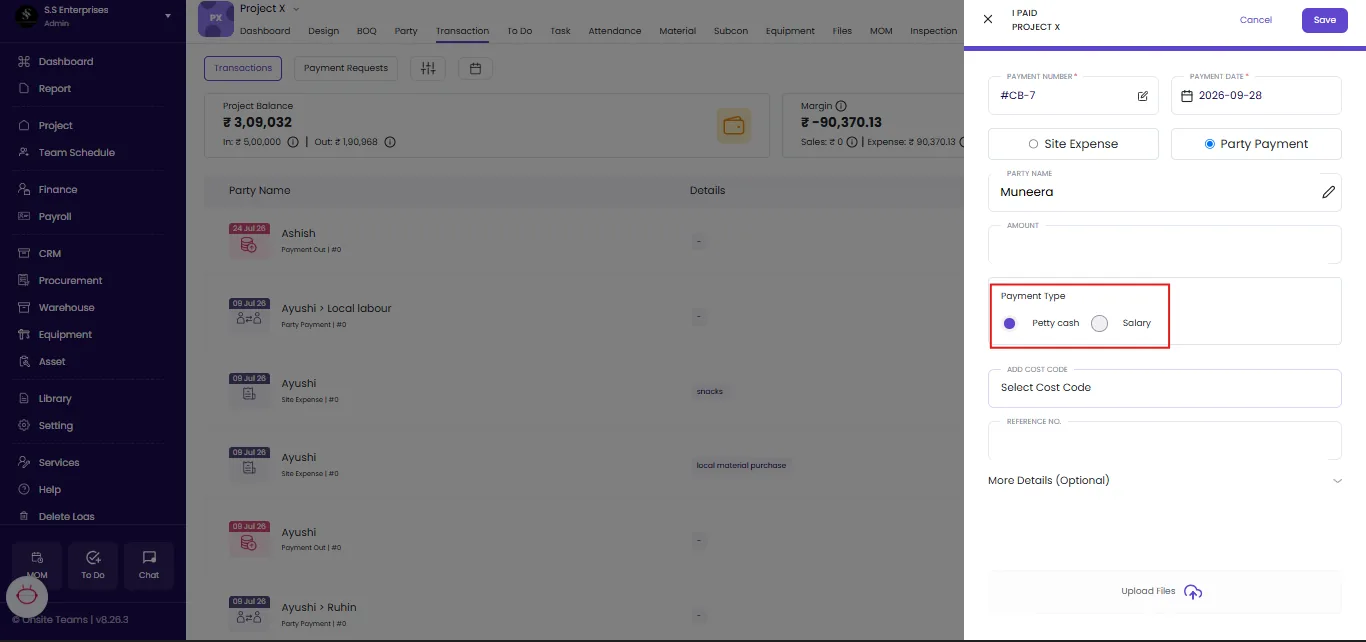
Choose Salary or Petty Cash When Paying a Staff Party
Paying a staff party through Party Payment recorded the amount without saying what it was for. The payment type now sits on the entry itself.
What’s new
- Select salary or petty cash when paying a staff party
- Available on the I Paid flow under Party Payment
- Matches the payment type already available on payment out to staff
Where to find it
Transactions, I Paid, Party Payment
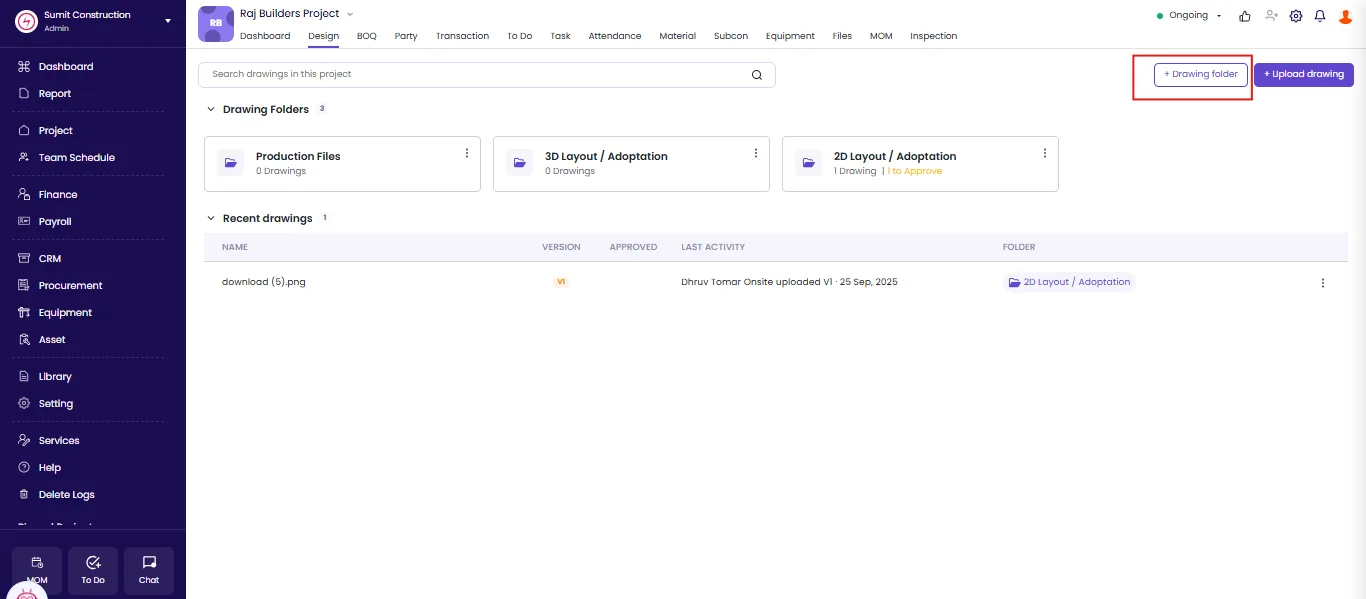
Create Your Own Folders in the Design Section
Every project’s Design section previously carried three fixed folders: Production Files, 2D Layout, and 3D Layout. Users now create as many folders as a project needs.
What’s new
- Create custom folders inside any project’s Design section
- Keep the existing Production Files, 2D Layout, and 3D Layout folders alongside
- Empty a folder of its contents before deleting it
Where to find it
Project, Design, + Drawing folder
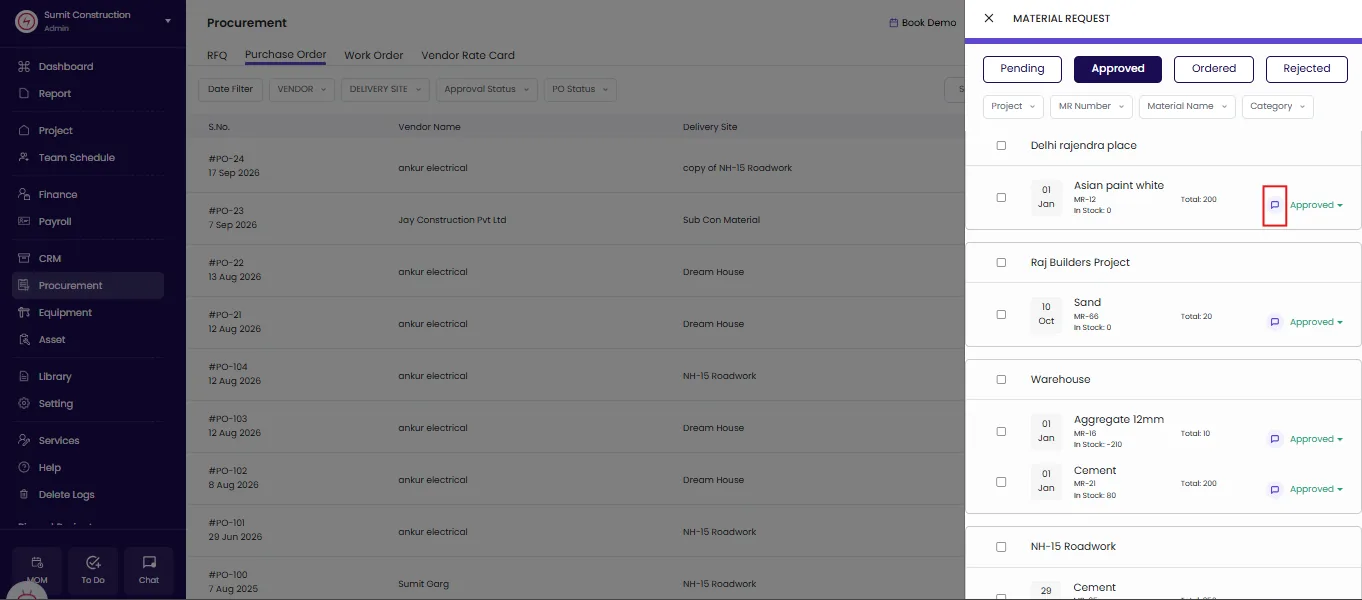
Add a Comment When Approving or Rejecting a Material Request
Reviewers approved or rejected a material request without recording why, so the requester saw the decision and not the reason. A comment box now appears against every material request raised.
What’s new
- Add a comment against every material request under review
- Record the reason for approving or rejecting the request
- Keep the reason on record next to the decision for the requester
Where to find it
Procurement, Material Request
Calculate Leave from the Date of Joining
Staff leave now calculates from the party’s date of joining. Where a date of joining does not exist on the party record, leave calculates from the payroll creation date instead.
What’s new
- Leave calculates from the party’s recorded date of joining
- Falls back to the payroll creation date when no date of joining exists
- Applies to all staff leave calculations
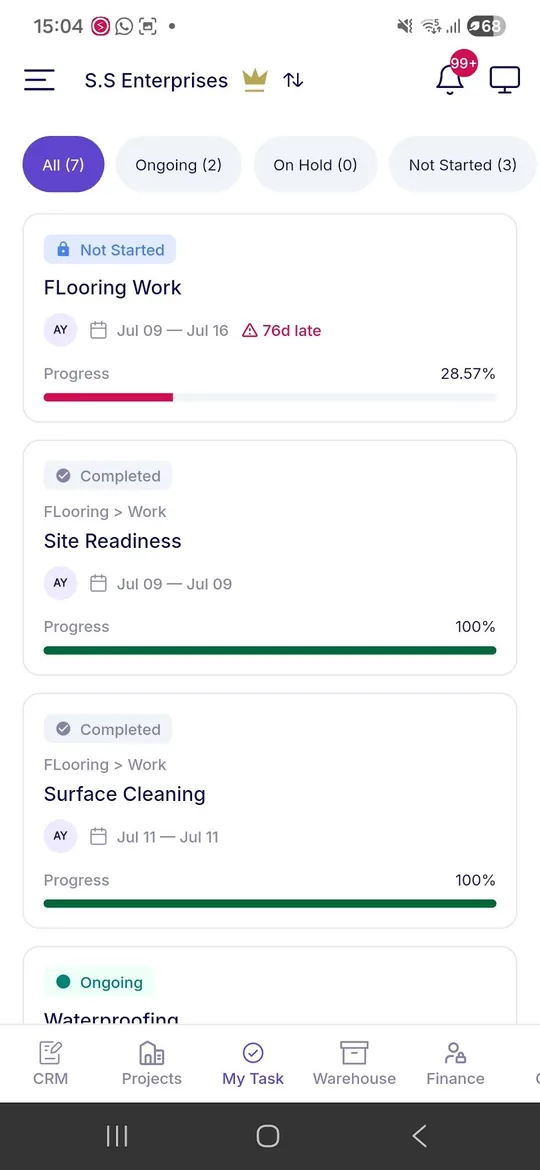
See Every Task Assigned to You in One Place
Users opened each project separately to find the work assigned to them. My Tasks now collects every task assigned to a user across all the projects they can access.
What’s new
- View your tasks across every project you have access to
- Prioritise delayed tasks without opening each project one by one
- Update progress and manage completion against the project schedule
Where to find it
Mobile app, My Tasks
View the Task Gantt Chart with Dependencies on Mobile
Site teams working away from a desk could not see how one task sat against the ones before and after it. The task Gantt chart, with dependencies, now opens directly in the Onsite mobile app.
What’s new
- Open the task Gantt chart with its dependencies from the mobile app
- Assess progress stage by stage against the tasks each stage depends on
- Available to admins and site teams
Where to find it
Mobile app, Project, Task
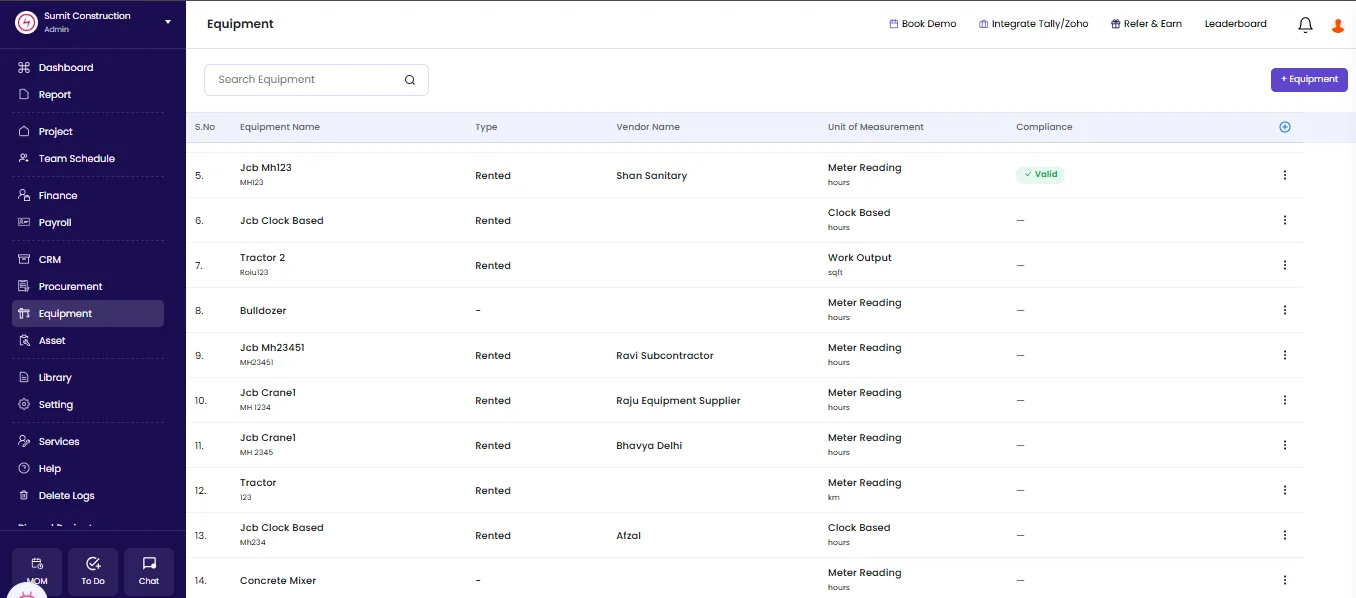
Track Equipment Compliance Expiry at a Glance
Checking whether a machine’s insurance or permit had lapsed meant opening each equipment record. Expiry status now sits in the equipment list itself.
What’s new
- See expiry status against every piece of equipment in one column
- Identify valid compliance, due soon, or already expired
- Covers insurance, service, registration certificate, permit details, and more
Where to find it
Equipment
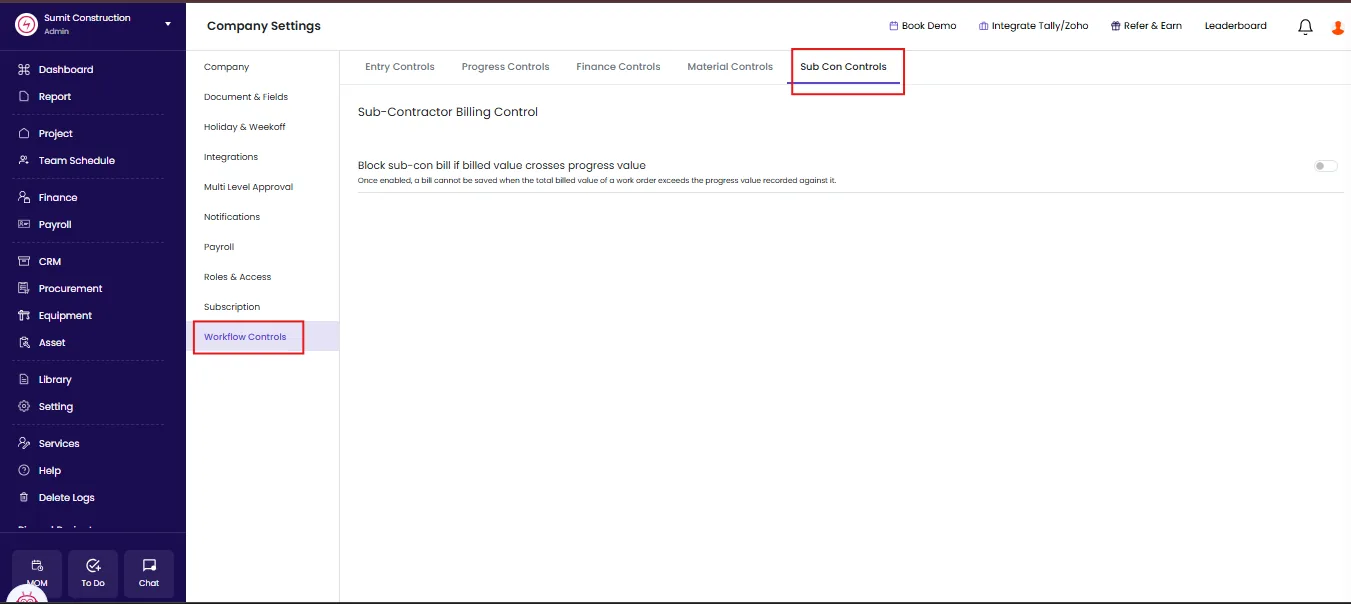
Block Subcon Bills That Exceed Recorded Progress
A subcontractor bill previously saved regardless of how much progress the work order carried against it. The new Subcon Bill Control setting stops a bill from saving when the total billed value on a work order exceeds the progress value recorded.
What’s new
- Block a bill from saving when billed value exceeds recorded progress
- Measures against the total billed value on the work order, not a single bill
- Switch it on at company level
Where to find it
Company Settings, Workflow Controls, Sub Con Controls
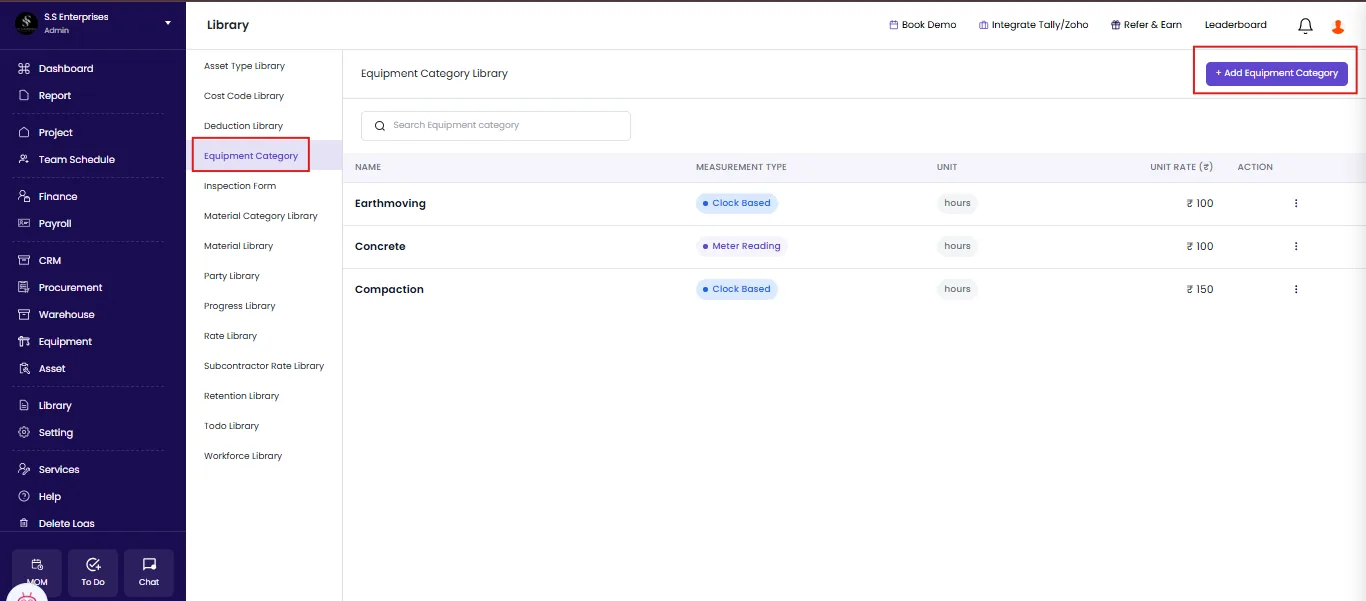
Maintain Equipment Categories in a Dedicated Library
Onsite now carries an Equipment Category Library. Users add each category once and set how that category is measured and charged.
What’s new
- Add equipment categories to a company level library
- Select the measurement type and unit for each category
- Set a unit rate against every category
Where to find it
Library, Equipment Category Library
Punch In Within Five Minutes of Opening the Screen
Opening the self-punch screen now starts a five-minute window. Staff mark attendance from their site or office location inside that window. Once the timer ends, the staff member reopens the punch-in screen to mark attendance for the day.
What’s new
- Every self-punch screen opens a five-minute window to mark attendance
- Staff punch in from the site or office location within that window
- Reopen the punch-in screen once the timer runs out
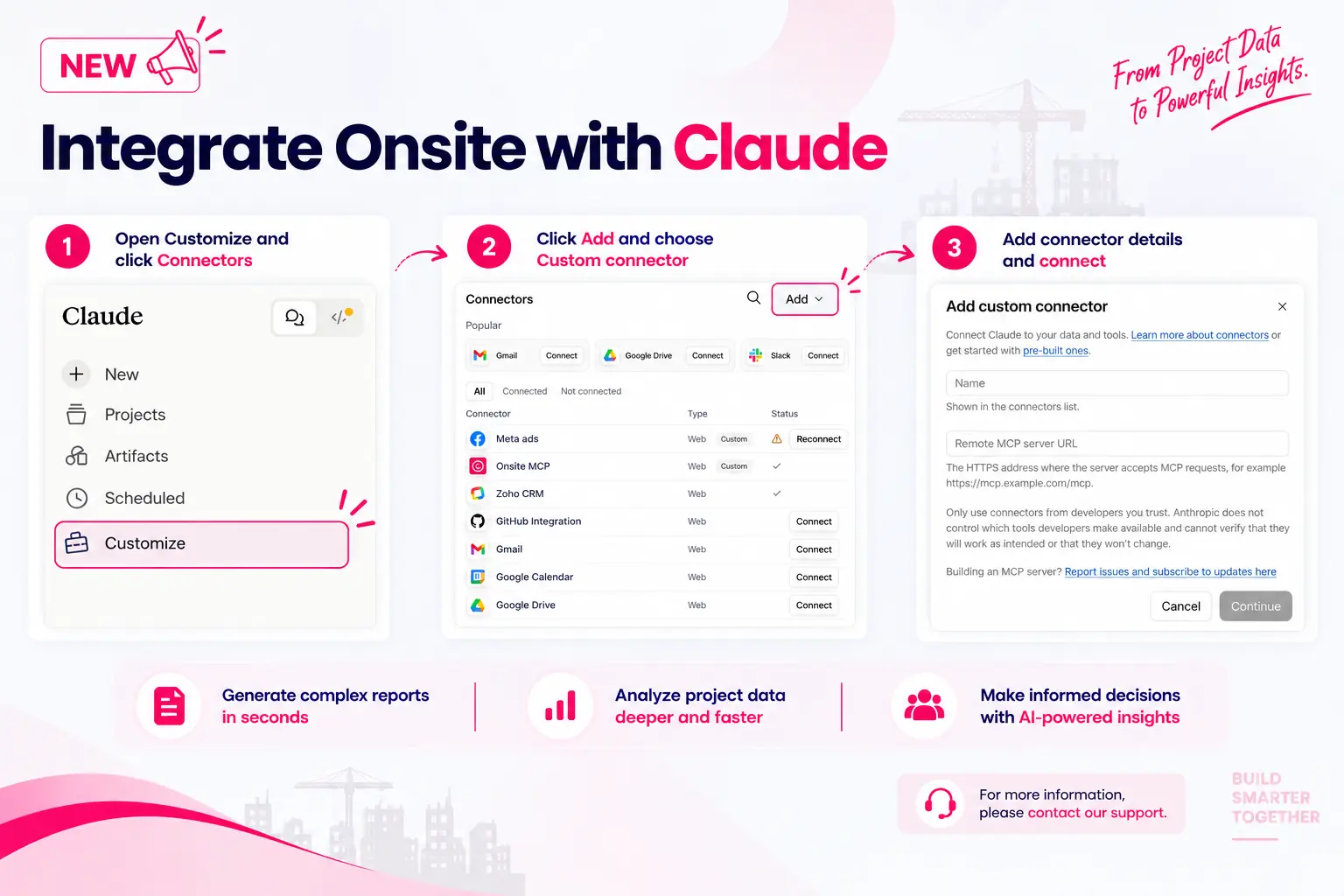
Connect Your Onsite Data to Claude
Answering a project question usually means opening several reports and reconciling them. Onsite now connects to Claude, so admins ask the question directly and get an answer built from their own project data.
What’s new
- Ask about costs, progress, purchases, and payments in simple language
- Generate analysis and pull project updates through the same conversation
- Work through business questions across projects rather than one report at a time
Good to know
Where it runs: Inside Claude. This integration does not appear in the Onsite product.
Who it is for: Admins only
Availability: Available as a paid add-on. Contact Support Team for access.
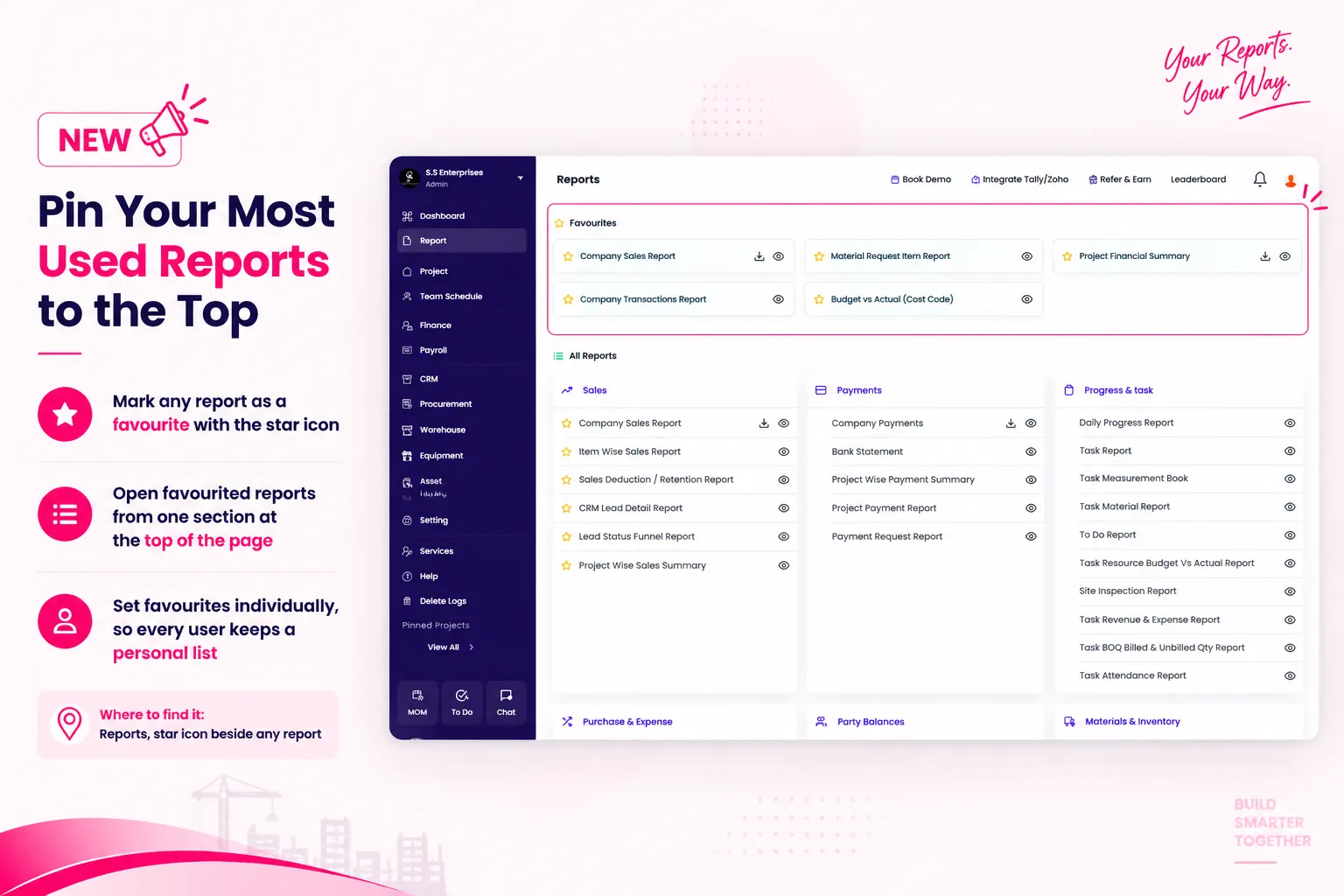
Pin Your Most Used Reports to the Top
The Reports section spans categories including Sales, Payments, Progress and Task, Purchase and Expense, Party Balances, and Materials and Inventory. Users now mark any report with the star icon, and every favourited report sits together at the top of the page.
What’s new
- Mark any report as a favourite with the star icon
- Open favourited reports from one section at the top of the page
- Set favourites individually, so every user keeps a personal list
Where to find it
Reports, star icon beside any report
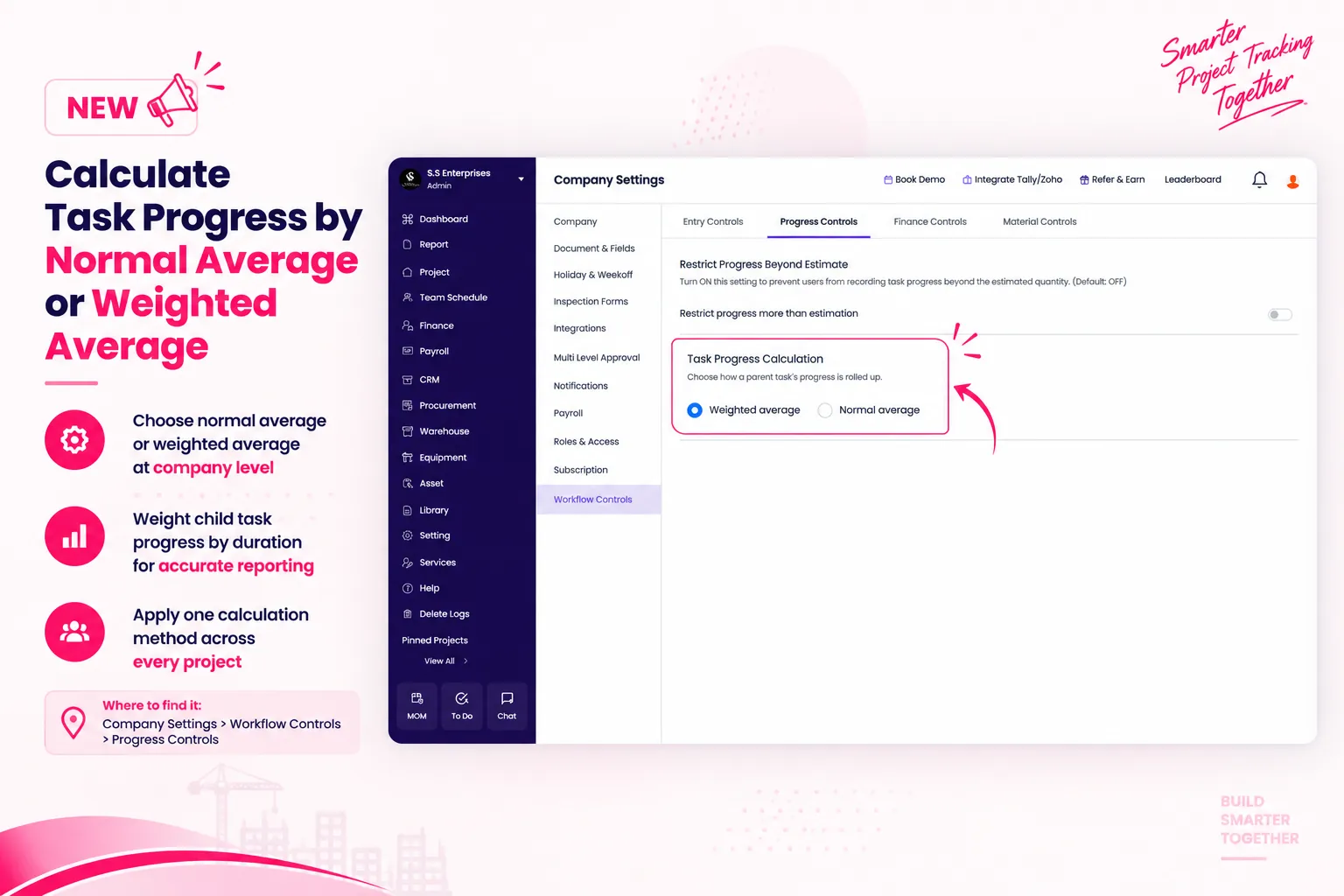
Calculate Task Progress by Normal Average or Weighted Average
A simple average treats a one-day task and a 10-day task as equal, which distorts the overall project number. Admins now select weighted average, which weights each child task by its duration and reflects how much work each task actually represents.
What’s new
- Choose normal average or weighted average at company level
- Weight child task progress by duration for accurate project reporting
- Apply one calculation method consistently across every project
Where to find it
Company Settings, Workflow Controls, Progress Controls
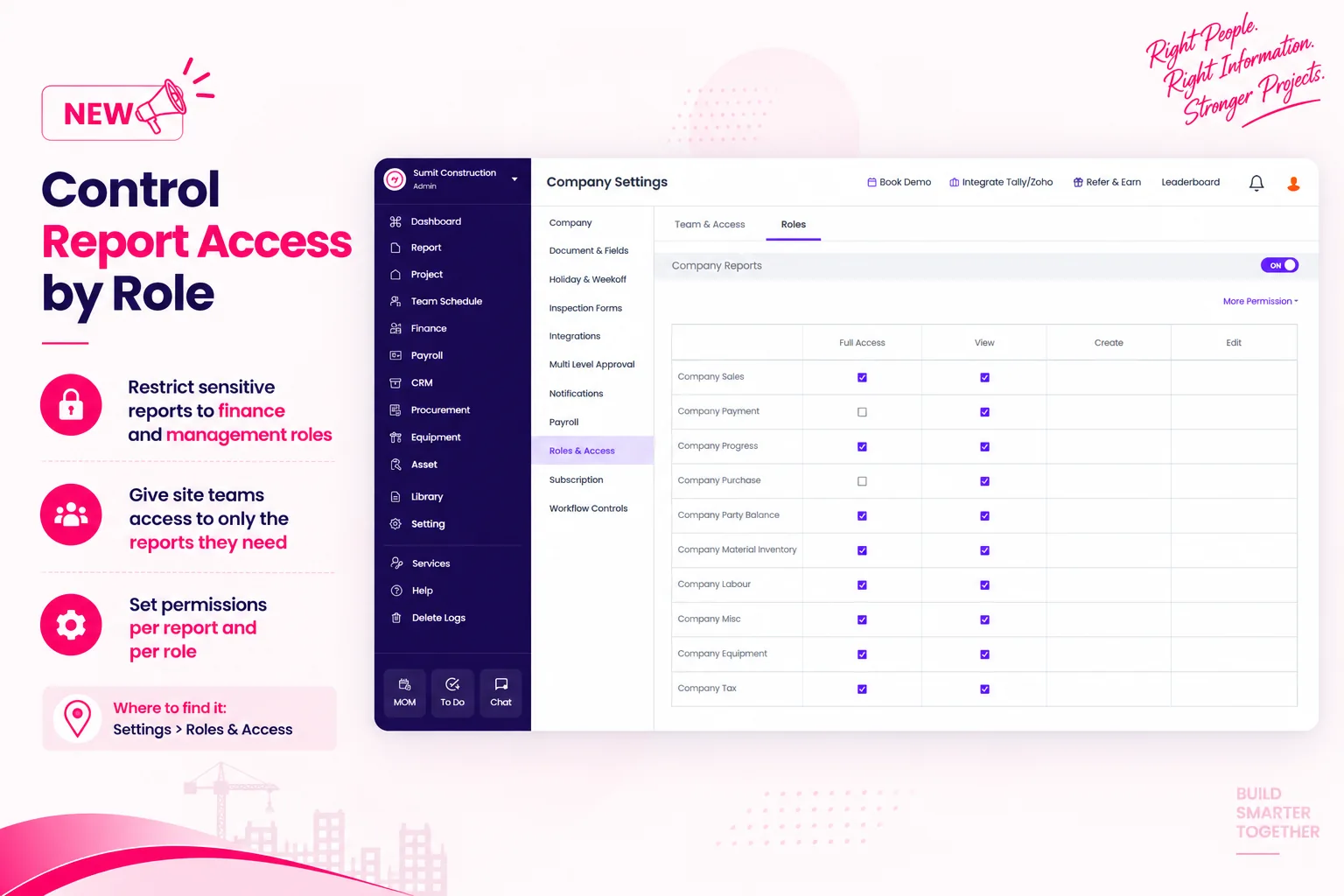
Control Report Access by Role
Every team member could previously open every report, including financial summaries and payment reports. Admins now switch report access on or off for each role, so sensitive project financials reach only the people who need them.
What’s new
- Restrict reports such as the Project Financial Summary to finance and management roles
- Give site teams access to only the reports their work requires
- Set permissions per report and per role
Where to find it
Settings, Roles and Access
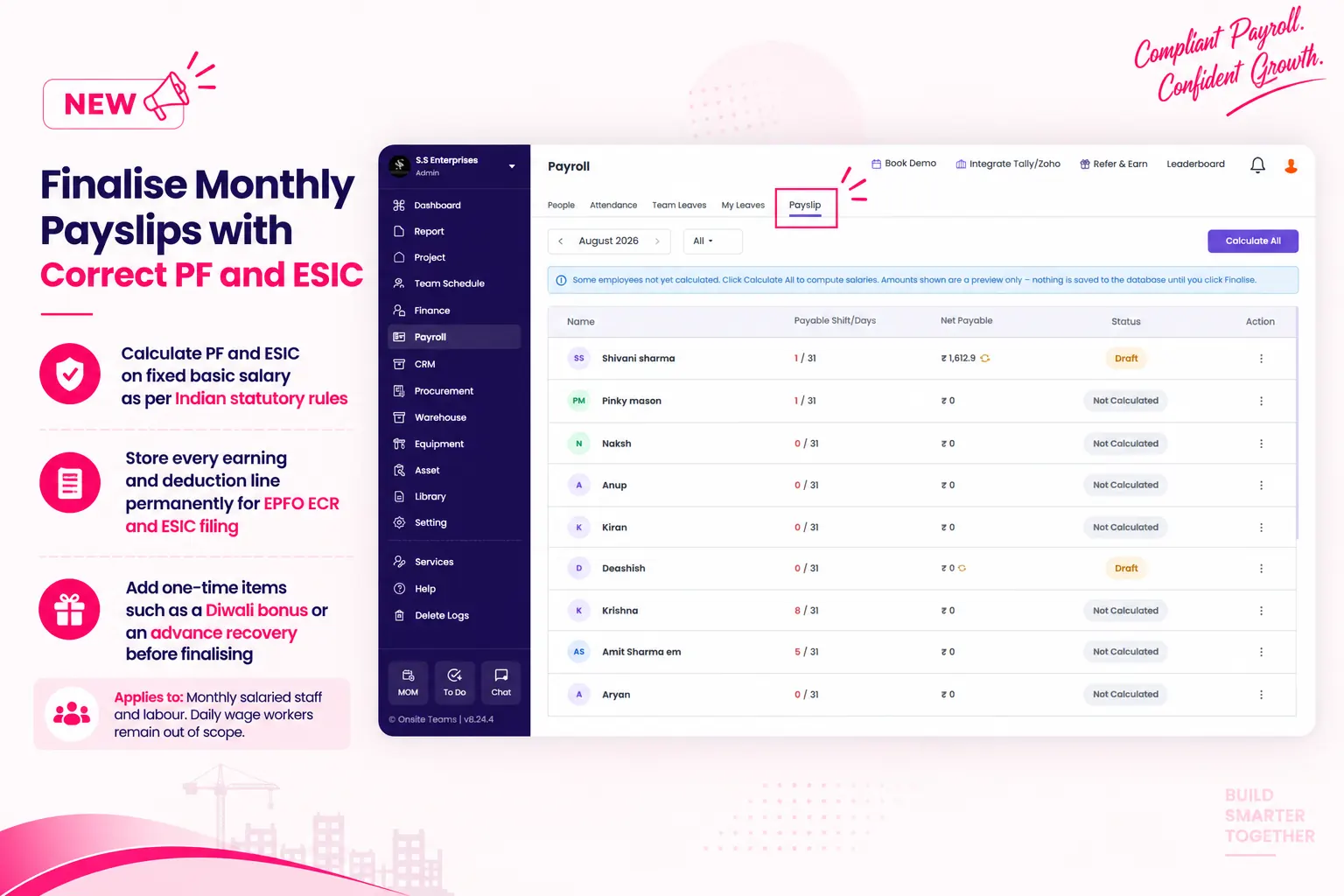
Finalise Monthly Payslips with Correct PF and ESIC
Onsite previously generated salary slips as PDFs without storing a permanent record, and prorated PF and ESIC with attendance, which contradicts Indian statutory rules. Payroll managers now review earnings, deductions, and adjustments, then finalise and lock the payslip for the month. Employees and admins view payslips for any previous month.
What’s new
- Calculate PF and ESIC on fixed basic salary as Indian statutory rules require
- Store every earning and deduction line permanently for EPFO ECR and ESIC filing
- Add one-time items such as a Diwali bonus or an advance recovery before finalising
Applies to
Monthly salaried staff and labour. Daily wage workers remain out of scope.
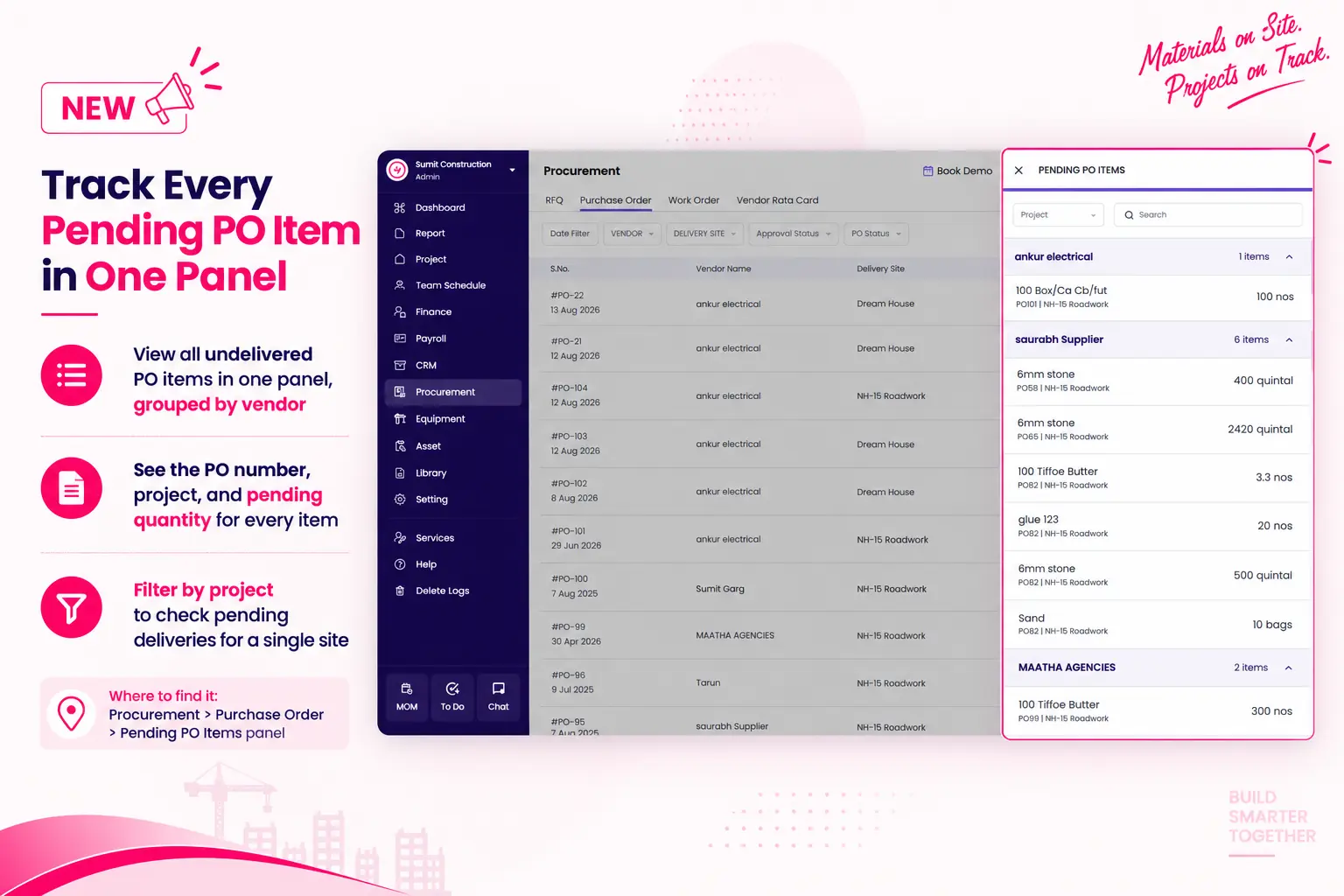
Track Every Pending PO Item in One Panel
Purchase managers previously opened each purchase order to check which materials had not yet arrived at site. The Pending PO Items panel now lists every undelivered item across all purchase orders, grouped by vendor.
What’s new
- View all undelivered PO items in one panel, grouped by vendor
- See the PO number, project, and pending quantity for every item
- Filter by project to check pending deliveries for a single site
Where to find it
Procurement, Purchase Order, Pending PO Items panel
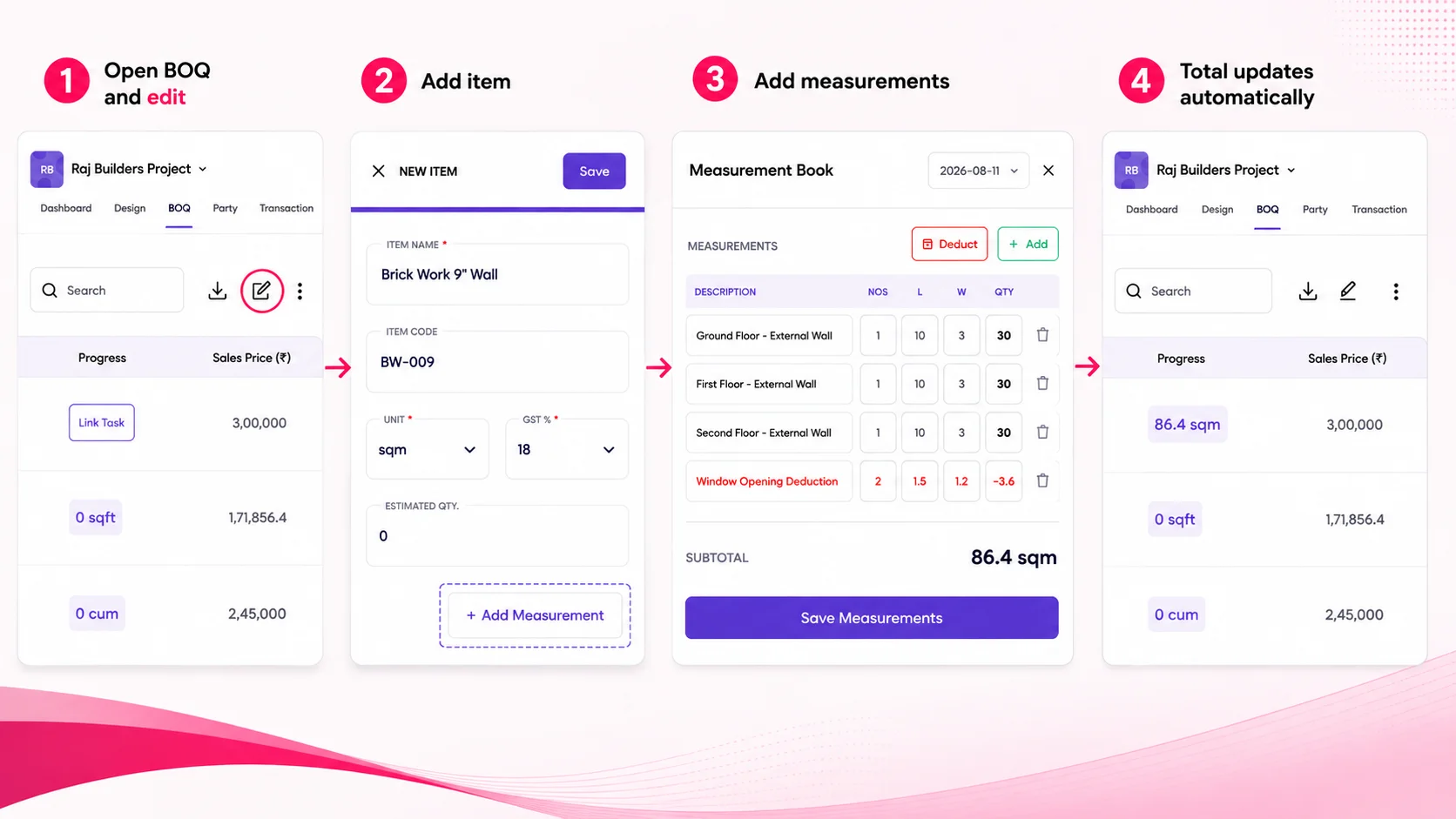
Multiple Measurements: Build Accurate Quantities, Item by Item
With Onsite’s new Multiple Measurements feature, construction company owners can break down a single BOQ item, invoice line, or subcon expense into multiple measurement portions.
What’s new
- BOQ items, invoice lines, subcon work order items, and subcon expenses often cover multiple portions — different floors, walls, or rooms
- Record each portion as a separate row with its own quantity; total computes automatically
- Add deduction rows for openings like windows or doors
- Invoice and subcon expense rows carry a date, giving a clear, dispute-proof record of how a billed quantity was arrived at
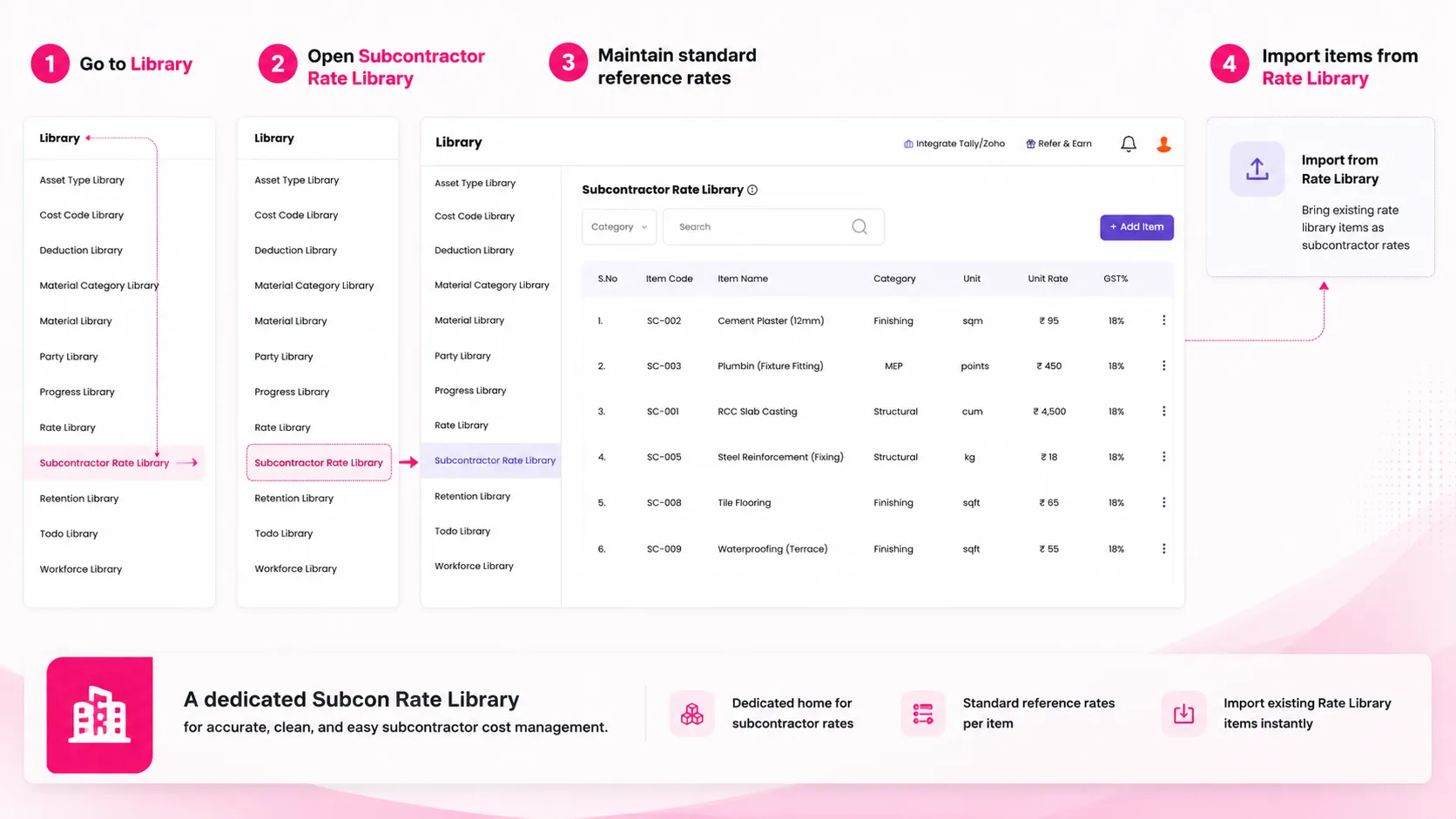
Subcon Rate Library: A Dedicated Home for Subcontractor Rates
To eliminate confusion around managing subcontractor costs, Onsite introduces a dedicated Subcon Rate Library, separate from the client-facing Rate Library.
What’s new
- Subcontractor rates used to sit mixed inside the client-facing Rate Library, making clean cost-only pricing difficult
- Subcontractor rates now have their own dedicated library under the Library tab
- Standard reference rates maintained per item — for work like excavation, masonry, or shuttering
- Existing Rate Library items can be imported directly, so teams don’t rebuild subcon rates from scratch
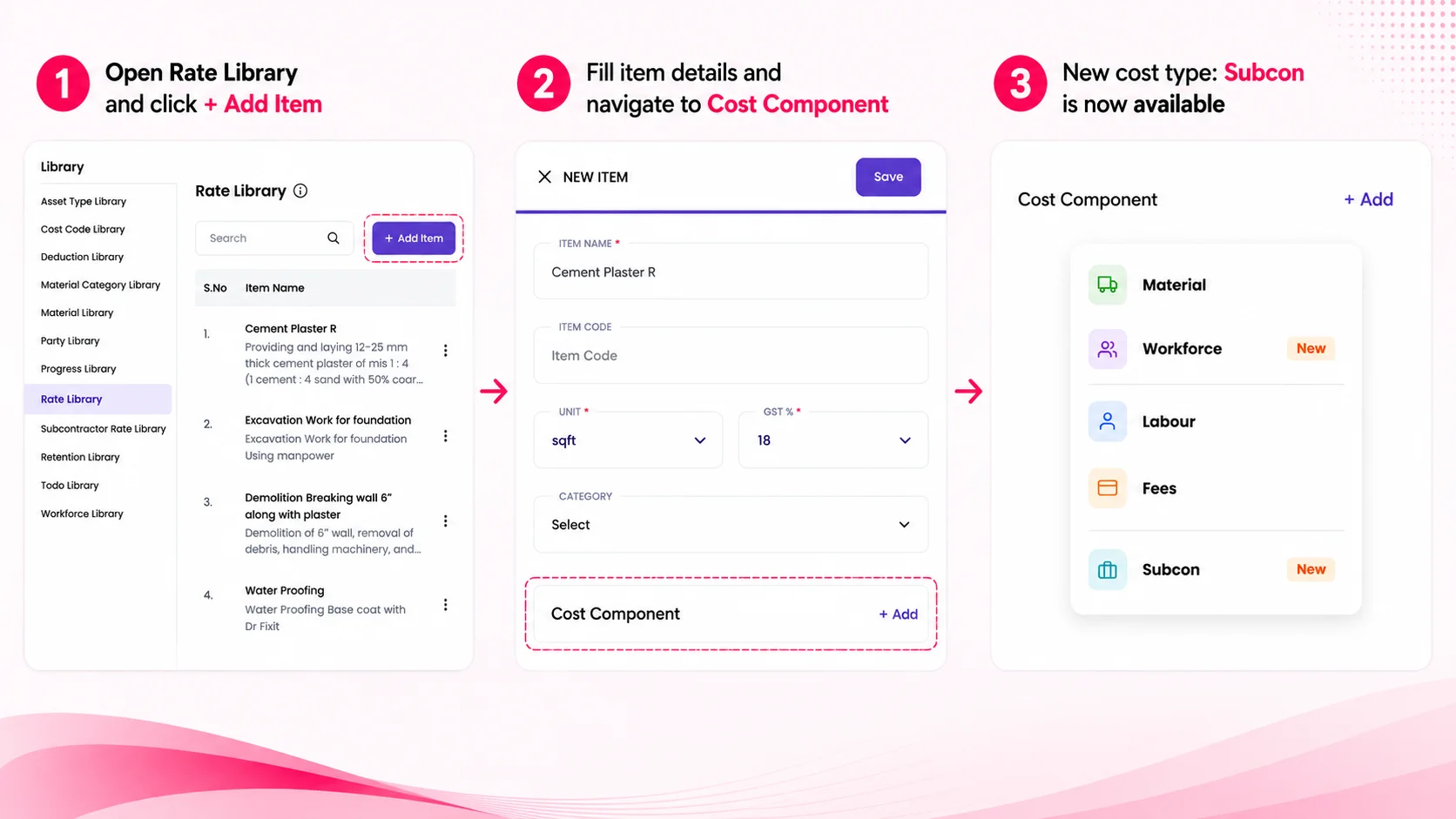
Subcon Cost Component: Model Subcontracted Work Properly in Your Estimates
A new cost type alongside material, labour, and workforce — for the parts of a job that are subcontracted out.
What’s new
- Subcontracted portions of a job — like shuttering or reinforcement on an RCC slab — had no place in cost estimates
- These costs were either left out or wrongly lumped under “fees”
- Onsite adds a Subcon cost type to Rate Library and BOQ items
- Rates pull directly from the Subcon Rate Library, capturing subcontracted costs accurately from the estimation stage itself
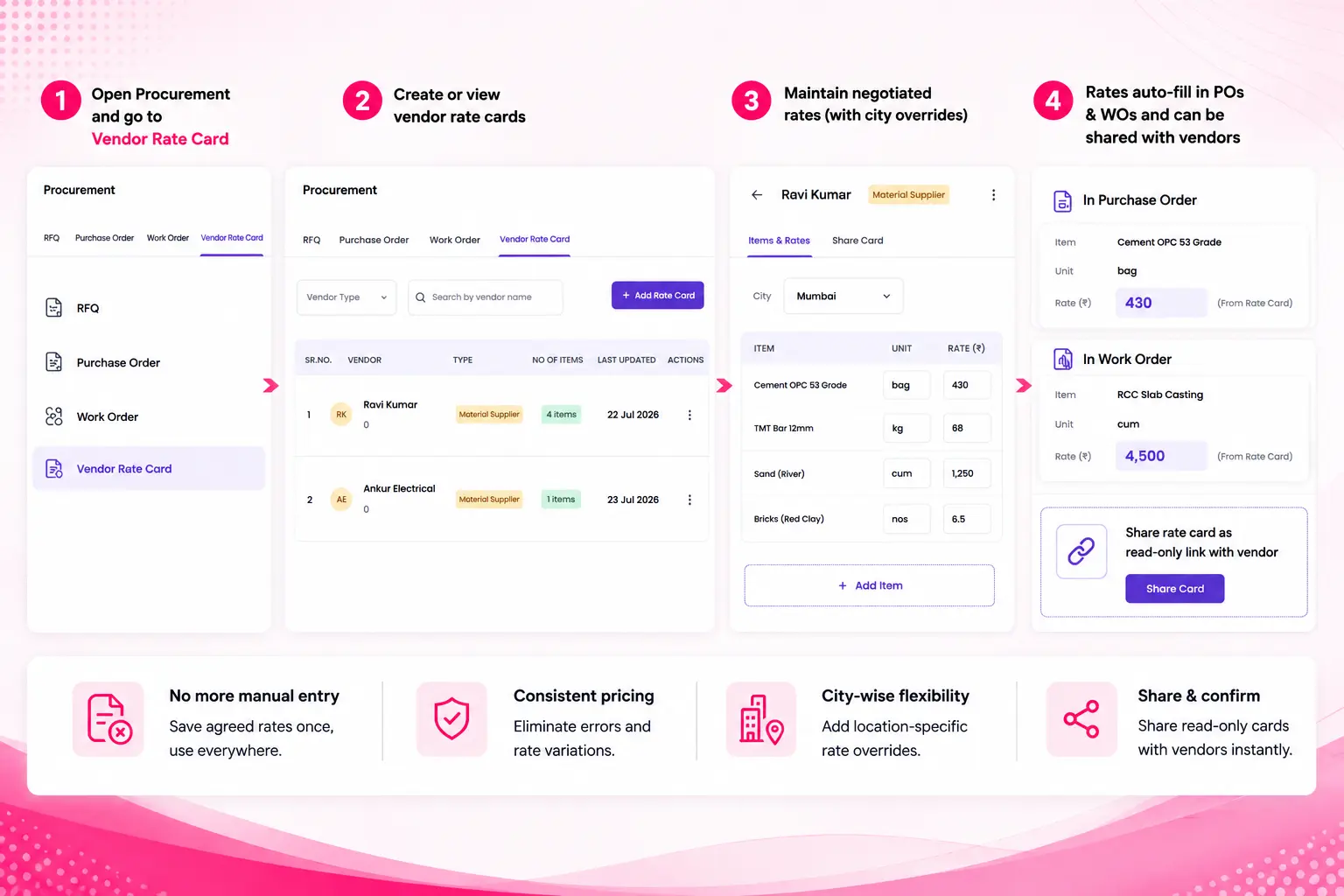
Vendor Rate Card: Consistency in Rates, Consistency in POs and WOs
Users can now maintain negotiated rates with any vendor — material suppliers and subcontractors alike — in one place.
What’s new
- Rates negotiated with vendors had no fixed record, so every PO or WO needed the rate typed in manually
- This led to entry errors and inconsistent pricing across transactions
- Vendor Rate Card lets you save agreed rates per vendor, with city-specific overrides where needed
- Rates auto-fill on POs and WOs; cards can also be shared with vendors as a read-only link for confirmation
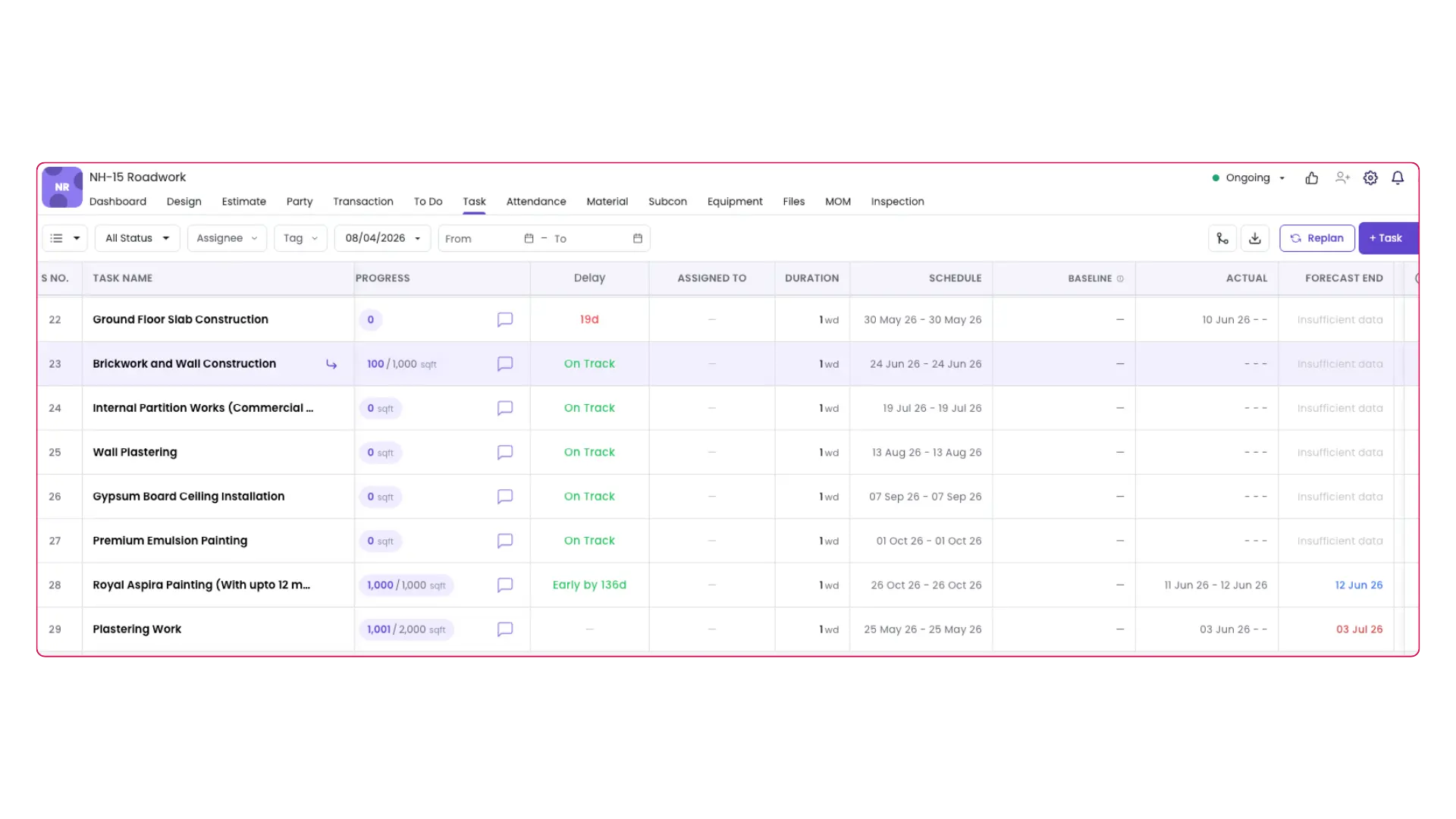
Task Planning: Actuals, Forecasts, Delay Detection & Replan
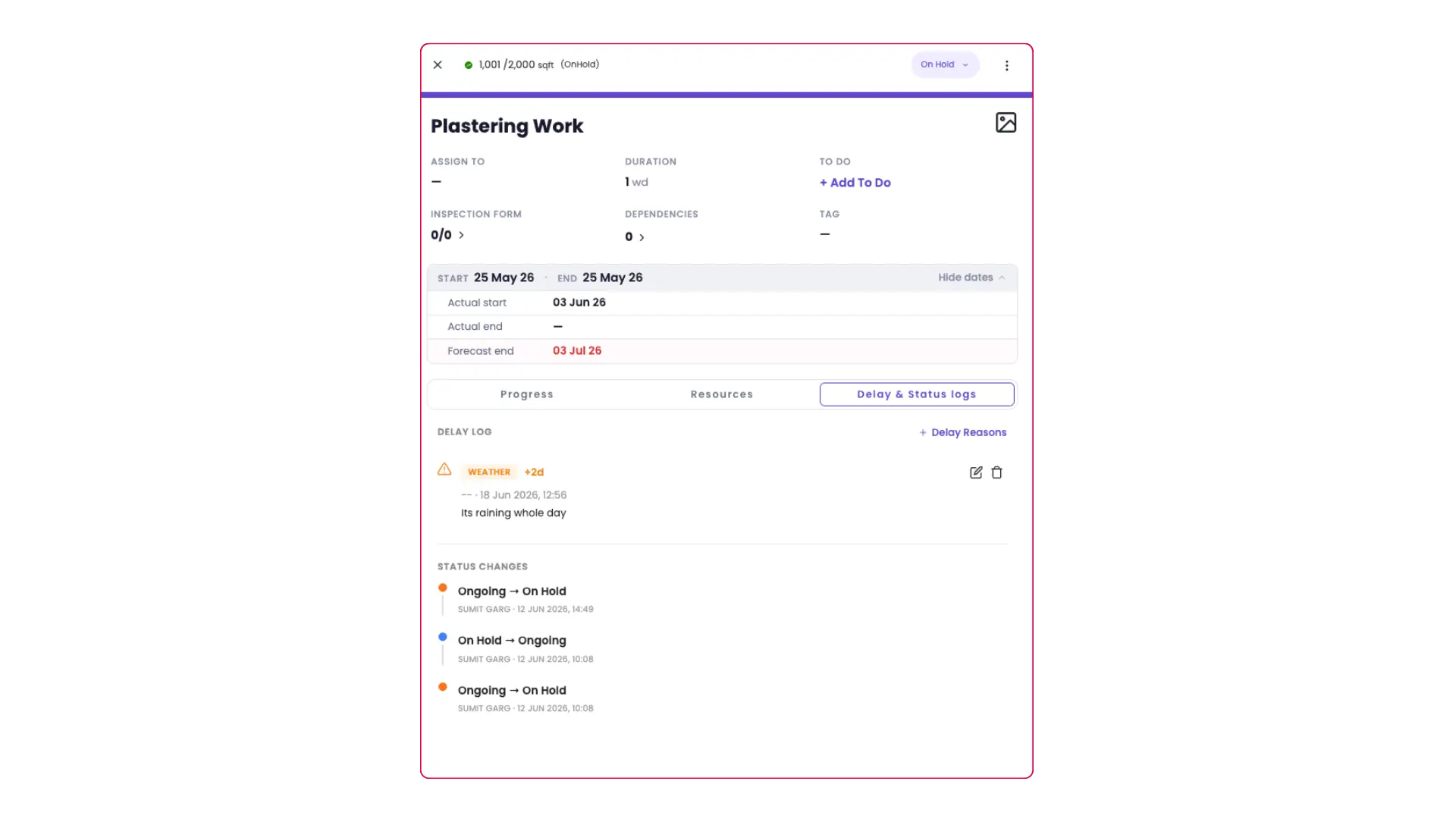
Onsite now tracks planned and actual dates separately. When a task starts, the system captures the actual start date. When it completes, the actual end date is recorded. Your original plan stays intact for comparison. No more overwriting history.
What’s new
- Forecasted End Date , based on current progress pace, Onsite calculates when a task is likely to finish and updates the forecast automatically with every progress entry.
- Delay Detection , every task is automatically flagged as On Track, At Risk, Delayed, or Early. Delayed and At Risk tasks prompt the site team to log a reason and category (weather, material shortage, labour, subcontractor, etc.).
- Status Change History , every status change is logged with who changed it, when, and what they said. Full audit trail, no manual tracking needed.
- One-Click Replan , when actuals diverge from the plan, the Replan button saves the current schedule as a baseline, pushes actual dates in, and recalculates all downstream tasks based on dependencies.
- Holidays & Weekoffs , task durations and forecasts now account for your company’s holidays and weekly off days, with per-project overrides for sites on different schedules.
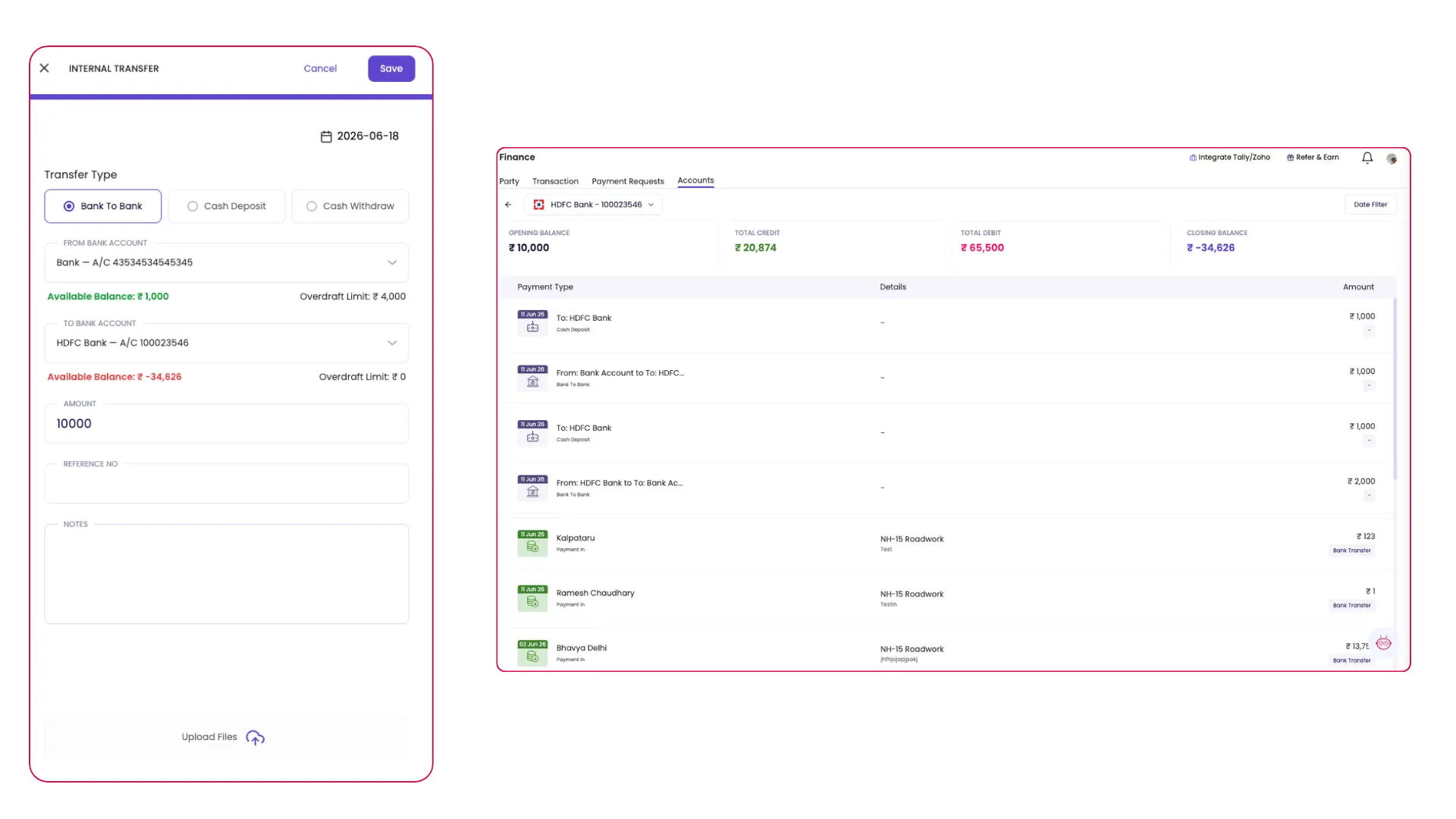
Bank Account Management: Fund Transfers & Account Statement
Manage your bank accounts directly in Onsite. Record fund movements between accounts, track cash deposits and withdrawals, and get a clean account statement. No dummy entries, no workarounds.
What’s new
- Bank to Bank Transfer , move money between your company’s bank accounts in a few taps. Select source account, destination account, amount, and date. Both balances update instantly once approved.
- Cash Deposit , record a cash deposit as a single entry. Select the bank account, enter the amount, and submit for approval. Cash balance and bank balance update together automatically.
- Cash Withdrawal , log cash withdrawn from the bank directly. Both balances stay accurate automatically.
- Account Statement , every bank account now has its own statement showing payments in, payments out, and all fund transfers in one view with a running balance.
Key benefit
Reconcile your books or share with your auditor directly from Onsite , no exports or manual assembly needed.
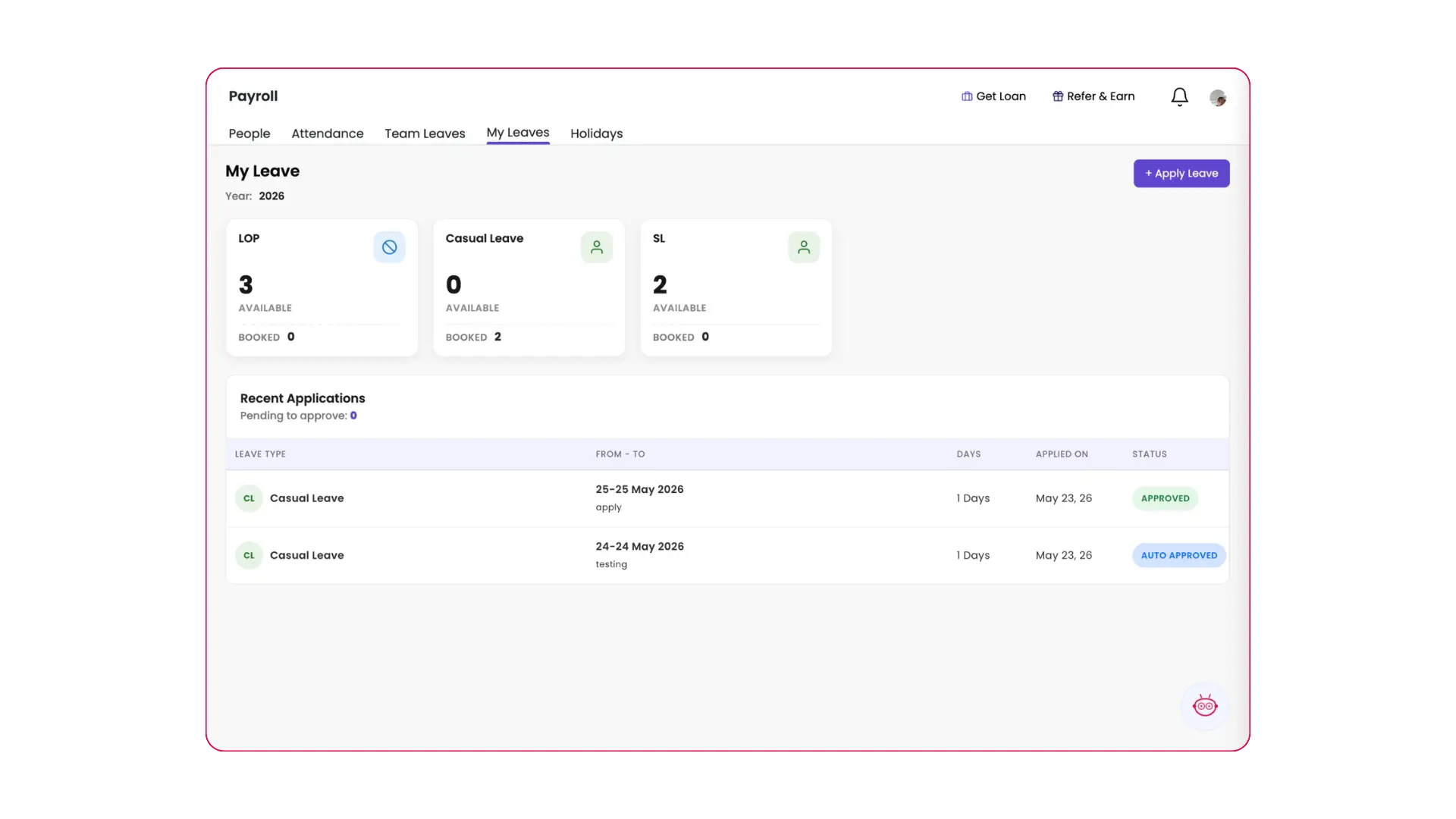
New Module: Leave Management
Leave Management is now live on Onsite. Define your company’s leave policies, set up a holiday calendar, and let your team apply for leaves directly through the app — with full admin visibility into balances, history, and approvals.
What’s new
- Leave policies — define leave types, entitlements, and approval rules for your company.
- Holiday calendar — configure national and company-specific holidays in one place.
- Leave applications — team members apply through the mobile app; admins approve or reject with full balance visibility.
Key benefit
Manage staff leaves and holidays in one place — no more tracking on spreadsheets or WhatsApp. Fully integrated with attendance so your payroll stays accurate.
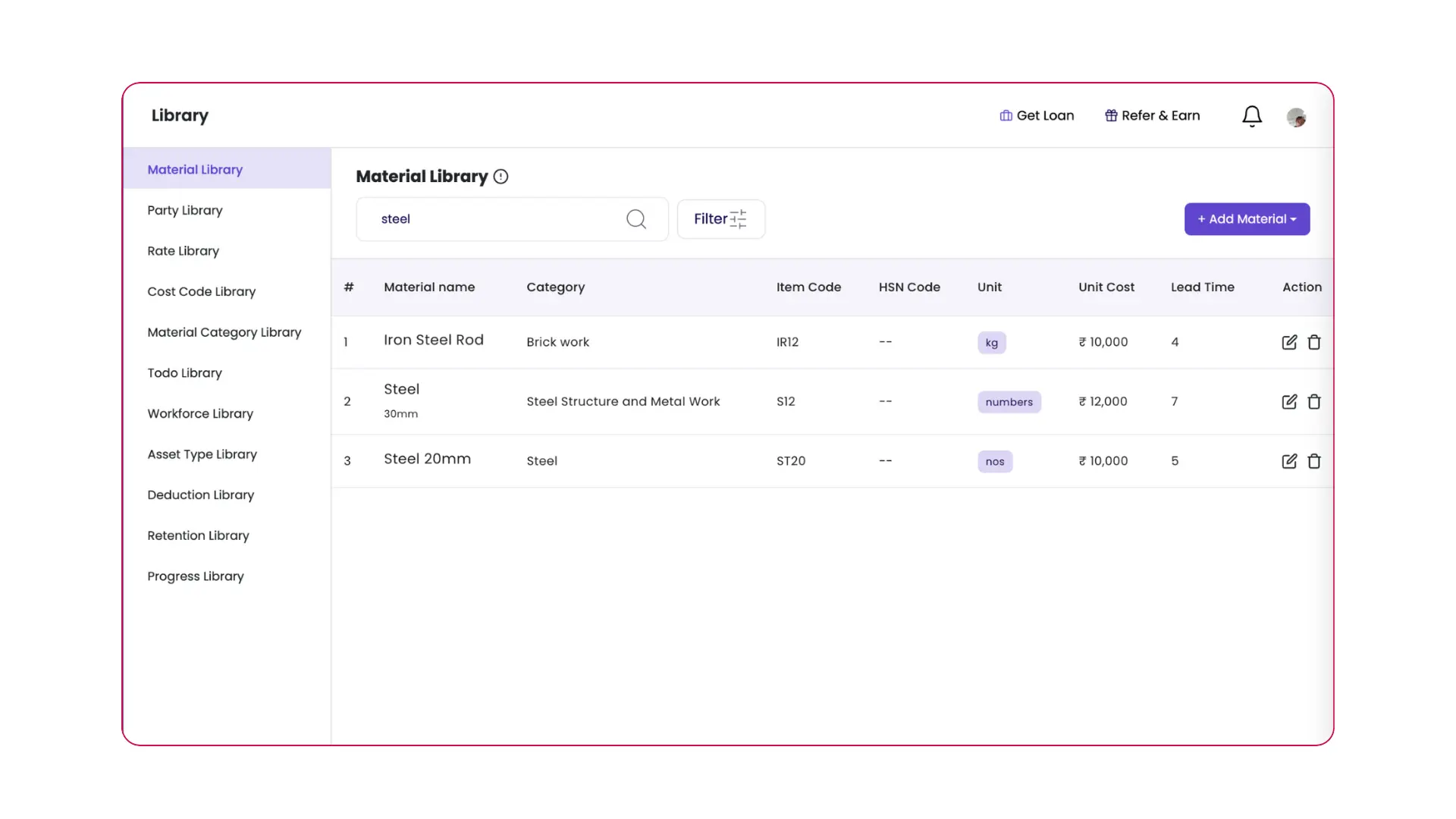
Material Library: Unit Cost, Lead Days & Alternative UOM
Three new fields are now available in your material library.
- Unit Cost — automatically picked up when adding materials as cost components in your BOQ or rate library, and when budgeting material costs in the BOM.
- Lead Days — helps plan procurement based on material required for each task and its start date, so you know exactly when to order.
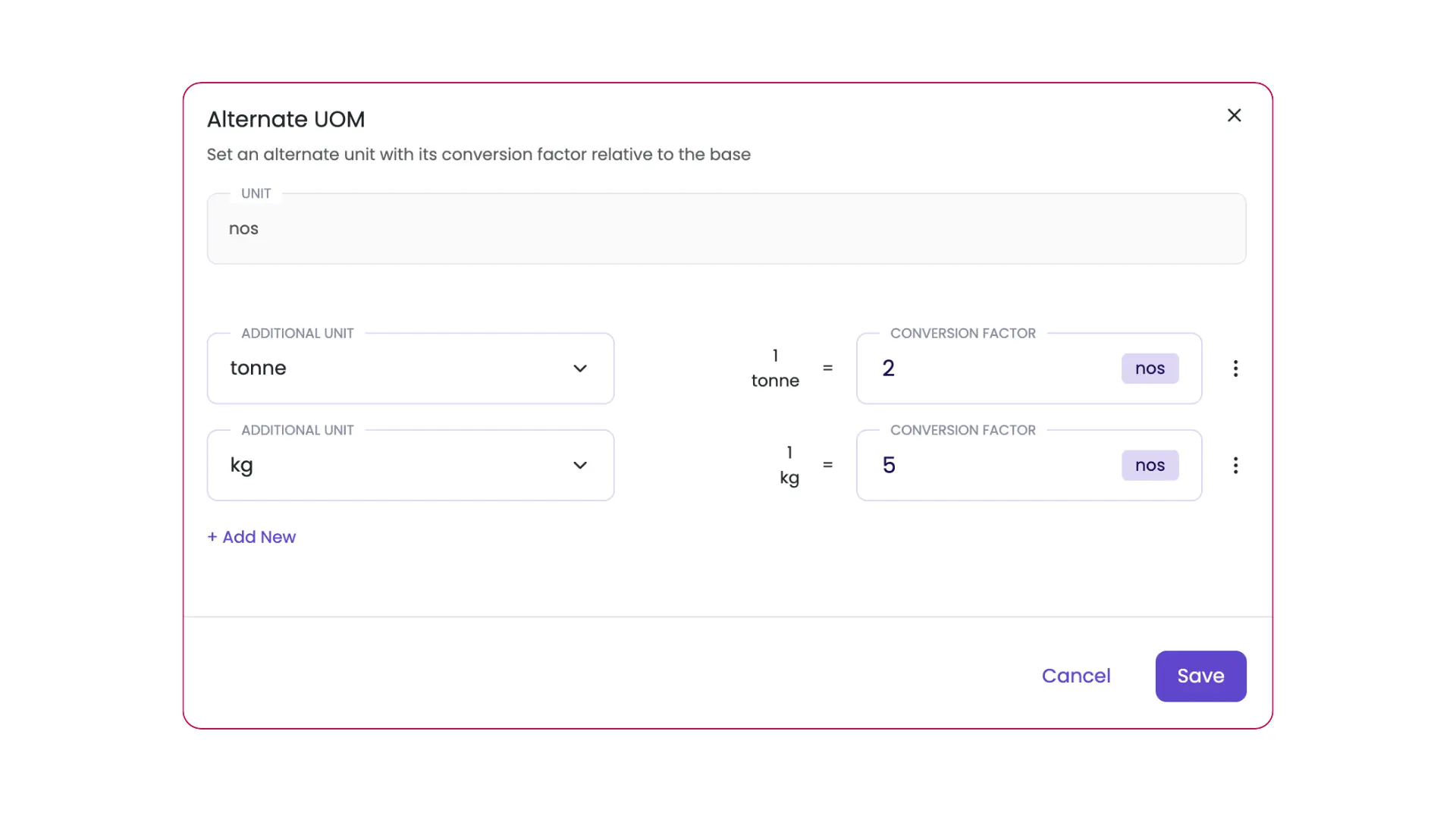
- Alternative UOM — handles cases where you purchase a material in a different unit than what your inventory tracks (e.g. buying in tonnes but stocking in nos).
Key benefit
Smarter cost planning in BOQ and BOM, timely procurement scheduling, and accurate unit conversion — all set once in the material library.
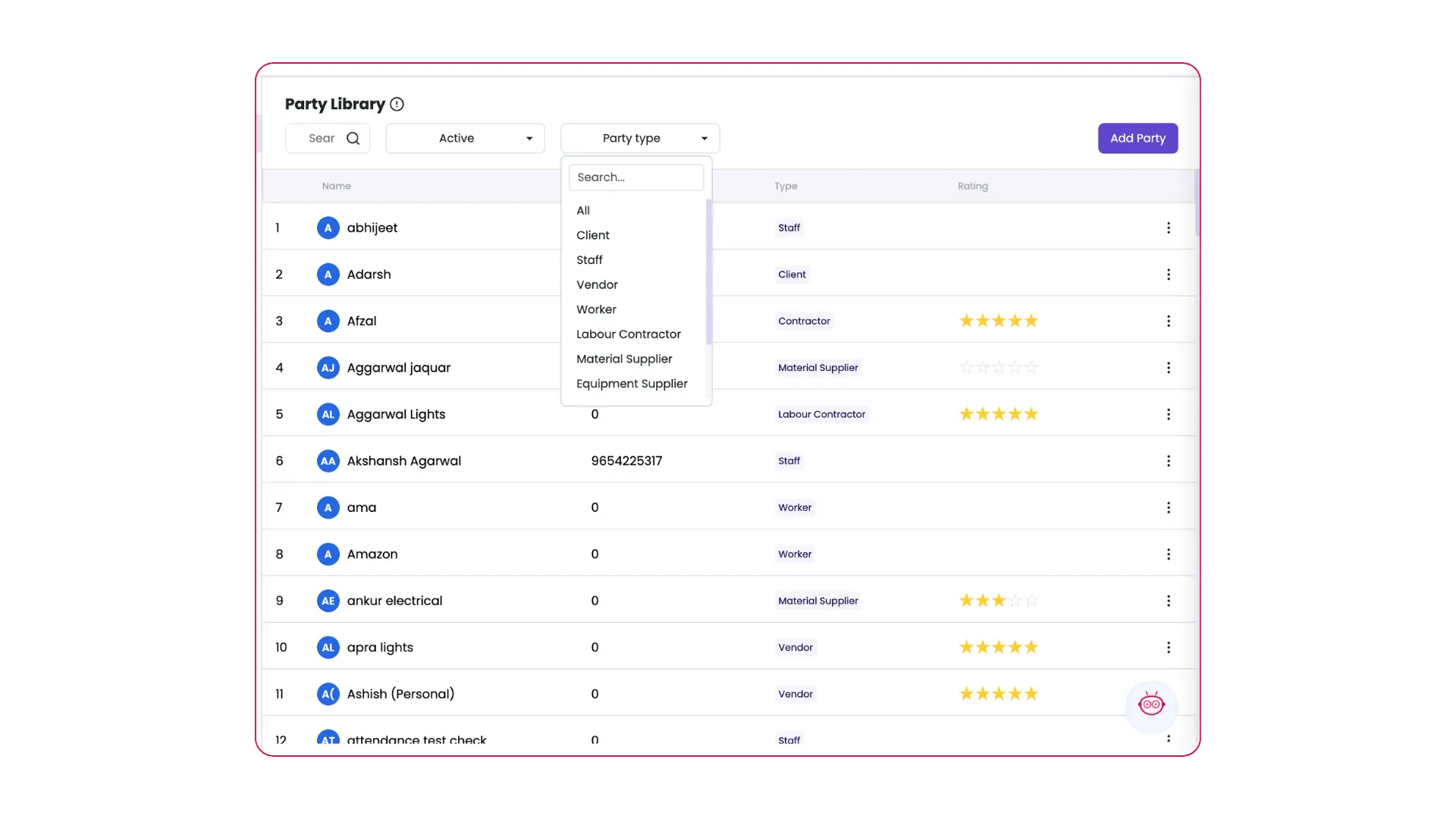
Party Library: Filter by Party Type
You can now filter parties in your party library by type — vendors, subcontractors, clients, and more. Instead of scrolling through your entire party list, quickly narrow it down to the exact type you need.
Key benefit
Faster party lookup, especially for companies with large party lists across multiple project types.
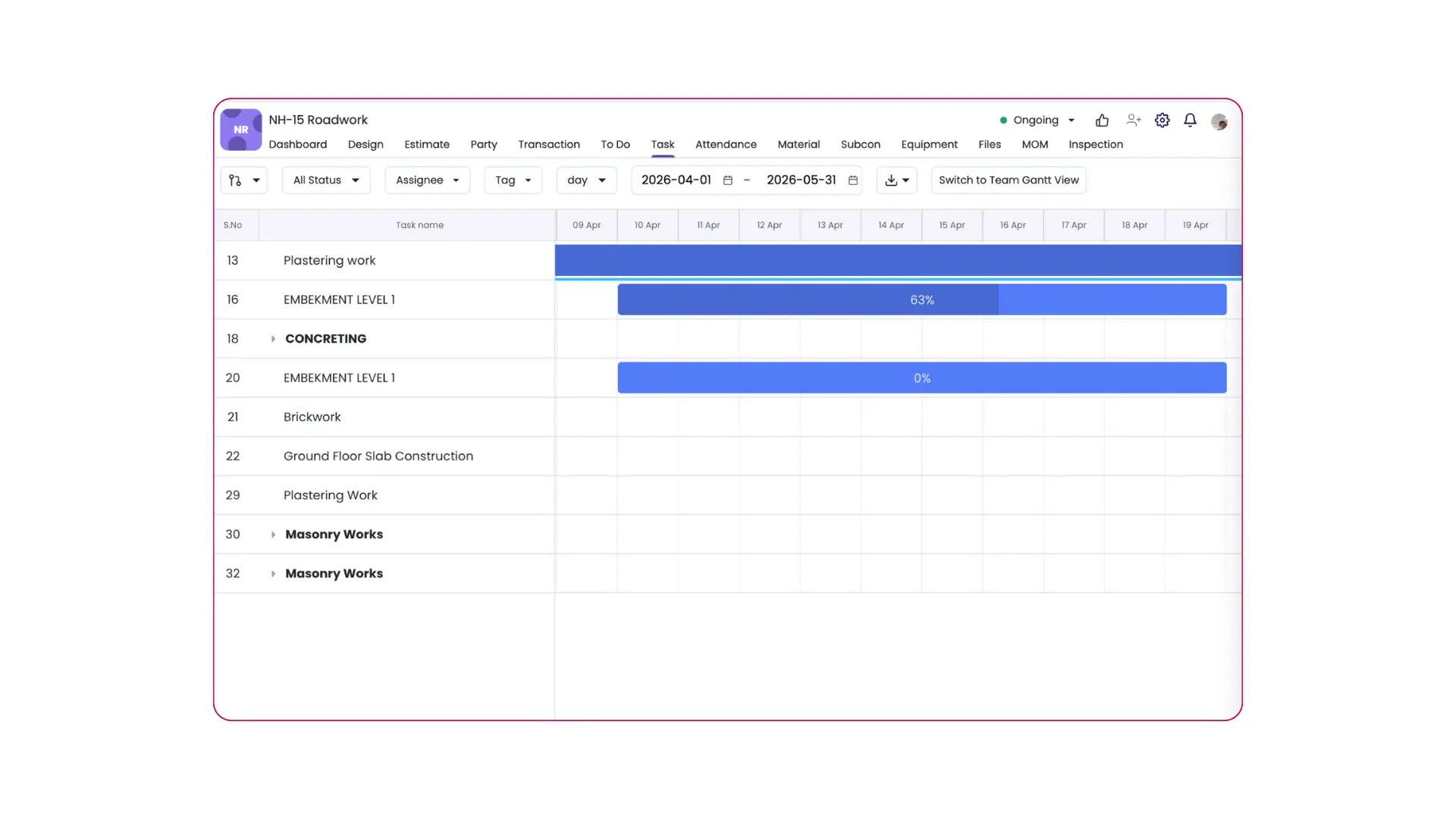
Gantt Chart: Filter Tasks by Date
You can now filter the Gantt chart by date range to focus only on tasks within a specific period. Instead of viewing the entire project timeline, zoom into what’s relevant — whether it’s this week’s work, a specific phase, or an upcoming milestone.
Key benefit
Easier planning and review for site managers handling large projects with dozens of concurrent tasks.
Already using Onsite? These features are live in your account.
New to Onsite? See how these work on your actual projects.
2025
Material Production & Mixing
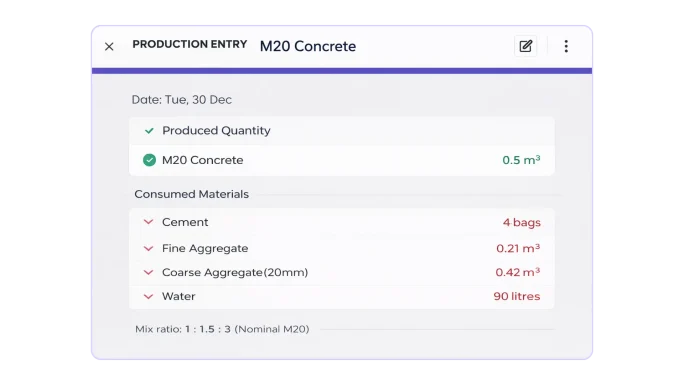
Construction sites don’t just consume materials — they also produce / mix them.
Concrete, mortar, plaster, bitumen mixes — these are produced daily on-site, yet most teams still track them manually (or not at all). This creates blind spots in material consumption, wastage, and cost control.
With Onsite’s Production & Mixing module, on-site manufacturing is now tracked as cleanly as procurement.
Timely and Accurate Client Billing — Automatic Client Invoicing Linked to Progress
What’s new
Generate Client Invoices automatically based on the Project Work Progress.
The impact
- Faster and accurate client invoicing with measurements
- Improved cash flow and reduced revenue leakage
- Fewer disputes and stronger client confidence
How it works
- Upload your BOQ and create the Project Schedule (Gantt)
- Record daily site progress against BOQ items from mobile
- Client invoices generate automatically from verified quantities — no manual calculations
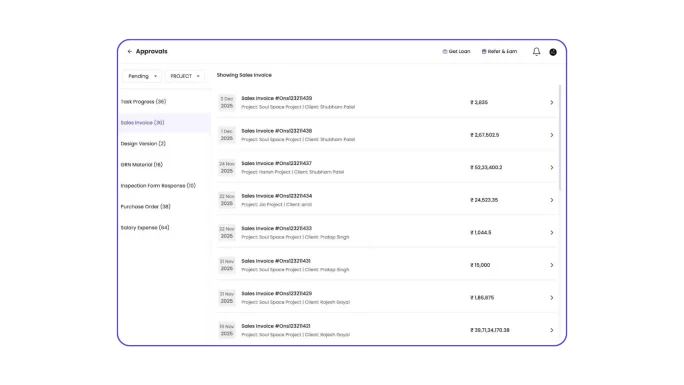
Multilevel Approval in Drawings, Expenses, Invoices, Material Requests, and Inspections
Onsite now provides a structured multi-level approval system across critical construction workflows — drawings, expenses, invoices, material requests, and inspections.
Instead of informal approvals over calls or messages, every submission follows a defined approval flow, ensuring the right stakeholders review and approve at each stage.
Covered workflows
- Drawing approvals — revision-by-revision sign-off before site use
- Expense approvals — site expenses verified before payment
- Invoice approvals — vendor and subcontractor bills reviewed at each level
- Material request approvals — BOQ and budget check before any PO is raised
- Inspection approvals — quality checks signed off by the right authority
More updates shipping regularly
New entries will be added here as features ship. Book a demo to see the latest in your projects.
FAQ
Questions About Onsite Updates
How updates work, how to access them, and how to send your feedback to the product team.
Onsite ships updates every month. These include new features, improvements to existing workflows, bug fixes, and mobile app enhancements. The product roadmap is heavily driven by feedback from active customers — construction companies using Onsite daily across India and the Gulf. All updates are deployed automatically and do not require any action from users to activate.
For web platform features — no action is needed. Updates deploy automatically and are live as soon as you refresh your browser. For mobile app features, you may need to update the app from the App Store or Play Store to access the latest version. We recommend keeping automatic updates on so you always have the newest features and fixes.
The most recent major releases include Material Production & Mixing (December 2025) — which allows teams to track on-site production of concrete, mortar, and plaster mixes — and Automatic Client Invoicing Linked to Progress (December 2025), which generates client invoices automatically from verified BOQ progress without manual calculation. Multilevel Approvals across drawings, expenses, invoices, material requests, and inspections also shipped in December 2025.
Yes — and we actively encourage it. Onsite’s product roadmap is shaped by feedback from active customers. You can share feature requests directly with your dedicated account manager, through the in-app feedback option, or by raising it during your regular customer success check-in. Many of the features listed on this page — including the multilevel approval system and automatic client invoicing — were built directly from customer requests.
The Production & Mixing module allows site teams to log on-site material production — concrete, mortar, plaster, bitumen mixes — as a trackable activity rather than an unrecorded consumption event. Each production entry records the input materials used, the output quantity produced, and links the consumption back to BOQ cost positions. This eliminates the blind spot where material is consumed in mixing but not captured in any inventory or cost record.
Once you upload your BOQ and create the project schedule, site engineers record daily progress against BOQ items from mobile. Onsite uses verified quantities from those progress updates to generate client invoices automatically — no spreadsheets, no manual measurement calculations. The invoice always reflects actual work done, which speeds up billing cycles, reduces disputes with clients, and improves cash flow by removing the delay between work completion and invoice submission.
The multilevel approval system covers five critical workflows: Drawings (revision-by-revision sign-off before site teams can use updated drawings), Expenses (site expenses verified before payment processing), Invoices (vendor and subcontractor bills reviewed at each approval level), Material Requests (BOQ and budget check before any purchase order is raised), and Inspections (quality checks signed off by the right authority before work proceeds). Each workflow can have a customised number of approval levels and approvers.
No. Onsite follows a non-breaking update policy — new features are additive and do not change or remove existing workflows without advance communication. When a major structural change is planned, your account manager will brief your team ahead of the release and guide you through any migration steps. Your existing project data, BOQs, approvals, and reports remain intact across all updates.
Actively shipping
See the Latest Features
On Your Own Projects
Every feature on this page is live and available to all Onsite users. Book a free demo to see how Material Production, Automatic Invoicing, and Multilevel Approvals work on projects like yours.
No credit card required · Go live in under 3 days · All new features included in your plan
On Your Own Projects