
Software Comparison
Onsite vs Procore
The first choice of many construction companies is Procore. Other teams choose Onsite because it focuses on what happens at a site every day. Both are construction software — but their approach to managing a project is fundamentally different.
BOQ-linked progress tracking and billing
Onsite
Real-time site cost visibility during execution
Onsite
Mobile-first adoption — no heavy training needed
Onsite
INR-based pricing — designed for India and Gulf
Onsite
Zero double-entry — Tally and Zoho Books native sync
Onsite
Enterprise governance and BIM integration
Procore
Execution Control Score
Onsite vs Procore — Execution Benchmark
Live
Onsite
Execution-First
9.2
Execution Score
Procore
Process-First
7.1
Execution Score
Recommended for Execution Teams · BOQ-driven contractors, builders & EPC firms
Platform Overview
Two Different Approaches to Construction Software
Both Onsite and Procore are construction management platforms — but they are built for different ways of working. Understanding their philosophy helps you choose the right fit.
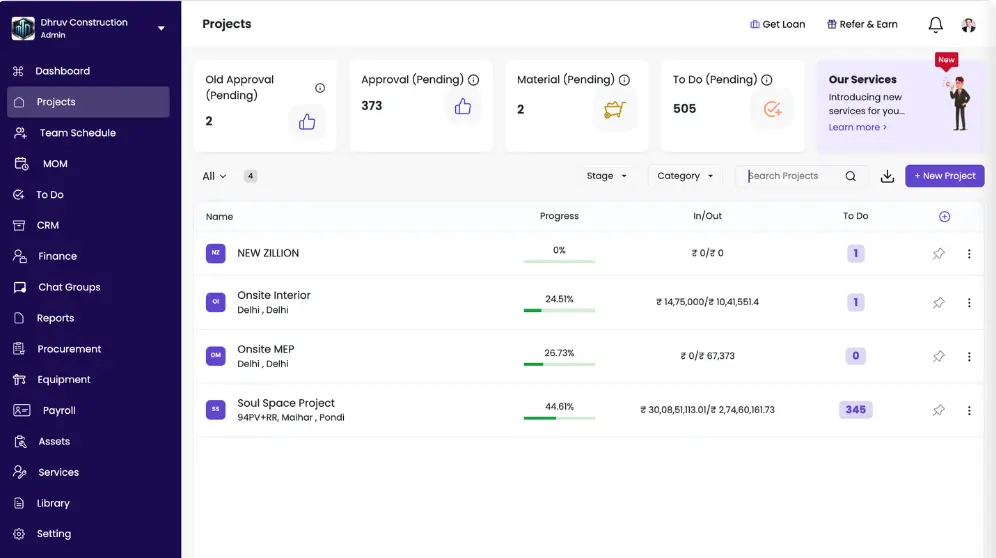
● Onsite
What is Onsite
Onsite is a construction management software built specifically around BOQ-driven execution, cost control, and live site visibility. It connects scope definition, installed quantities, labour attendance, material usage, subcontractor billing, and project finances into one continuous workflow.
Onsite is best suited for construction companies that want:
- BOQ-linked budgeting, progress tracking, and billing
- Real-time capture of labour, material, and site activity
- Integrated subcontractor work orders and running bills
- Budget vs actual dashboards aligned with execution
- Native integration with Tally and Zoho Books
Why construction teams choose Onsite:
- Designed for execution-centric control, not enterprise documentation governance
- Works best for contractors managing multiple active projects with BOQ-based scope
- Focuses on live commercial clarity instead of post-execution reporting
Pricing: Onsite follows a project-friendly software pricing model designed for construction teams of different sizes — INR-based, per user per year.
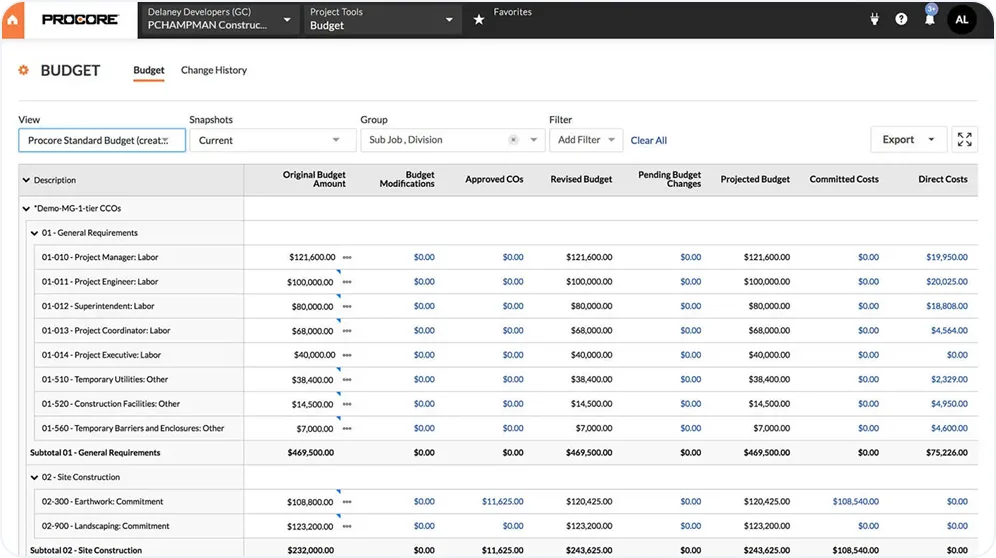
● Procore
What is Procore
Procore is a global construction management platform used widely across large, enterprise, and compliance-heavy projects. It focuses on documentation, coordination, and formal project controls — connecting office workflows, legal approvals, and integrations across large stakeholder environments.
Procore is typically suited for teams that need:
- Enterprise-grade documentation and governance workflows
- BIM integration and large-scale drawing management
- Compliance, submittals, and formal RFI processes
- Large contractor ecosystems with structured communication
- ERP integrations with external accounting and finance systems
Important considerations:
- Often requires ERP integrations to complete financial views
- Pricing scales with construction volume — costs increase significantly as projects grow
- Execution-level cost visibility often depends on structured workflows and later financial consolidation
Pricing: Procore pricing scales with construction volume — contact Procore directly for current pricing based on your annual construction value.
Key Differentiators
Key Differences Between Onsite and Procore That Impact Daily Project Control
Four critical areas where Onsite and Procore take fundamentally different approaches — each with real impact on your daily execution.
Comparison
✓ Onsite
Creates scope-based work orders directly linked to BOQ quantities, agreed rates, and project budgets before execution begins. Budget exposure adjusts automatically as site progress updates enter the system, giving early visibility into scope creep and cost drift.
● Procore
Manages commitments and contracts effectively, but execution-level cost reflection often depends on structured workflows and later financial consolidation.
✓ Onsite
Captures installed quantities, labour presence, material receipts, and daily activities directly from the site. Progress updates automatically adjust cost views, billing eligibility, and project dashboards in real time.
● Procore
Emphasizes daily logs, inspections, and documentation workflows. Commercial clarity often requires consolidation and integration with external systems.
✓ Onsite
Generates running bills directly from approved execution quantities, applying retention percentages and contractual deductions automatically. Billing stays aligned with actual work completed without waiting for month-end reconciliation.
● Procore
Supports pay applications and contract-based billing, but approvals and structured workflows can slow visibility into live project status.
✓ Onsite
Allows multi-level approval hierarchies for subcontractor bills, purchase orders, and expense requests. Site-level data flows directly into finance systems such as Tally or Zoho Books, eliminating double entry.
● Procore
Aligns more closely with global ERP conventions. Local contractors often require additional configuration to sync site-level activity with accounting workflows.
Detailed Comparison
Onsite vs Procore: Feature-wise Comparison
A complete module-by-module breakdown to help you evaluate which platform fits your construction workflow.
Feature
Onsite
Procore
Pre-Sales and CRM4 features
Lead Capture and Funnels
Not available as a native module
Not positioned as CRM
Marketing Integrations
Not available
Not positioned as CRM
Quotations and Proposals
BOQ and estimation used post-award for execution and billing, not pre-sales quotations
Estimating tools available under preconstruction
Convert Lead to Project
Not applicable
Project creation happens post award
Site Survey and Recce4 features
Survey Templates
Not a configurable survey template module
Custom inspection templates available
Survey Report Export
Site photos and reports can be exported
Inspection and observation reports exportable
Assign Survey Tasks
Tasks can be assigned for site activities post project start
Inspections can be assigned
Contextual Collaboration
Comments and references linked to tasks and documents
Markups and observations on drawings
Design Management4 features
Design Reviews and Comments
Comments linked to documents and tasks
Markups, comments, and issue tracking
Design Approval Workflows
Approval flows supported through document and task workflows
Approvals typically handled via submittals
BIM Integration
Not available
BIM supported
Vendor Access to Drawings
Controlled sharing of drawings and documents
Access via distribution lists or permissions
Project Scope and BOQ4 features
BOQ Revisions
BOQ revisions tracked with quantity and rate changes
Change orders used for scope changes
BOQ vs Actual Tracking
Executed quantities compared against BOQ
Limited runtime BOQ analytics
Budget Rates on BOQ
Budget values maintained alongside BOQ
Budget controls exist but not BOQ-native
Client Scope Approvals
Client scope and changes tracked within BOQ workflows
Client approvals via change orders
Orders and Payables5 features
Approval Workflows
Configurable approval chains for POs and bills
Workflow engine available but complex
Running Bills and Final Bills
Vendor bills tracked against orders and progress
Bills tracked via commitments
Petty Cash and Site Expenses
Site expenses recorded and approved
Requires external tools or integrations
Vendor Debits and Adjustments
Adjustments reflected through order updates
Managed through commitment change orders
Progress Tracking4 features
Planned vs Actual Tracking
Actual progress compared against planned tasks
Schedule variance tracking
Dependency Management
Basic task sequencing supported
Advanced scheduling via integrations
MSP Import
Not available
Supported via integrations
Mobile Schedule Updates
Task updates from site
Limited schedule editing on mobile
Materials3 features
GRN and Inward Materials
Materials received recorded at site
Inventory via integrations
Site Stock Tracking
Site-wise stock and consumption tracking
Inventory not site-execution native
Inter-Site Transfer
Supported within material workflows
Requires manual tracking
DPR — Daily Progress Report3 features
Photo-Based Reporting
Site photos linked to DPR
Photo logs available
DPR Circulation
DPRs exported and shared as PDF
Daily log exports available
Weekly and Monthly Reports
Date-range based progress reports
Reporting available
Quality and Snags3 features
Categorisation
Predefined snag categories available
Categories must be custom created
Vendor Assignment
Snags assigned to vendors or teams
Assignment supported
Import and Export
Snag reports exportable
Export supported, import limited
Task Management2 features
Approvals and Reminders
Task-based approvals and notifications
Notifications via module inboxes
Central Task Visibility
Tasks visible across site and office
Tasks distributed across tools
Mobile Experience3 features
Progress and BOQ Updates
Quantity and progress updates from mobile
Limited quantity updates
Material and Expense Logging
Material usage and site expenses logged on mobile
Limited mobile coverage
Offline Usability
Supports field usage in low connectivity
Partial offline support
Make Your Decision
Which Platform Fits Your Workflow?
The right choice depends on whether your team needs execution-driven BOQ control or enterprise governance and compliance across large project ecosystems.
Procore
May suit you if
Choose Procore if your projects require enterprise-level governance, compliance, and extensive integrations across large stakeholder environments.
- Your projects operate in compliance-heavy environments requiring formal submittals, RFIs, and documentation governance
- BIM integration and large-scale drawing management are central to your project workflow
- You manage large contractor ecosystems with structured communication across multiple stakeholder tiers
- Your projects are very large and highly regulated, where formal processes and enterprise ERP integrations play a critical role
- Advanced scheduling, MSP import, and dependency management are core requirements
Onsite
May suit you if
Choose Onsite if your business needs execution-driven control, BOQ-based tracking, fast site adoption, and real-time cost visibility without heavy ERP dependency.
- Execution data drives everything — progress, labour, materials, and costs updated from site in real time, not reported weeks later
- BOQ-first control — progress, billing, and cost tracking tied directly to BOQ items, not contract SOVs
- Fast site adoption — engineers and supervisors go live from mobile with minimal setup, no heavy configuration
- INR-based pricing per user per year — not scaled to construction volume
- Zero double-entry — native Tally and Zoho Books integration; no separate ERP needed
- Running bills from approved quantities, retention applied automatically, billing aligned with actual work
FAQ
Questions companies ask when comparing Onsite and Procore
Direct answers to the most common questions about both platforms.
Onsite focuses on capturing construction execution as it happens on site and uses that data to drive visibility, billing readiness, and cost control. Site teams record progress, quantities, material usage, labour attendance, and expenses directly during execution, and the system reflects these updates immediately. Procore structures its workflows around documentation, coordination, and formal project controls. Teams often consolidate data through office processes and integrations before leadership sees the full picture. This difference makes Onsite more execution-driven and Procore more process-driven.
Onsite works as a strong alternative to Procore for construction companies that want faster site adoption and clearer execution visibility. Contractors, builders, EPC firms, and interior companies often choose Onsite because it links work done on site directly to progress tracking, billing, and cost views. Procore suits organisations that operate in compliance-heavy environments, but many execution-focused teams find it heavier to configure and slower to reflect site reality. Onsite fits teams that want practical control without heavy dependency on external systems.
Onsite tracks site progress more directly by tying updates to BOQ items, activities, or installed quantities. Site engineers update progress from mobile, and the system reflects those updates immediately in reports and billing readiness. Procore tracks progress through production quantities, schedules, and pay applications, which often require structured review before management sees consolidated insights. When teams need real-time execution visibility, Onsite delivers clearer outcomes.
Onsite can replace Procore for cost control in many construction environments because it connects execution data directly to cost visibility. Labour usage, material consumption, site expenses, and progress updates flow into project cost views continuously. Teams spot overspending and leakage while work is still underway. Procore often relies on accounting integrations to complete cost views, which can delay insights. Companies that want cost control during execution often prefer Onsite.
Onsite generates billing based on executed quantities and approved progress, which ensures invoices reflect verified site data. This approach reduces disputes and speeds up billing cycles. Procore supports billing through pay applications and contract workflows, but teams often rely on external accounting systems to complete the process. Onsite simplifies billing by keeping it close to execution data.
Site teams typically find Onsite easier to use because it designs workflows for daily field updates. Engineers and supervisors record progress, materials, labour, photos, and reports quickly without extensive training. Procore’s mobile app supports daily logs, drawings, and punch lists, but many workflows still depend on structured office-side processes. Faster field adoption often drives teams toward Onsite.
Procore suits very large and highly regulated projects where formal processes, documentation, and integrations play a critical role. Its enterprise controls and ecosystem support complex coordination. Onsite fits environments where execution speed, site adoption, and real-time visibility matter more than layered compliance. The project scale and operating style usually determine the better fit.
Choose Onsite if your business needs execution-driven control, BOQ-based tracking, fast site adoption, and real-time cost visibility without heavy ERP dependency. Choose Procore if your projects require enterprise-level governance, compliance, and extensive integrations. The way your teams execute work on site should guide the decision.
Get started