
Construction Payroll Software
Onsite Payroll Software for Construction
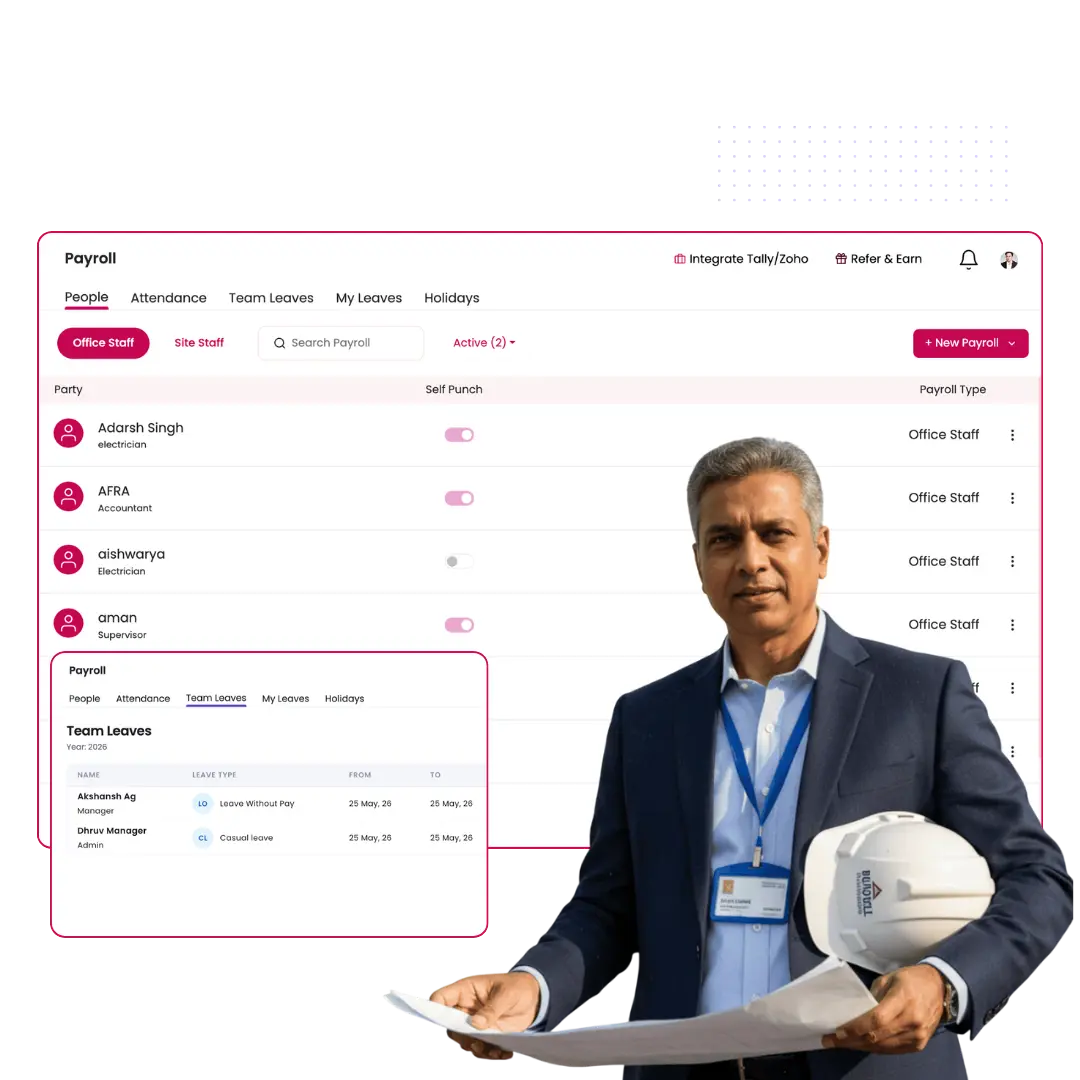
Construction payroll fails when attendance is on paper and wages are calculated manually at month end. Onsite connects daily site attendance to payroll automatically.
- Attendance from mobile flows directly into payroll
- EPF, ESI, TDS and overtime calculated automatically
- Payslips generated for every worker across all sites
Who Needs This
Built for every construction company that pays workers on site
Onsite payroll software for construction works across company types, project sizes, and worker categories, from a single residential site to multi-location infrastructure projects.
01
Contractors and Developers
Residential and commercial contractors manage daily-wage labour, skilled tradespeople, and site staff across multiple projects simultaneously. Tracking attendance manually across sites and computing wages at month end produces errors and delays. Onsite payroll software for construction captures attendance at each site and calculates wages, overtime, and statutory deductions without any manual consolidation work from the accounts team.
02
Infra and EPC Companies
Infrastructure and EPC projects deploy large workforces across remote and multi-location sites where paper attendance is unreliable and payroll consolidation takes days. Onsite captures verified attendance from every site through the mobile app, applies trade-wise wage rates and allowances, computes EPF and ESI contributions accurately, and produces a consolidated payroll register across all project locations without manual data assembly.
03
Industrial Companies
Industrial construction and plant maintenance companies pay workers across shift-based schedules with variable overtime, hazard allowances, and category-wise wage structures that Excel cannot handle cleanly. Onsite applies the correct wage category and shift rules for each worker, calculates deductions and net pay automatically, and generates payslips and payment records that the accounts team can process without rework or recalculation.
04
Interior and Fit-Out Firms
Interior and fit-out companies run short-duration projects with rotating site teams where workers change across projects and attendance is tracked informally. Onsite links each worker to the project they are assigned to, records daily attendance against the correct site, and computes wages and deductions per worker regardless of how frequently the team composition changes across active projects.
How It Works
From wage configuration to payslip generation, four steps
Onsite payroll for construction runs as a connected workflow: worker wage rates and categories are configured once, deductions are computed automatically each pay period, and payslips are generated across all sites without manual calculation at any step.
1
Step OneWorker categories and wage rates configured once for every site
Before payroll can run correctly, every worker on every site needs the right wage rate, the right trade category, and the right deduction rules attached to their profile. Onsite lets you configure daily wage rates, weekly off rules, overtime multipliers, advance limits, and statutory applicability per worker category once, and the system applies those rules every pay period across every site without re-entry. New workers added to a site inherit the correct category settings immediately, so the payroll configuration stays accurate and consistent as the workforce composition changes across the full project duration without requiring manual updates to the wage rules each month.
- Attendance recorded from mobile at check-in, not compiled from memory at week end
- New workers inherit the correct wage category and deduction rules automatically on assignment
- Wage configuration applies consistently across all sites without re-entry each month
Wage Category Setup
Mason
Rs 700/day
Helper
Rs 500/day
Electrician
Rs 850/day
Carpenter
Rs 700/day
Overtime multiplier
2× base rate
2
Step TwoWages calculated from attendance, not entered manually
Onsite computes gross pay for every worker by applying the configured wage rate, weekly off rules, and overtime multiplier against the days and hours worked in the pay period. The calculation is not based on verbal supervisor reports or manually entered spreadsheet figures. It runs from the structured data already in the system. Every worker’s gross pay is computed from the same rule set, removing the recurring discrepancies that arise between sites when wage calculations are done separately in different Excel files by different people each month, leading to unexplained differences in the total payroll figure across the full project portfolio each pay cycle.
- Daily wage rate, overtime, and weekly off applied per worker category
- Gross pay computed from verified attendance, not from manually entered figures
- Consistent wage calculation across all sites from the same rules set
Gross Pay: June 2026
3
Step ThreeEPF, ESI and TDS computed without a spreadsheet
Onsite calculates EPF employee and employer contributions, ESI deductions, TDS, and any advance recoveries against each worker’s gross pay automatically. The deduction rules are configured once per worker category and the system applies them consistently every pay period without manual recalculation. Construction companies operating under BOCW, EPF, and ESI regulations get the correct statutory deductions computed directly from the verified payroll data. This removes the compliance errors that manual calculation in Excel produces when wage figures change, worker categories are updated, or the accounts team applies deduction rates inconsistently across different sites or worker categories in the same month payroll run.
- EPF employee and employer share, ESI, and TDS calculated automatically each pay period
- Advance recoveries and other deductions applied against gross pay without manual entry
- Deduction rules configured once per category and applied consistently across all sites
Deduction Breakdown: Ramesh Kumar
Gross Pay
Rs 18,200
EPF Employee 12%
– Rs 1,800
EPF Employer 13%
– Rs 2,100
ESI (0.75%)
– Rs 137
Advance Recovery
– Rs 2,000
✅ Net Pay
Rs 14,263
4
Step FourPayslips generated and payment records maintained
Once the payroll run is complete, Onsite generates individual payslips for every worker showing gross pay, all deductions, and net pay in a clear format. Payment records are maintained in the system against each worker and each pay period, giving the accounts team a complete and structured payroll history without assembling it from separate files or spreadsheets. The payroll register across all sites and all worker categories is available from one screen for review and approval. The data exports directly to Tally or Zoho Books for accounting entries without any manual reprocessing or reformatting by the finance or accounts team.
- Individual payslips generated per worker showing gross, deductions, and net pay
- Full payroll register across all sites and worker categories from one screen
- Data structured for export to Tally and Zoho Books without manual reprocessing
Payslip Preview
Ramesh Kumar
Days Worked
26 days
Gross Pay
Rs 18,200
Total Deductions
– Rs 3,937
Net Pay
Rs 14,263
Industry Challenges
Why construction payroll goes wrong every month
Construction payroll problems are not caused by careless teams. They are caused by the structural gap between where payroll data lives, who holds it, and when the accounts team finally gets it.
Wages are still calculated from paper registers submitted days after the pay period ends
On most construction sites, attendance is recorded by supervisors in physical registers that travel from site to office at irregular intervals. By the time the accounts team receives them, the pay period has already closed. Wages are then calculated from these delayed, handwritten records, with no way to verify whether the figures are accurate. Errors introduced at the register stage carry directly into gross pay without correction. They surface only when workers raise disputes after payment has already been processed, forcing manual reconciliation after the fact with no reliable source to resolve the discrepancy.
EPF, ESI and TDS are recalculated manually every month from changing wage figures
Statutory deductions in construction payroll are not simple fixed amounts. EPF is calculated on basic wages that can vary by days worked. ESI applies only up to a wage ceiling. TDS depends on annual projections that change mid-year. When these calculations are done manually in Excel by an accounts team handling multiple sites, the margin for error in any individual deduction is high. Small errors in ESI or EPF remittances accumulate into compliance gaps that surface only during audits or when the company faces regulatory scrutiny from the EPFO or ESIC.
Multi-site companies have no consolidated payroll view without assembling it manually every month
A contractor running three to five active sites simultaneously receives wage data from each site through a different channel: some through registers, some through supervisor phone calls, some through WhatsApp messages. The accounts team consolidates this information manually into a single payroll register each month. There is no single source of truth. Different sites use different formats, different categories for the same trade, and different methods for recording half-days and overtime. The consolidation exercise takes days and produces a figure that no one can independently verify without revisiting every source.
Advance payments and recoveries are tracked informally and frequently missed in final payroll
Workers on construction sites regularly take salary advances against their monthly wages. These advances are typically recorded in a supervisor’s notebook or a separate informal list that is not connected to the main payroll calculation. When payroll is processed at month end, advance recoveries are applied from memory or from verbal confirmation rather than from a verified record. Advances that are not properly recovered become unaccounted liabilities that accumulate over time, and the total exposure is only discovered when a worker leaves the site or a reconciliation is finally forced by the accounts team.
Why Tools Fail
Excel and WhatsApp cannot run construction payroll accurately
The problem is not how well the team uses these tools. The problem is structural. Excel and WhatsApp were not built to connect wage rules, statutory calculations, and payment records into one verified output.
With Excel and WhatsApp
With connected payroll software
Wage calculation
Attendance and wage rates live in separate files. Someone transfers numbers manually between sheets every pay period, with no way to detect a transcription error before payroll is processed.
Wage rates are configured per category once. Gross pay is calculated automatically from days worked each period, with no manual transfer between files, no transcription step.
Statutory deductions
EPF, ESI, and TDS formulas sit inside a spreadsheet that different people edit across sites. A formula overwritten or a ceiling not updated after a regulatory change produces incorrect deductions that appear only in a statutory filing months later.
EPF, ESI, and TDS rules are configured once and applied consistently across every site and every pay period. No formulas to overwrite, no ceilings to remember. Deductions are computed correctly from the verified payroll data.
Multi-site payroll consolidation
Wage data from five sites arrives through WhatsApp in five different formats. The accounts team spends two to three days converting, verifying, and assembling the consolidated register, before a single calculation has even been checked.
The payroll register across all sites is available from one screen. Every site follows the same structured input format. No assembly exercise, no format conversion. The consolidated view is built automatically as data comes in.
Advance recovery
Advances are recorded in a separate register with no link to the payroll file. Recoveries are applied from memory at month end. Advances for workers who changed sites or were not updated get missed and accumulate as unrecorded liabilities.
Advances are recorded against the worker profile in the system. Recoveries are applied automatically in the payroll run. No separate register, no memory-based entry, no liability left untracked when a worker moves between sites.
Payslip generation
Payslips are produced by formatting individual Excel rows, copying figures into a template, and distributing through WhatsApp. Any figure that changed after the template was filled does not update in the payslip that the worker receives.
Payslips are generated from the verified payroll run, and every figure in the payslip comes directly from the same source as the payment record. No manual formatting, no copy-paste step, no version mismatch between payslip and payment.
Audit trail
When a worker disputes their pay, the trail leads back to a WhatsApp message, a handwritten register, and an Excel formula that may have been edited since the payroll was run. There is no reliable way to prove what figure was used and why.
Every payroll run is recorded with the exact inputs used: days worked, wage rate, deductions applied, and net pay. The calculation is traceable to its source at any point, for worker disputes, auditor reviews, or statutory filings.
Showing 6 structural failure points, not user errors, not workarounds. Structural limitations of the tools themselves.
Customer Success Story
Before Onsite, our accounts team was spending three to four days every month compiling attendance registers from five sites, calculating wages manually, and chasing supervisors for missing figures. The payroll was always late and always disputed. After moving to Onsite, the payroll runs from the data already in the system. The team now completes the full payroll cycle in one day with no disputes and no manual calculations.
1 day
Full payroll cycle completed, down from 3 to 4 days of manual work
★
★
★
★
★
✕ Before Onsite
Paper registers across 5 sites · 3 to 4 days of manual wage calculation · Supervisors chased for figures · Payroll always late and disputed
✓ After Onsite
Attendance flows into payroll automatically · Wages calculated from verified records · Full payroll cycle done in one day · Zero disputes
Mr. Manish Kumar
Reidius Infra · Design and Build · Jaipur, India
FAQs
Frequently Asked Questions About Onsite Payroll Software for Construction
Onsite payroll software for construction is a connected payroll management system built specifically for construction companies that pay daily-wage workers, skilled tradespeople, and salaried site staff across multiple project sites. It connects verified site attendance to wage calculation, applies statutory deductions for EPF, ESI, and TDS automatically, generates individual payslips for every worker, and maintains a complete payroll register across all active sites from one platform without manual data transfer, spreadsheet-based calculation, or register compilation required at any step in the payroll process across any active project site.
Onsite calculates wages by applying the configured daily wage rate, overtime multiplier, and weekly off rules for each worker category against the verified attendance record for the pay period. When a worker is assigned to a site, the system applies the correct wage structure automatically based on their category. Gross pay is computed from the actual days present and overtime hours recorded in the system, not from manually entered figures or supervisor reports, removing the recurring transcription errors that manual wage entry consistently introduces across multiple project sites.
Yes. Onsite calculates EPF employee and employer contributions, ESI deductions, and TDS against each worker’s gross pay automatically every pay period. Deduction rules are configured once per worker category and applied consistently without manual recalculation. The system handles the applicability thresholds and contribution rates for EPF and ESI correctly, and the deduction totals are available in structured form for statutory filing at the end of each pay period. Advance recoveries are also tracked and applied automatically against each worker’s total payable amount without a separate manual entry step in the payroll process.
Yes. Onsite manages payroll across all active construction sites from one platform. Each site’s attendance, wage calculation, and deduction data is maintained independently per site and consolidated into a single payroll register at the company level without manual assembly. The accounts team sees the payroll position across all sites from one dashboard and can review, approve, or flag corrections per site before the payroll run is finalised. This eliminates the multi-file consolidation exercise that accounts teams currently perform every month when managing payroll for five or more active project sites.
Onsite generates individual payslips for every worker directly from the verified payroll run. Each payslip shows the worker’s name, trade category, days worked, gross pay, itemised deductions including EPF, ESI, TDS, and advance recoveries, and the net pay amount. Payslips are generated from the same verified data source as the payment record, so there is no version mismatch between what the worker receives and what the accounts team has recorded. Payment records are maintained against each worker and each pay period and are accessible at any point for audit or dispute resolution.
Yes. The Onsite payroll register exports in a format compatible with Tally and Zoho Books so that accounting entries for wage costs, EPF employer contributions, and ESI employer contributions are posted from verified data without the accounts team re-entering any figure from a separate source. The integration removes the manual step of transferring payroll totals from a spreadsheet into the accounting system, reducing the risk of data entry errors between the payroll record and the financial books at the end of each pay period across all active project sites.
Advance payments to workers are recorded against the individual worker profile in Onsite at the time the advance is given. The recovery amount and recovery period are configured in the system. When payroll is processed, advance recoveries are applied automatically against the worker’s gross pay without a separate manual entry step and without the accounts team needing to cross-reference a separate advance register. Workers who move between sites carry their advance balance with them in the system, so recoveries are not missed when a worker’s site assignment changes during an active project period.
Yes. Onsite payroll software is specifically built for construction companies that pay daily-wage workers, where the wage for any given period depends on actual days present, half-days recorded, and overtime hours worked. The system supports multiple worker categories with different daily rates, different overtime rules, and different statutory applicability settings within the same company and across different project sites. Daily-wage labour payroll that currently requires manual compilation from paper registers and supervisor reports is replaced by an automatic calculation from verified attendance data recorded through the Onsite mobile app.
Onsite provides a site-wise labour cost report showing total wages paid per site against the project budget, a worker-level payroll register showing gross pay, deductions, and net pay for every worker in the pay period, and a statutory deduction summary showing EPF employee contributions, EPF employer contributions, ESI deductions, and TDS totals for the period. These reports are generated from the verified payroll run and are available from the platform at any point for management review, auditor access, or statutory filing preparation without any manual compilation or data assembly by the accounts team.
Most construction companies complete the initial Onsite payroll setup within one working day. The setup involves configuring worker categories with their wage rates, overtime rules, and statutory deduction settings, adding the active workforce to the platform, and assigning workers to their respective project sites. The Onsite onboarding team assists with the setup and ensures that the first payroll run is completed correctly before the team operates independently. Companies typically run their first automated payroll within the first week of implementation and report significantly reduced payroll processing time from the first completed pay period.
Get Started
Stop Calculating Wages Manually.
Start Running Payroll with Onsite.
Every month that payroll runs from paper registers and manual spreadsheets, the same errors repeat: wrong wages, missed deductions, late payslips, and disputed payments. Onsite connects site attendance directly to wage calculation, applies EPF, ESI, and TDS automatically, and gives the accounts team a verified payroll register across all sites without a single manual step.
Get Free DemoTrusted by 10,000+ construction companies across India and the Middle East