
Design Software for Interior Designers
Manage Construction Drawings, Approvals, and Revisions Across Every Site with Onsite
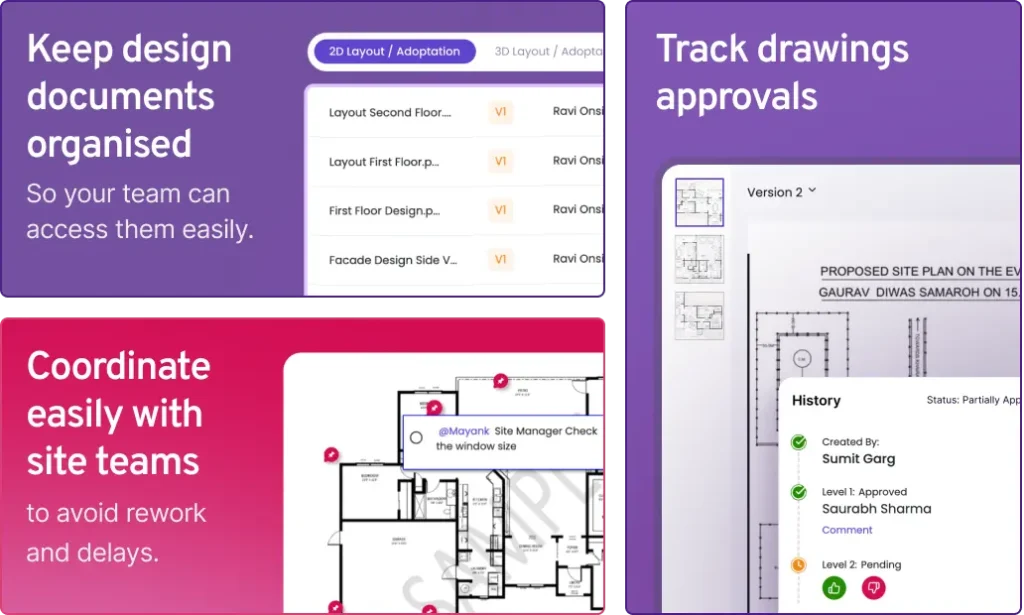
Construction rework happens when site teams execute from outdated drawings. Onsite gives every team a centralized drawing repository with version control, digital approval workflows, and pin-based site queries so architects, consultants, project managers, and site engineers always work from the same latest approved drawing without searching email threads or WhatsApp groups.

Every site team always on the latest approved drawing version
Drawing approvals tracked digitally from submission to sign-off
Real-time coordination between design office and site teams on one platform
Built for Construction Companies Where Design Control Directly Determines Execution Cost
Construction rework costs between fifteen and thirty percent of project value in most cases. The primary cause is site teams executing from drawing versions that were superseded days or weeks earlier. Onsite gives every construction team type centralized drawing control, version visibility, and real-time approval tracking so design changes reach site teams before work begins, not after demolition is already required.
01
Interior and Fit-Out Firms
Interior projects run on high-frequency design changes where a single revision requires every trade to update their scope immediately. Onsite gives interior teams a centralized repository where revised drawings replace previous versions automatically and site engineers access only the current approved version.
02
Developers and PMC Teams
PMC teams coordinate drawing approvals across multiple consultants on overlapping timelines. Onsite centralizes every submission, approval status, and revision record so PMC teams see what is approved, what is pending, and what has outstanding revisions without managing separate email threads per consultant.
03
Infra and EPC Companies
Large EPC projects generate hundreds of drawings across disciplines where a revision in one triggers updates in others. Onsite lets teams organize drawings by discipline and status, track which revisions have been issued to which site teams, and ensure no contractor executes from a superseded drawing.
04
Industrial Projects
Industrial projects depend on precise layout drawings where a single version mismatch creates rework that costs far more than the drawing error itself. Onsite gives industrial teams strict version control, role-based access per contractor, and timestamped approval records for every layout change.
Why Construction Companies Lose Lakhs to
Drawing Version Failures
Onsite connects drawing uploads, version control, digital approvals, and site coordination in one platform so every team works from the same verified drawing without searching emails or WhatsApp.
Centralized Drawing Repository by Discipline
Every drawing uploaded to Onsite is tagged by discipline, area, category, and version status. Architectural, structural, MEP, interior, and services drawings sit in one organized workspace. Site engineers and subcontractors access only drawings relevant to their scope based on role-based access controls.
Version Control and Automatic Locking
When a revised drawing is uploaded, Onsite tags it as the latest version and automatically locks all previous versions so no site team can access a superseded file by mistake. Site teams always open the current approved drawing without checking manually whether a newer version exists.
Digital Approval Workflows With Audit Trail
Approval workflows route every submitted drawing to designated approvers with status tracking showing pending, approved, rejected, or revision required at every stage. Every approval creates a timestamped record of who approved which version and when. Site teams know the moment a drawing is approved and ready for execution.
Pin-Based Site Queries Directly on Drawings
Site engineers open the drawing in Onsite mobile, pin the exact location where an issue exists, add notes, attach photos, and raise a formal query that routes directly to the responsible architect. Every query carries a location reference, a timestamp, and the drawing version it applies to. Architects respond within the platform, creating a complete record of every clarification raised and resolved.
Why Construction Companies Lose Money to Drawing Version Failures?
When drawing revisions scatter across email and WhatsApp, site teams execute from the wrong version. The consequence is not a minor correction. It is rework that adds lakhs to project cost and weeks to timelines.
Rework From Outdated Drawings
Site teams executing from superseded drawing versions is the most expensive and most preventable construction cost. A wall built to an older layout or an MEP route installed from a version since modified requires demolition before correct execution can begin. The rework cost is always a multiple of the version control failure that caused it.
Approvals Lost in Email Threads
Drawing approval cycles run through email chains involving architects, consultants, PMC teams, and clients simultaneously. When an approval arrives buried in a thread, there is no structured record of when it was given or which version it applied to. Disputed approvals surface at handover when they are most expensive to resolve.
No Visibility Into Version History
When an execution error is found on site, the first question is which drawing the team was working from. Without a version history, reconstructing the sequence requires searching email archives and asking team members to recall details from months earlier. The answer is rarely clear or fast.
Design Office and Site Working in Silos
Architects prepare revised drawings in the office. Site engineers receive updates through informal channels with no confirmation the new version was downloaded before execution continued. The two teams never share a view of which drawings are current, approved, and issued to site.
Core Features of Onsite Construction Design Management Software
Onsite connects centralized drawing storage, version-controlled approvals, and pin-based site coordination in one platform so every drawing has a verified version history, every approval is timestamped, and every site query is formally tracked.
Central Drawing Repository With Version Control
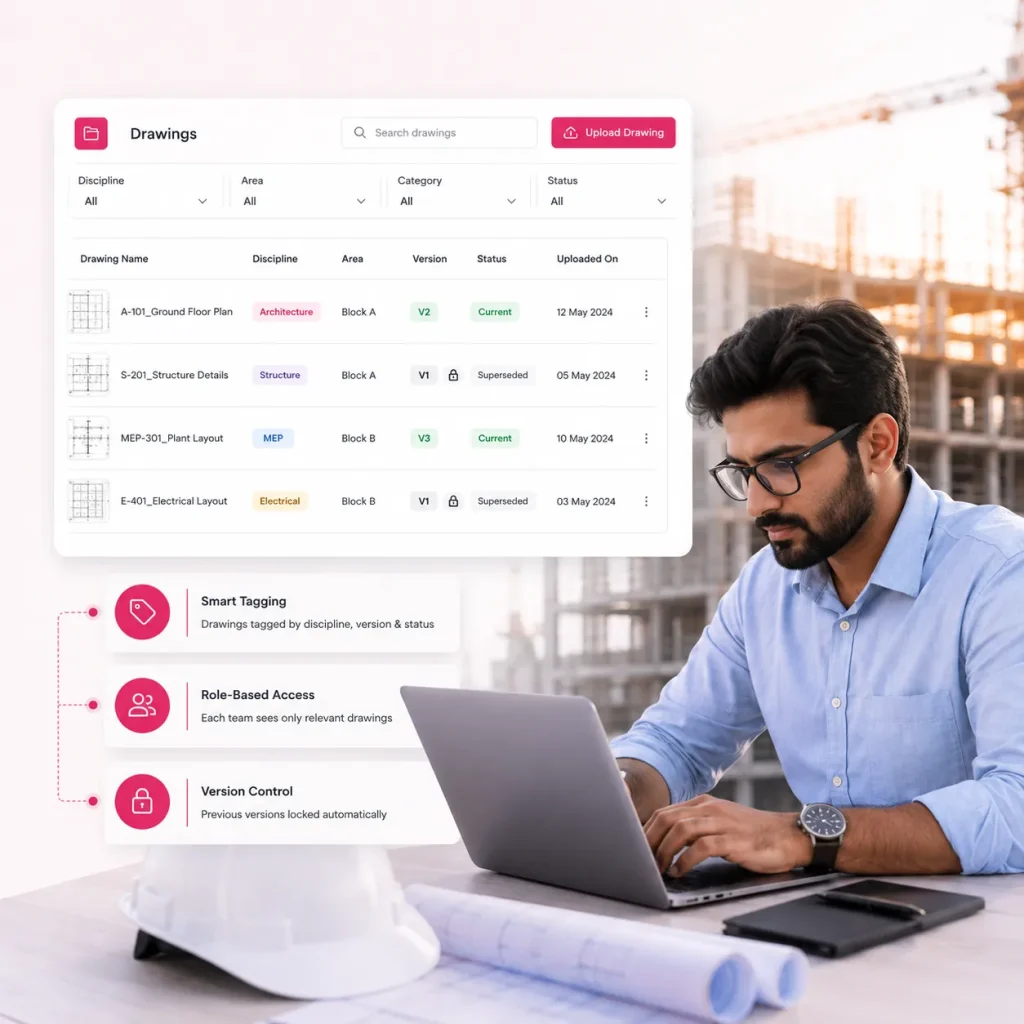
Every drawing uploaded to Onsite is tagged by discipline, area, category, and version status. When a revised drawing is uploaded, Onsite marks it as current and locks all earlier versions automatically. Role-based access ensures each team sees only the drawings relevant to their scope with no uncertainty about which version is approved for execution.
Drawings tagged by discipline, version, and status on upload
Role-based access ensuring each team sees only relevant drawings
Previous versions locked automatically when revised drawing is uploaded
Digital Approval Workflows with Full Audit Trail
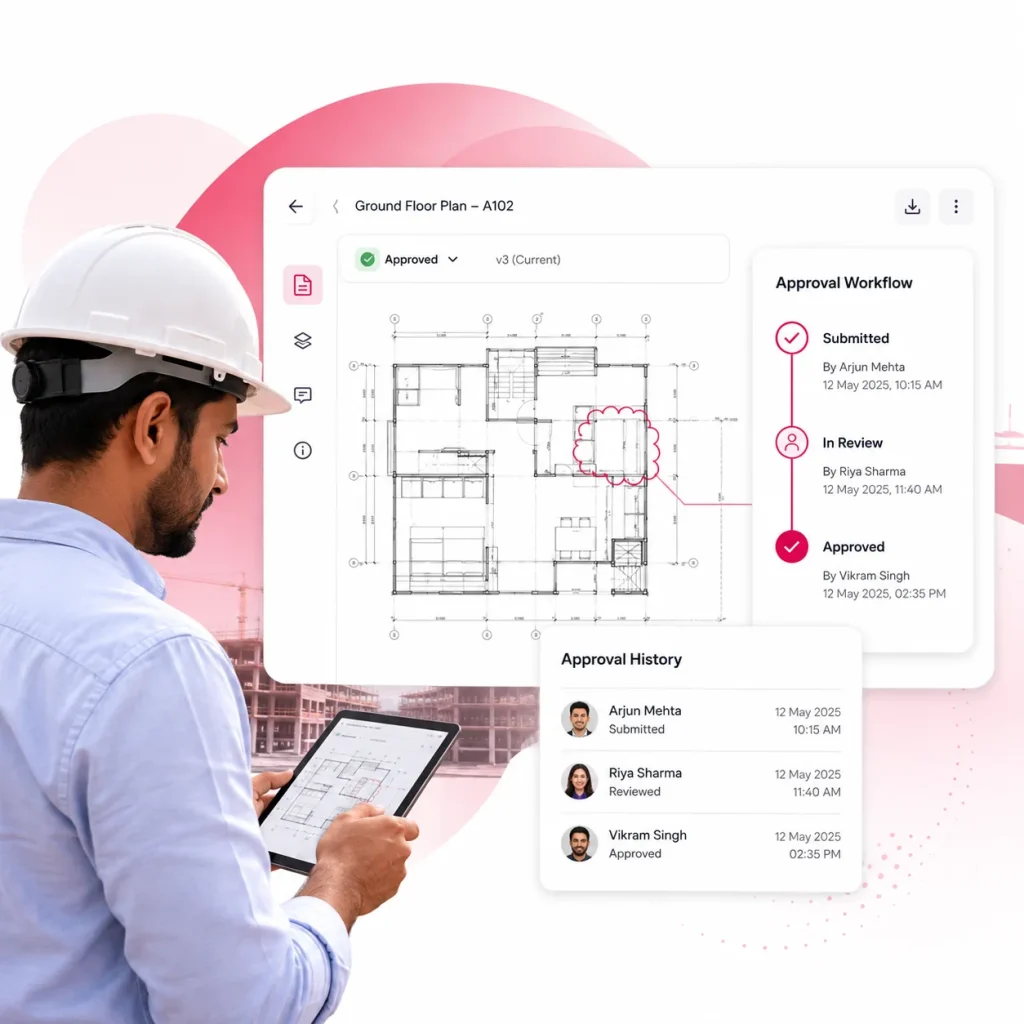
Approval workflows route every drawing to designated approvers with status tracking at every review stage. Every approval creates a timestamped record of who approved which version and when. Complete approval history sits in one place for dispute resolution and handover documentation without searching email archives.

Pin-Based Site Queries and Real-Time Coordination
Site engineers pin queries to the exact drawing location from mobile, with photos and notes routing directly to the responsible architect. Every query carries a location reference, drawing version, and timestamp. Architects respond within the platform, creating a complete record of every clarification with no informal WhatsApp messages left unresolved.
Queries pinned to exact drawing location with photos and notes
Full resolution record replacing informal WhatsApp design queries
Clarification requests routed directly to responsible architect or consultant
What Construction Companies Say About Onsite Construction Design Management Software
Construction companies using Onsite design management report fewer rework incidents, faster drawing approval cycles, and complete version visibility across every active site without searching email threads or WhatsApp histories.
Customer Success Story
“
Managing drawing revisions across multiple concurrent projects was creating coordination failures between our design office and site teams. Site engineers were executing from versions that had been superseded. With Onsite, every team accesses the current approved drawing from the same platform. Revision disputes that previously surfaced at handover now surface in the approval workflow before any work begins.
★
★
★
★
★
✕ Before Onsite
Site teams executing from superseded drawings · Revision disputes discovered at handover · Design and site disconnected
→
✓ After Onsite
One platform for current approved drawings · Revision disputes caught in approval workflow · Zero superseded version errors
Mr. Kathirvel, Founder
Theeran Avant · Erode, Tamil Nadu · Mechanical Construction Company
Stop Managing Construction Drawing Revisions
Through Email and WhatsApp
Email delivers files and WhatsApp sends messages. Neither enforces version control, tracks approvals, or prevents site teams from executing from a drawing superseded three days ago.
Email drawing distribution has no lock mechanism preventing site teams from executing from a version that has since been revised.
WhatsApp drawing approvals leave no structured record of who approved which version, creating disputes that surface at project handover.
Multiple drawing versions accumulating in email threads give site teams no reliable way to identify which one is current approved.
Pin-based site queries cannot be raised on WhatsApp drawings because there is no drawing markup or location-tagging capability in a messaging app.
Extended Features for Construction Design Management
Onsite construction design management goes beyond drawing storage and approval tracking. Role-based access control, timestamped audit trails, mobile drawing access from site, multi-discipline organization, and real-time approval notifications connect every design management workflow to the execution teams acting on those drawings without manual coordination effort.
Role-Based Drawing Access Control
Every team member at Onsite sees only the drawings relevant to their assigned scope. Subcontractors access their trade-specific drawings. Site engineers access their discipline. Architects and consultants access the full repository. Sensitive design documents stay protected from unauthorized access without requiring manual distribution of individual files to individual recipients for every revision cycle.
Timestamped Audit Trail
Every upload, approval, rejection, revision, markup, and download in Onsite creates a timestamped record showing which user performed the action, which drawing version was involved, and when it happened. This audit trail supports dispute resolution at handover, accountability reviews during execution, and compliance documentation for projects requiring formal design change records.
Multi-Discipline Drawing Organization
Architectural, structural, MEP, interior, and services drawings for the same project sit in one organized workspace tagged by discipline, area, and category. Project managers and PMC teams see the full drawing set organized by type rather than searching across separate folders, email attachments, or shared drives for drawings from different consultants.
Real-Time Approval Notifications
When a drawing moves from pending to approved, rejected, or revision required in Onsite, every stakeholder with relevant access receives an instant notification confirming the status change, the drawing version affected, and the action required from their side. Approval cycle delays caused by consultants not knowing a submission was waiting for their review are eliminated.
Mobile Drawing Access from Sites
Site engineers access the current approved version of any drawing from the Onsite mobile app at the construction site without returning to the office or calling a colleague to send the file. Drawing access, version confirmation, and query submission all happen from the same mobile app used for daily progress tracking and attendance.
Drawing History and Change Log
Every drawing in Onsite maintains a complete revision history showing every version uploaded, every change made, every approval given, and every rejection issued from the first submission to the current approved version. Teams working on long-duration projects can trace the full design evolution of any drawing without reconstructing the history from email archives.

Stop Construction Rework from Outdated Drawings. Start Managing Designs with Onsite.
Drawing revisions that travel through email and WhatsApp reach some teams immediately and others days later, with no confirmation either way. Onsite replaces scattered drawing distribution with a centralized platform where every team accesses the current approved version in real time, every approval creates a timestamped record, and every site query routes directly to the responsible design team without a single informal message.
FAQs
What is construction design management software?
Construction design management software is a platform that helps construction teams store, organize, version-control, and approve drawings during project execution. Unlike general file storage tools, construction-specific design management connects drawing versions to approval workflows, gives site teams role-based access to only the drawings relevant to their scope, and allows site engineers to raise pin-based queries directly on drawings from mobile devices. Onsite ensures every team from the design office to the active construction site always works from the same current approved drawing without searching email attachments or WhatsApp histories.
How does Onsite prevent rework caused by outdated drawings?
Onsite prevents outdated drawing rework through automatic version control at the point of upload. When a revised drawing replaces a previous version, Onsite locks all earlier versions immediately so site teams cannot access superseded drawings by mistake. Role-based access ensures each team member sees only their current approved scope drawings rather than a full archive where older versions remain accessible alongside newer ones. The combination of automatic version locking and controlled access eliminates the distribution gap between design office approval and site team awareness that causes most drawing-related rework.
How does drawing version control work in Onsite?
Every drawing uploaded to Onsite receives a version tag based on its upload sequence and the status assigned by the uploading team member. When a revision is uploaded to replace a previous version, Onsite automatically marks the new file as current and moves all earlier versions to a locked archive that remains accessible for audit and historical reference but is no longer presented to site users as an active drawing. Site engineers and subcontractors always see the current approved version without needing to check which file is most recent across multiple uploads.
How does the drawing approval workflow work in Onsite?
When a drawing is uploaded to Onsite, the submitting team assigns the relevant approvers from the platform — architects, PMC representatives, structural consultants, MEP engineers, or client representatives depending on the drawing type. Each approver receives a notification, reviews the drawing within Onsite, and marks it as approved, rejected, or requiring revision. Every decision creates a timestamped record showing who acted on which version and when. Design teams see the exact approval stage of every submission without sending follow-up emails to consultants for status updates.
What are pin-based queries in Onsite and how do they work?
Pin-based queries allow site engineers to raise clarification requests directly on the drawing rather than describing a location issue through a WhatsApp message or phone call. The site engineer opens the relevant drawing in the Onsite mobile app, taps the exact location where the issue exists, adds a written description of the clarification needed, attaches site photographs as evidence if required, and submits the query. The query routes instantly to the responsible architect or consultant who responds within the platform, creating a complete location-referenced resolution record for every design clarification raised during the project.
Can Onsite manage drawings across multiple disciplines simultaneously?
Yes. Onsite organizes drawings by discipline, area, and category within a centralized repository so architectural, structural, MEP, interior, and services drawings for the same project sit in one organized workspace. Project managers and PMC teams see the full drawing set organized by type. Subcontractors and site engineers see only the drawings relevant to their assigned scope based on role-based access. For EPC and infrastructure projects managing multi-discipline drawing sets with revision dependencies between disciplines, this centralized organization prevents version conflicts between drawing types that frequently cause coordination failures during execution.
How does Onsite improve coordination between the design office and site teams?
Onsite replaces informal drawing distribution through email and WhatsApp with a centralized platform where design offices upload approved drawings and site teams access them in real time through the mobile app. When a drawing is approved, relevant site teams receive an instant notification confirming which drawing is current and ready for execution. Site engineers raise queries directly on drawings through the mobile app rather than calling the design office or sending WhatsApp messages that may not reach the right person. Both teams work from the same verified drawing data simultaneously without communication gaps between design approval and site execution.
Is Onsite design management suitable for interior and fit-out companies?
Yes. Interior and fit-out projects involve some of the highest drawing revision frequencies in construction, with client design changes, material substitutions, and scope adjustments creating new drawing versions throughout the project lifecycle. Onsite is specifically effective for interior companies because version control prevents site teams from executing to a design the client changed two days ago, approval workflows keep client sign-offs documented with timestamps rather than buried in WhatsApp conversations, and pin-based queries allow site teams to raise finish and layout clarifications directly on drawings from the active site without delaying execution for informal responses.