
Construction Budgeting & Cost Control Software
Plan Your Budget, Track Your Actuals & Protect Your Margins
Most construction companies prepare a budget at project start and never look at it again until the final account reveals a loss. Site expenses, material consumption, and labor costs accumulate separately from the budget with no automatic linkage. Onsite construction budgeting software connects your planned costs to actual site spending as it happens so project managers see deviations at task level while corrective action is still possible.

Build project budgets from BOQs or templates with category-wise cost allocation
Capture purchase bills, material usage, and labor costs automatically against budget lines
Compare budget versus actual based on completed work, not time elapsed
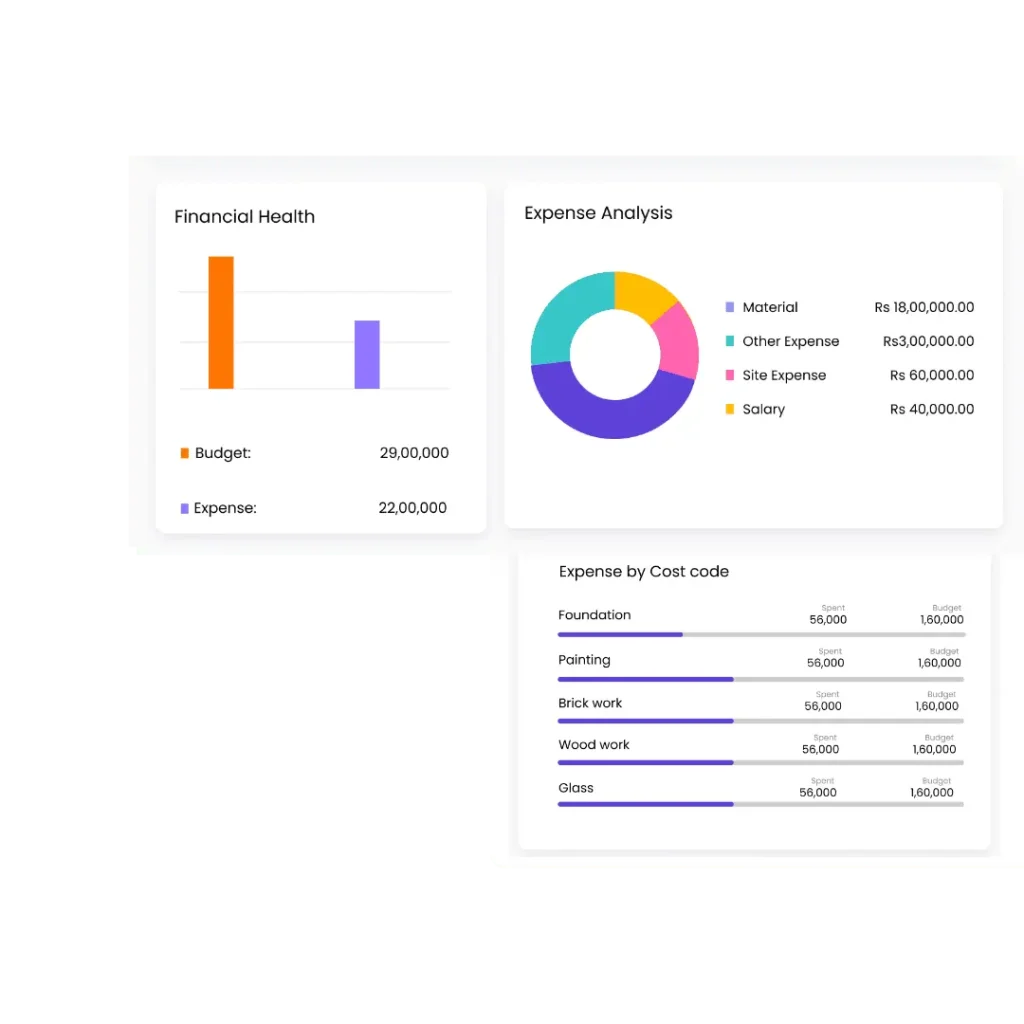
Trusted by 10,000+ Construction Companies Worldwide
Construction teams plan activities, track progress, and stay ahead of delays with Onsite construction planning software.

Built for Construction Teams That Need Live Cost Visibility Across Every Project
Onsite construction budgeting software serves every company type that manages project costs across multiple categories, tracks actuals against a plan, and needs early warning before overruns become unrecoverable.
01
Contractors and Developers
Contractors and developers record material, labour, subcontractor, and overhead costs in separate registers that nobody reconciles against the original budget until the project closes. By then the overrun is a fact rather than a risk. Onsite gives contractors a single budget baseline linked to actual site spending as it occurs so deviations surface during execution when there is still time to adjust before the margin is fully eroded.
02
Infra and EPC Companies
Infrastructure and EPC firms run long-duration projects where cost overruns accumulate across multiple packages and procurement cycles before anyone notices. A 10 percent overrun on a Rs 10 crore project represents months of silent erosion that spreadsheet reviews catch too late. Onsite gives EPC teams centralized budget visibility across packages and phases with actual costs flowing in from procurement, labour, and subcontractor billing in real time.
03
Interior and Fit-Out Firms
Interior and fit-out firms operate on tight margins where a single scope change can turn a profitable job into a loss before execution is half complete. Tracking material, labour, and vendor bills manually against an Excel budget makes cost control reactive rather than preventive. Onsite gives interior firms task-level cost visibility updated from actual site data so margin performance is visible at every stage of a fast-moving project.
04
Manufacturing-Led Projects
Industrial projects align cost performance with production milestones and commissioning stages, making time-based budget tracking inadequate for understanding true financial position. Spending within budget relative to time elapsed may be significantly over budget relative to work actually completed. Onsite compares actual costs against progress-based completion rather than calendar progress, giving industrial project teams an accurate financial picture
From Budget Creation to Cost Variance: One Connected Financial Workflow
Onsite links budget setup, automatic actual capture, and progress-based comparison in one system so the gap between what a project was supposed to cost and what it actually costs is visible throughout execution, not just at the end.
Build Accurate Budgets From BOQs or Templates
Project budgets in Onsite are built from BOQ line items, standard rate libraries, or reusable templates — not from memory or copied Excel files with outdated rates. Each budget is structured by cost category: material, labour, subcontractor, and equipment. Planned quantities and rates from the BOQ feed directly into budget line items, creating a cost baseline that reflects the actual scope of work rather than a rough estimate assembled under tender pressure. Once set, the budget becomes the financial reference point that all actual costs are measured against throughout execution.
Capture Actual Costs Automatically From Site Activity
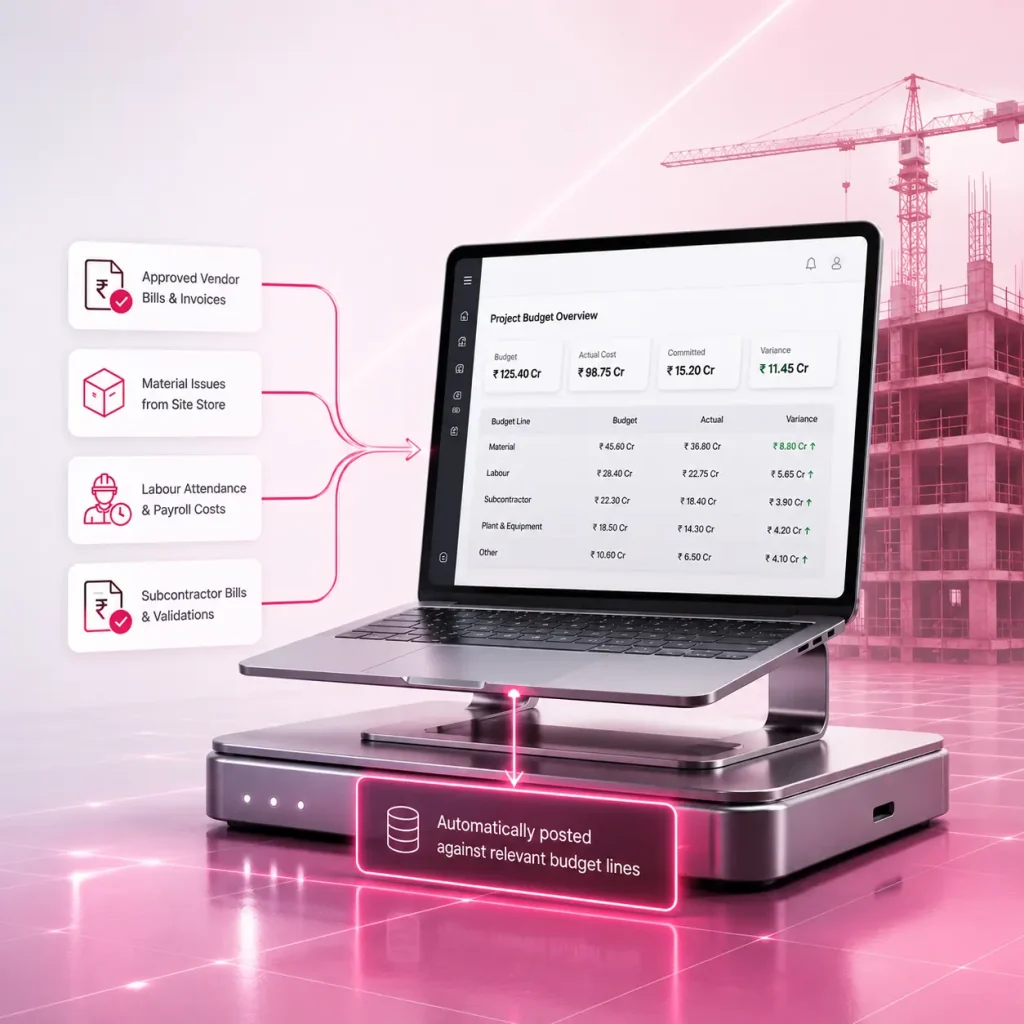
Purchase bills, material issue records, labour attendance costs, and subcontractor invoices flow into the budget automatically as they are recorded elsewhere in Onsite — no manual re-entry, no separate month-end reconciliation. When a vendor bill is approved, it posts against the relevant budget line. When a material issue is recorded from the site store, it reduces the remaining material budget for that activity. Labour costs calculated from attendance and payroll link to labour budget lines without a separate entry step. Actuals are always current because they come from the same records operational teams are already maintaining.
Compare Budget Versus Actual Based on Completed Work
Onsite compares costs against progress-based completion rather than time elapsed — the only comparison that gives an accurate financial picture on a construction project. A project that has spent 60 percent of its budget after completing 40 percent of the work is in a different financial position than one where 60 percent spend aligns with 60 percent completion. Onsite calculates cost-per-unit metrics at task level, flags activities where actual unit costs exceed budgeted rates, and surfaces variances with enough lead time for project managers to investigate and take corrective action before the overrun compounds.
Identify Cost Leakages and Protect Project Margins
Onsite surfaces the specific activities, materials, and cost categories where spending has deviated from plan — not a total budget number that obscures which line items are responsible. Project managers see exactly where the overrun is occurring: which material category is running above budget, which subcontractor scope is billing beyond agreed quantities, which labour activity is consuming more days than planned. This task-level visibility allows targeted intervention rather than broad cost-cutting decisions that affect the wrong parts of the project while the actual leakage continues unaddressed.
Why Construction Budget Control Fails Without a Connected System?
Construction budgets do not fail because contractors make poor estimates. They fail because the systems used to track costs were never connected to the budgets set at project start, so deviations accumulate invisibly until the project closes.
Budgets Prepared Once and Never Revisited
Most construction companies prepare a project budget at tender stage and treat it as a completed task rather than a live reference. Site conditions change. Material rates move. Scope additions arrive without budget revisions. By the time execution is underway, the budget no longer reflects the project being built. Project managers making cost decisions mid-execution have no valid baseline because the original budget stopped being relevant within the first few weeks of site activity.
Site Expenses Not Linked to Budget Lines
Material bills, labour wages, and subcontractor invoices get recorded in separate registers — accounts payable, site registers, payroll sheets — with no linkage to the budget created at project start. Accounting teams reconcile these records monthly, if at all. By the time a cost overrun appears in a monthly summary, it reflects spending decisions made three to four weeks earlier. The window for intervention is already closed.
Deviations Invisible Until the Project Closes
Material wastage above planned quantities, additional labour days beyond the planned productivity rate, and unapproved subcontractor rate revisions erode margins silently throughout execution. None of these deviations appear in a weekly WhatsApp update or monthly Excel summary until someone reconciles the full project ledger — typically at or after completion. Companies discover a project lost 15 to 20 percent of its expected margin only after there is nothing left to do about it.
No Cost Visibility Relative to Progress
A project that has spent 65 percent of its budget with 45 percent of work completed is in serious trouble — but spreadsheet-based tracking cannot surface this because it compares spending against time rather than work completed. A project manager seeing 65 percent budget consumed with three months remaining might conclude the project is on track, not knowing completion is only at 45 percent. Without progress-based cost comparison, the financial picture is consistently misleading.
Core Features of Onsite Construction Budgeting Software
Onsite combines BOQ-based budget creation, automatic actual cost capture, and progress-linked variance tracking into one system that gives project managers and finance teams live financial visibility without manual reconciliation.
BOQ-Based Budget Creation With Category Allocation
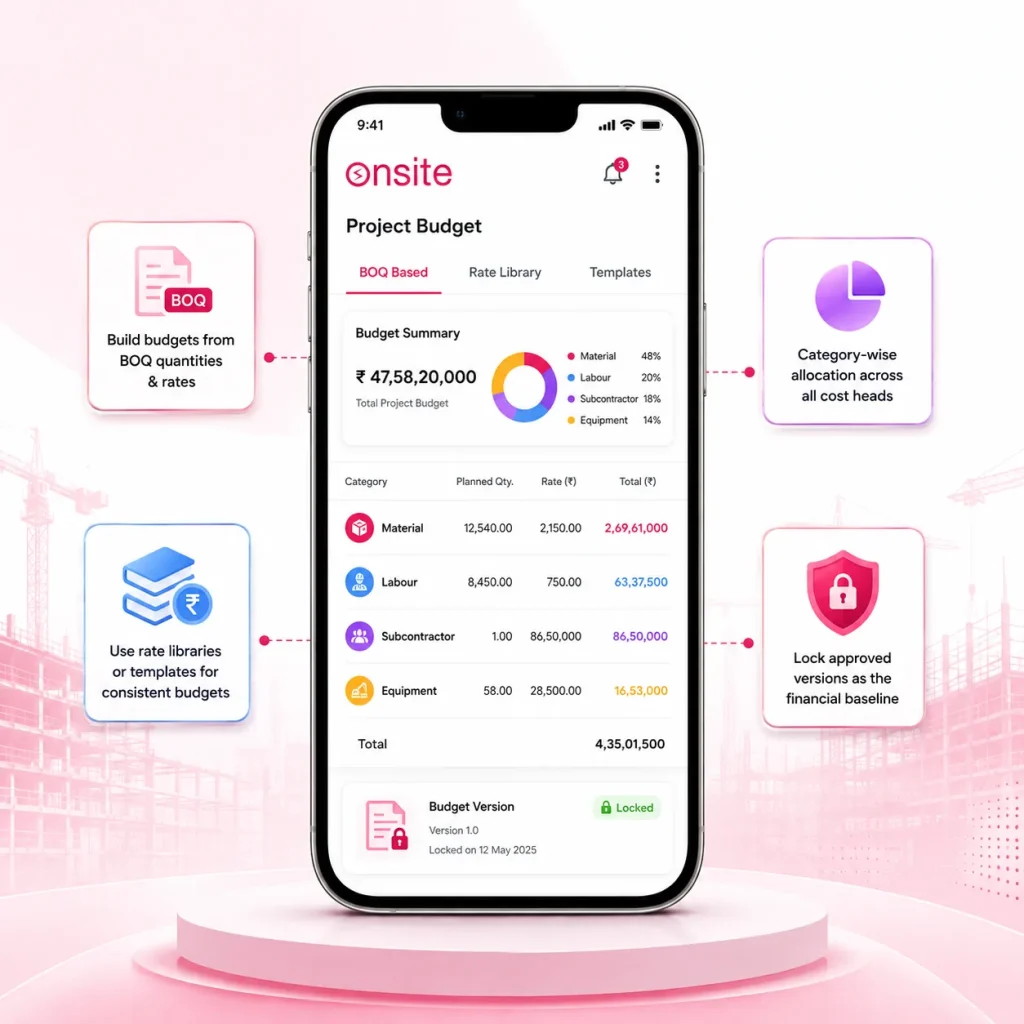
Onsite builds project budgets from BOQ line items, standard rate libraries, or reusable templates, structured by cost category across material, labour, subcontractor, and equipment heads. Each budget line carries planned quantity, rate, and total cost drawn from the same BOQ used for project planning, creating a cost baseline that reflects actual project scope rather than a separate estimate built in isolation. Budget versions can be saved, revised, and locked so the approved baseline is always available for comparison even after scope changes are incorporated through formal revisions.
Build budgets from BOQ quantities and rates across material, labour, subcontractor, and equipment categories
Use rate libraries or reusable templates for consistent budget preparation across projects
Lock approved budget versions as the financial baseline for all variance tracking
Automatic Actual Cost Capture From Site Records
Purchase bills approved in the procurement module, material issues recorded from the site store, labour costs calculated from attendance and payroll, and subcontractor bills validated through the billing module all post automatically against the relevant budget lines without manual data entry. Finance teams and project managers see actual costs updated in real time from the same operational records that site teams and accounts are already maintaining. There is no separate reconciliation step, no month-end data collection exercise, and no gap between when a cost is incurred and when it appears in the budget comparison.
DPR-verified
1 overrun
68%
spent
Total budget
₹84.6L
✓ DPR quantities
Auto alert
+18.4%
Steel Fixing overrun
₹57.5L
Actual spend
₹27.1L
Remaining
Task
Level granularity
Progress-Based Budget vs Actual Variance Reporting
Onsite calculates cost variance relative to work completed rather than time elapsed, using DPR-verified executed quantities as the progress denominator. Project managers see cost-per-unit metrics at task level, how much it actually cost to complete a cubic metre of concrete work versus the budgeted rate, alongside total budget consumption and remaining balance by category. Automated alerts flag cost heads where actual spending has exceeded budget thresholds, identifying the specific activities driving the overrun rather than reporting a total variance number that obscures where intervention is needed.
Compare actual costs against progress-based completion using DPR-verified quantities
View cost-per-unit variance at task level across all tracked activities
Receive automated alerts when spending on any cost head crosses budget thresholds
How Onsite Simplifies Budget Control for Construction Project Managers?
Construction cost overruns are rarely caused by a single large event. They accumulate through small deviations across dozens of cost lines that nobody caught early enough. Onsite closes the gap between when a cost decision is made and when management sees its impact on the budget.
01
Set the Budget Before Execution Begins
Project managers or estimators build the project budget in Onsite from the approved BOQ, selecting line items, confirming quantities, and applying rates from the team’s rate library or entering project-specific rates where needed. The budget is organized by cost category and activity, giving a structured financial baseline that mirrors how the project will actually be executed rather than how a static estimate was assembled at tender stage. Once reviewed and approved, the budget is locked as the reference baseline. Subsequent scope changes go through a formal revision process that keeps the original baseline intact for audit and variance tracking.
02
Actuals Flow In as Site Work Happens
From the moment execution begins, every cost event on site feeds into the budget automatically. A vendor delivers cement and the GRN is recorded, material cost posts to the material budget line. A mason crew completes a day’s work and attendance is marked, labour cost links to the labour budget for that activity. A subcontractor bill is submitted and approved the amount posts to the subcontractor cost head for the relevant scope. Project managers do not wait for a monthly reconciliation to see what was spent. The budget dashboard reflects costs as they occur, from the same records operational teams are already maintaining.
03
Variances Surface at Task Level in Real Time
As actuals accumulate, Onsite calculates variance at each budget line, comparing actual cost-per-unit against the budgeted rate for each task and flagging lines where spending has deviated beyond the defined threshold. A project manager reviewing the dashboard sees not just that the project is two percent over budget, but that the plastering activity is running 18 percent above its budgeted cost-per-square-metre, the steel procurement cost is within two percent of plan, and the labour allocation for masonry has been consumed ahead of the physical completion percentage. These are actionable insights rather than summary numbers.
04
Management Reviews Project Financial Health Across All Sites
Senior management and finance teams view portfolio-level budget performance across all active projects from one dashboard total budget allocated, actuals to date, variance by category, and projected final cost based on current spending trends. Projects where cost performance is deteriorating appear alongside the specific cost heads responsible, enabling resource allocation and escalation decisions based on financial data rather than verbal updates from project managers. The financial picture that previously required a full-day consolidation effort every month is now available on demand, updated from live site data.
What Construction Companies Say About Onsite Budgeting Software?
Construction companies across India and the Middle East use Onsite to replace disconnected planning tools with a live construction schedule that site teams actually update.
Customer Success Story
“
We finished a project and discovered we had lost almost 18 percent of the expected margin. Nobody had flagged it during execution because our budget and our site expenses were in completely separate systems. With Onsite, the budget and the actuals are the same screen. Our project managers now catch overruns in the second week, not the last week.
18%
Margin lost on a completed project before switching to Onsite
★
★
★
★
★
✕ Before Onsite
Budget and site expenses in separate systems · Overruns invisible during execution · Margin loss discovered only at project end
→
✓ After Onsite
Budget and actuals on the same screen · Overruns caught in week two · Project managers in control throughout execution
Mr. Anvesh, Founder
Bhavya Developers · Building Construction Company · India
Excel Cannot Deliver Live Budget Control on a Construction Project
Excel was designed to store and calculate data that a person enters manually. It has no connection to site activity, no automatic cost capture, and no mechanism to compare spending against work completion rather than time elapsed.
Excel budgets go stale the moment execution begins, scope additions and rate revisions accumulate without anyone updating the file, making every budget-versus-actual comparison less meaningful than the last
Actual costs enter Excel through manual data entry from accounts, payroll, and store registers — a process that happens weekly at best and produces figures that are already days old before anyone acts on them
Excel compares cost against time not against work completed — a project 60 percent spent with 40 percent done looks on track in Excel while running significantly over budget relative to actual progress
Multi-project cost visibility in Excel requires manually collecting and consolidating files in different formats before every review — producing a snapshot that is outdated before the meeting starts
Additional Features That Strengthen Construction Budget Control
Onsite provides supplementary cost tracking, reporting, and analysis capabilities that give project managers and finance teams complete financial visibility from project setup through final account closure.
Budget Revision and Version Control
Manage formal budget revisions when scope changes and rate adjustments affect the original cost baseline. Each revision is saved as a separate version with the change description and approval record. The original baseline stays accessible for comparison so variance analysis always reflects both the approved revision and the original plan.
Committed Cost Tracking
Track committed costs — purchase orders raised but not yet billed, subcontractor work orders issued but not yet invoiced — alongside actuals already recorded. Committed cost visibility gives project managers a true picture of total financial exposure at any point, not just what has been invoiced and approved to date.
Category-Wise Budget Reports
View budget consumption broken down by material, labour, subcontractor, and equipment categories for each project. These reports show how much of each cost head has been consumed, what remains, and which categories are tracking ahead of or behind the expected consumption rate relative to project completion.
Cost-Per-Unit Benchmarking
Compare actual cost-per-unit metrics for key activities — cost per cubic metre of concrete, cost per square metre of plastering, cost per running metre of pipe — against the budgeted rate and against historical project benchmarks. Use these figures to identify productivity issues and validate rates for future project estimates.
Multi-Project Budget Dashboard
View budget performance across all active projects from one consolidated dashboard showing total budget, actuals to date, variance percentage, and projected final cost for each project. Senior management identifies at-risk projects early without requesting individual status updates from project managers or waiting for monthly financial reviews.
Cashflow Impact Reporting
Track how actual spending against the budget translates into cash outflows by week and month, giving finance teams visibility into upcoming payment obligations from purchase orders, subcontractor bills, and labour payroll. Use cashflow projections alongside budget variance data to plan fund allocation across active projects.
4 Tips to Improve Budget Control on Construction Projects
A budgeting system works only when the data it receives is accurate and timely, and when project managers treat variance alerts as action items rather than informational updates. These practices determine whether budget control changes project financial outcomes.
Build the Budget From the BOQ, Not From a Previous Project’s Numbers
The most common source of budget inaccuracy in construction is copying cost figures from a previous project without adjusting for current material rates, project-specific productivity conditions, or scope differences between the two jobs. A budget inherited from a similar project carries every assumption that made that project different from the current one. Build each budget from the approved BOQ with current rates verified against recent procurement data. The extra time spent building from scratch rather than copying and adjusting produces a baseline that is actually useful for cost control rather than one that is directionally similar at best.
Connect Every Cost Record to a Budget Line Before Approving Payment
Budget control is only possible when the people approving costs — vendor bills, material requisitions, labour timesheets — are the same people who can see whether that cost is within the budgeted allocation. In most construction companies, accounts teams approve invoices without knowing what the budget position is for that cost head. The person with budget visibility is not in the payment approval chain. Onsite solves this structurally, but the discipline of requiring budget line linkage before payment approval must be established as a firm process — not an optional step that gets bypassed under time pressure.
Treat a Budget Variance Alert as an Investigation Trigger, Not an Acknowledgment
Automated budget alerts lose their value when project managers acknowledge them and move on without investigating the cause. A variance alert on the masonry labour budget means one of three things: the productivity rate is lower than planned, the labour headcount is higher than planned, or the rate per day has increased beyond the budgeted figure. Each cause has a different corrective action. Build the discipline of assigning every variance alert a root cause and a response within 48 hours. Alerts that go unaddressed for a week have already cost more than the investigation would have taken.
Revise the Budget Formally When Scope Changes Are Approved
Every construction project encounters scope changes. The financially damaging ones are not the changes themselves — it is the practice of executing scope changes without a formal budget revision that allows the additional cost to accumulate as an uncontrolled overrun against the original baseline. When a scope addition is approved, the budget revision should happen on the same day, not at the next monthly review. An unrevised budget that has absorbed three scope changes is no longer a useful cost control reference. It is a document that shows every activity over budget without explaining why.

Stop Discovering Cost Overruns After the Project Closes. Start Controlling Costs With Onsite.
Construction projects lose 15 to 30 percent of expected margin not because the overruns were unpreventable but because nobody saw them coming until the final account was complete. Onsite connects your project budget to actual site spending as it happens — giving project managers task-level variance visibility and finance teams live cost performance data across every active project. Check pricing or book a free demo today.
FAQs
What is Onsite construction budgeting software?
Onsite construction budgeting software is a project cost management platform that helps contractors, developers, and EPC firms build BOQ-based project budgets, capture actual site costs automatically, and compare spending against work completed in real time. Unlike static spreadsheets, Onsite links the budget to live operational data — purchase bills, material consumption, attendance costs, and subcontractor invoices — so project managers see cost deviations as they develop rather than discovering overruns after the project has already closed and the margin is lost.
How does Onsite help construction companies avoid cost overruns?
Onsite prevents cost overruns by connecting the project budget to actual site spending as it occurs, then comparing both against work completed rather than time elapsed. When spending on a cost head exceeds the budgeted rate for the work done, Onsite flags the variance automatically with the specific activity and cost category responsible. Project managers see which part of the project is generating the overrun early enough to investigate the cause — whether it is a rate increase, a productivity shortfall, or an unapproved scope addition — and take corrective action before the deviation compounds.
How does Onsite build project budgets from BOQs?
Onsite imports BOQ line items directly into the budget module, mapping quantities and rates to cost categories — material, labour, subcontractor, and equipment. Each BOQ item becomes a budget line with planned quantity, rate, and total cost pre-populated from the same BOQ used for project planning and quotation. The budget can also be built from standard rate library templates or reusable project templates for faster setup on routine project types. Once the budget is reviewed and approved, it is locked as the financial baseline that all actual costs are measured against throughout execution.
How does Onsite capture actual project costs automatically?
Actual costs enter the Onsite budget from the operational modules where costs are already being recorded. Vendor bills approved in procurement post to material budget lines. Material issues recorded from the site store reduce the material budget for the relevant activity. Labour costs calculated from daily attendance and payroll link to labour budget categories. Subcontractor bills validated and approved in the billing module post to the subcontractor cost head. No manual data entry step is required because the budget reads from the same records that site teams and accounts are already maintaining as part of daily operations.
What is progress-based budget comparison and why does it matter?
Progress-based budget comparison measures cost performance relative to work completed rather than time elapsed. A project that has consumed 65 percent of its budget while completing only 45 percent of the work is over budget — but a time-based comparison might show it as on track if 65 percent of the schedule has passed. Onsite uses DPR-verified executed quantities as the progress measure, calculating cost-per-unit metrics at task level and comparing them against budgeted rates. This gives project managers an accurate financial picture tied to what the site has actually delivered rather than how much time has passed.
Can Onsite track budget versus actual across multiple projects simultaneously?
Yes. Onsite provides a portfolio-level budget dashboard where finance teams and senior management view cost performance across all active projects in one consolidated view — total budget allocated, actuals to date, variance by category, and projected final cost for each project. Projects where cost performance is deteriorating appear with the specific cost heads responsible for the variance, so management can allocate resources, escalate issues, or adjust procurement decisions based on financial data rather than verbal updates from individual project managers collected through calls and meetings.
How does Onsite handle scope changes and budget revisions?
When a scope change is approved on a project, Onsite supports a formal budget revision process where the additional or revised cost is added to the budget with a revision description and approval record. Each revision is saved as a separate version alongside the original locked baseline, so variance analysis can compare actuals against both the original estimate and the current approved budget. This version history gives project managers and finance teams a clear record of how the budget evolved during execution and what drove each revision — essential for final account reconciliation and client variation claims.
Does Onsite track committed costs alongside actual costs?
Yes. Onsite tracks committed costs — purchase orders raised and subcontractor work orders issued that have not yet been invoiced — alongside actuals already recorded and approved. Committed cost visibility gives project managers a true picture of total financial exposure at any point in the project, not just the costs that have been billed and approved. A project manager who can see only approved actuals may believe the budget has significant remaining headroom when in fact most of it is already committed through open purchase orders that have not yet converted into vendor invoices.
Can Onsite generate cost variance reports for client or management review?
Yes. Onsite generates budget variance reports showing planned versus actual costs by category, activity, and time period, exportable in formats suitable for client reporting, management review, or project audit. Reports include cost-per-unit metrics, category-wise consumption summaries, committed cost positions, and projected final cost estimates based on current spending trends. These reports can be generated on demand at any point during project execution without manual compilation from separate data sources, giving project managers and finance teams a consistent, accurate financial summary that reflects live data rather than a period-end snapshot.
How quickly can a construction company start using Onsite construction budgeting software?
Construction companies typically go live with Onsite budgeting within one to two weeks of onboarding. Setup involves building the rate library, creating BOQ templates for common project types, and configuring cost category structures — all supported by the Onsite onboarding team. Existing projects can have budgets entered manually or imported from BOQ files. The actual cost capture begins working automatically as soon as procurement, attendance, and billing modules are in use. Most project managers have their first budget versus actual comparison visible within the first week of active project data being recorded in the system.