
Equipment Expense Summary Report
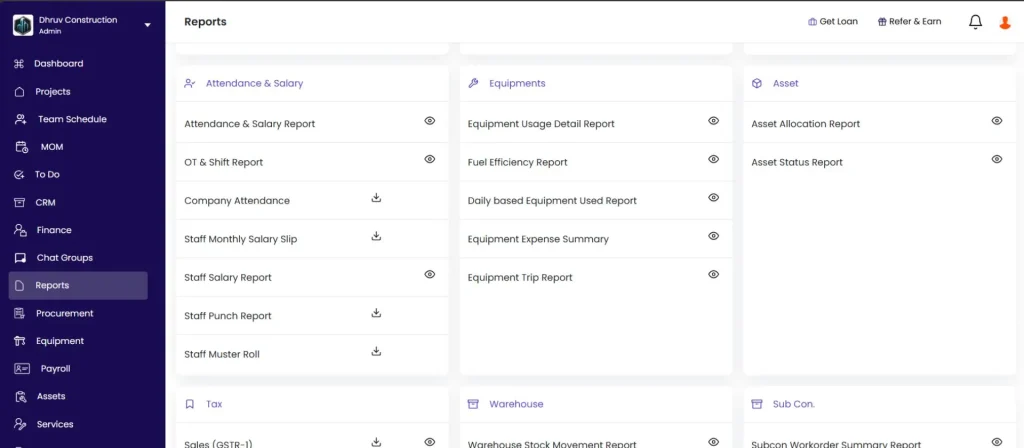
The Equipment Expense Summary report shows a project-wise and equipment-wise breakdown of all costs incurred on each piece of equipment. It splits every equipment cost into four categories: Fuel, Other Expense, Rental, and Spare Part
Before You Start
- Equipment must be added to the project before any costs can be tracked against it
- Fuel must be logged via the Add Fuel action on the equipment record for fuel costs to appear
- Equipment Expense transactions must be recorded in the Transaction tab for Rental to appear
- You need a role with Download Reports permission to access this report
How to Open the Report
- Click Reports in the left sidebar
- Scroll to the Equipment section
- Click Equipment Expense Summary
Filters
| Filter | What It Does |
|---|---|
| Equipment Name | Filter by a specific piece of equipment |
| Vehicle No. | Filter by registration or vehicle number |
| Txn Date | Set a date range for expenses |
| Project Name | Filter to one project or show all |
| Party Name | Filter by vendor or party (relevant for Rental entries) |
Report Columns
Each row in the report represents one piece of equipment on one project.
| Column | What It Shows |
|---|---|
| Project Name | Project the equipment is deployed on |
| Equipment Name | Name of the equipment |
| Vehicle No. | Registration or identification number |
| Fuel | Total fuel cost for this equipment on this project |
| Other Expense | Total maintenance, repair, and other tagged expenses |
| Rental | Total rental payments made to the vendor for this equipment |
| Spare Part | Total cost of materials issued from stock and tagged to this equipment |
| Total Expense | Sum of Fuel plus Other Expense plus Rental plus Spare Part |
Where Each Cost Category Comes From
Understanding where each category is sourced helps the team record costs correctly so they appear in the report.
Fuel
Fuel is calculated automatically. No manual cost entry is needed.
Source: Add Fuel entries on the equipment record in the project.
How it calculates: Fuel Quantity logged (from Add Fuel entries) multiplied by the average cost of that fuel material in the project (from Material Purchase entries for that fuel type).
Both inputs are needed for a fuel cost to appear:
- Fuel quantity must be logged on the equipment via Add Fuel
- A Material Purchase entry must exist for the fuel material in the same project so the system knows the cost per unit
💡 If Fuel shows zero, either no fuel quantity has been logged for this equipment, or no Material Purchase entry exists for the fuel material in this project.
Other Expense
Other Expense covers maintenance, repairs, servicing, and any miscellaneous equipment-related costs.
Source: Other Expense entries in the project’s Transaction tab where the equipment is tagged.
When a team member creates an Other Expense entry (e.g. tyre replacement, servicing), they can tag a specific piece of equipment to it. That amount then appears under Other Expense in this report.
⚠️ Other Expense only populates if the team remembers to tag the equipment when creating the Other Expense entry. Without the equipment tag, the expense is recorded at project level but does not appear in this report. Remind site and accounts teams to tag equipment on every relevant expense entry.
Rental
Rental covers all payments made to vendors for equipment hire or on-hire charges.
Source: Equipment Expense transactions in the project’s Transaction tab.
Go to the project, click the Transaction tab, click + Transaction, and select Equipment Expense. Enter the vendor, date range, equipment, and amount. These entries appear under Rental in the report.
Spare Part
Spare Part tracks the cost of materials consumed from stock for equipment maintenance and repair.
Source: Material Usage entries in the project where the equipment is tagged.
When a material is issued from stock (recorded as Material Used) and tagged to a specific piece of equipment, and that material is not the equipment’s designated fuel type, its cost appears under Spare Part. This is the correct way to track parts like filters, belts, bearings, and other consumables used during maintenance.
💡 Spare Part entries require the material to be issued from stock via a Material Usage entry, not just purchased from a vendor. A Material Purchase entry alone does not appear here — it must be followed by a Material Used entry tagged to the equipment.
Total Expense
Sum of all four categories: Fuel plus Other Expense plus Rental plus Spare Part.
Tips
- Use the Project Name filter to see all equipment costs for a single project at a glance. This is useful for a project-level equipment cost review before submitting a progress claim or billing the client.
- Fuel costs are calculated automatically from Add Fuel entries and Material Purchase prices. The team does not need to enter a fuel cost separately — only the quantity needs to be logged.
- The accuracy of Other Expense and Spare Part depends entirely on whether the equipment tag is applied when recording the expense or material usage. Make it a standard practice for the site team to tag equipment on every relevant entry.
- Use the Vehicle No. filter when you have multiple similar machines (e.g. two excavators) and need to track costs per individual unit.
- Use the Txn Date filter to limit the report to a specific billing period, such as a month or contract phase, for a periodic cost summary.
- If a category shows zero for a piece of equipment, the most likely cause is that entries were recorded but the equipment was not tagged. Review the relevant entries in the Transaction tab and ask the team to tag the equipment going forward.
If Something Goes Wrong
| Problem | Likely Cause | What to Do |
|---|---|---|
| Fuel showing zero for equipment | No Add Fuel entries logged, or no Material Purchase for the fuel type in the project | Log fuel quantity via Add Fuel on the equipment record, and create a Material Purchase entry for the fuel material |
| Other Expense showing zero | Other Expense entries not tagged to the equipment | Open each relevant Other Expense transaction, edit it, and add the equipment tag |
| Rental showing zero | No Equipment Expense transactions created in the Transaction tab | Go to the project’s Transaction tab and create Equipment Expense entries for rental payments |
| Spare Part showing zero | Material Usage entries not tagged to equipment, or parts were purchased but not issued from stock | Create Material Used entries and tag the relevant equipment. Purchasing alone is not enough. |
| Equipment not appearing in the report | Equipment not added to the project | Add the equipment to the project via the Equipment tab first |
| Report showing no data at all | Date filter too narrow, or no equipment expenses recorded | Widen the Txn Date filter or confirm that expense entries exist for this equipment |
| Cannot access the report | Role does not have Download Reports permission | Ask Admin to enable Download Reports on your role in Settings, then Roles and Access |