
How to Manage Tasks and Project Schedule in Onsite
How to manage the full task lifecycle in a project — creating tasks and subtasks with up to 7 levels of hierarchy, importing tasks from a BOQ or another project, updating progress with measurements, managing material, labour, and equipment resources, attaching inspection forms, setting dependencies, using Gantt and S-curve views, and downloading the Daily Progress Report.
Before You Start
- You must be inside a project
- Team members must be added to the project before they can be assigned to tasks
- Inspection forms must be created in Settings before they can be attached to tasks
- A BOQ must exist in the Estimate tab before using the From BOQ import option
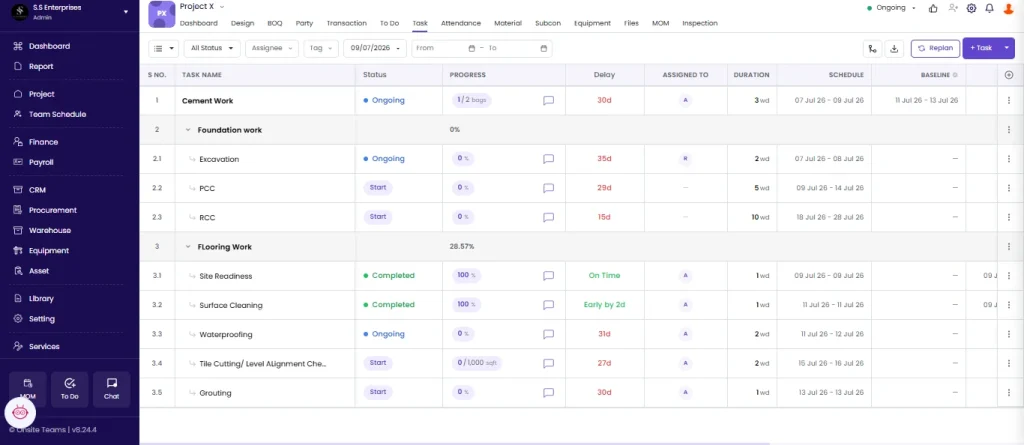
Overview: What the Task Tab Shows
Task List Columns
| Column | What It Shows |
|---|---|
| S.No. | Task sequence number |
| Task Name | Name of the task, indented for subtasks |
| Duration | Duration in days |
| Start Date | Actual start date |
| End Date | Actual end date |
| Progress Status | Completion percentage or stage progress |
| Planned Start Date | Baseline planned start |
| Planned End Date | Baseline planned end |
| Dependencies | Tasks that must complete before this one starts |
| Assigned To | Team member responsible |
Views Available
| View | What It Shows |
|---|---|
| List View | Default. Hierarchical task list with all columns. |
| Gantt View | Timeline bar chart showing planned vs actual schedule |
| Resources View | Team member allocation across all tasks |
Switch between views using the toggle buttons at the top right of the Task tab.
Part 1 — Adding a Task
Option A: Add Manually
Click + Add Task. The New Task form opens on the right.
| Field | Required | What to Enter |
|---|---|---|
| Task Name | Yes | Description of the work (e.g. “Brickwork — Ground Floor”) |
| Duration (days) | Yes | Number of days to complete this task |
| Start Date | No | Select from the date picker |
| End Date | No | Auto-calculated from start date plus duration, or set manually |
| Unit | No | Unit for progress tracking (sqft, cft, nos, RMT, MT, etc.) |
| Est Quantity | No | Total planned quantity for this task |
| Tag | No | One or more tags for filtering (e.g. Civil, Electrical, Finishes) |
| Assign To | No | Select the team member responsible |
| Dependencies | No | Tasks that must be completed before this one can start |
Click Save. The task appears in the list.
💡 Always set Est Quantity and Unit on tasks where you want to track progress by measurement (sqft done, RMT laid, nos fixed). Tasks without Est Quantity can only be marked as a percentage, not a measured quantity.
Option B: Import From BOQ
Click the dropdown arrow next to + Add Task and select From BOQ.
- A panel shows all BOQs in this project
- Click the BOQ to pull from
- Tick the items you want to add as tasks
- Click Save
Each selected item is added as a task with its name and quantity pre-filled from the BOQ. This keeps the task list and the financial estimate aligned from the start.
Option C: Import From Another Project
Click the dropdown next to + Add Task and select From Other Projects.
- Search for and select the project to copy tasks from
- Click Next
- Tick the tasks you want to copy
- Click Save
Option D: Import via CSV
Click the dropdown next to + Add Task and select Import CSV.
Download the CSV template first. Populate it with your task list and upload. Do not rename or reorder the column headers in the template.
Part 2 — Task Hierarchy (Up to 7 Levels)
Onsite supports up to 7 levels of nested tasks. This lets you break large work items into granular sub-items.
| Level | Example |
|---|---|
| Level 1 | CIVIL WORKS (task group) |
| Level 2 | Substructure |
| Level 3 | Foundation |
| Level 4 | Column Footings |
| Level 5 | RCC Work |
| Level 6 | Shuttering |
| Level 7 | Shuttering Checklist Item |
Adding a Subtask
- Hover over the parent task row
- Click the three dots icon that appears on the row, select add subtask
- Fill in the task form
- Click Save
The subtask appears indented under the parent. Parent task progress rolls up automatically from child task completion percentages.
Part 3 — Task Actions
Click the three dots (⋮) icon on any task row to open the action menu:
| Action | What It Does |
|---|---|
| Edit | Opens the task form to update name, duration, dates, unit, or estimated quantity |
| Add Subtask | Adds a child task directly under this task |
| Move Up | Moves the task one position up in the list |
| Move Down | Moves the task one position down in the list |
| Duplicate | Creates an exact copy of the task immediately below the original |
| Delete | Permanently removes the task. A confirmation appears — click OK. |
| Add Dependency | Opens the dependency panel to link this task to a predecessor |
Part 4 — Setting Task Dependencies
A dependency defines that one task cannot start until another reaches a certain point.
- Click the three dots (⋮) on the task and select Add Dependency
- The New Dependency panel opens on the right
- Click Select Task and choose the predecessor task
- Set the Dependency Type (default: Finish to Start)
- Enter the Lag Days (e.g. 5 means this task starts 5 days after the predecessor finishes)
- Click Save
The dependency appears in the Dependencies column as a badge (e.g. 1.1 FS 5d = Task 1.1, Finish to Start, 5-day lag).
To view or remove a dependency, click the badge on the task row.
⚠️ Circular dependencies (Task A depends on Task B which depends on Task A) cannot be saved. If a dependency does not save, check for circular links and remove them.
Part 5 — Task Detail Panel
Click any task to open its full detail panel on the right side.
Task Status
Click the status dropdown to update the task’s current state:
| Status | When to Use |
|---|---|
| Not Started | Task has not begun |
| Ongoing | Work is in progress |
| On Hold | Task is paused |
| Needs Revision | Task reviewed and requires rework |
| Cancelled | Task has been called off |
| Completed | Task is fully done |
Status changes may trigger WhatsApp alerts to relevant team members if Alert Settings are configured.
Comments
The comment section at the bottom of the detail panel lets all project team members post updates. Comments are visible to everyone with access to the project.
View To Do
Click View To Do in the task detail panel to see all To Do items linked to this task. The project’s To Do list opens filtered for this specific task.
Part 6 — Resources Tab
Inside the task detail panel, click the Resources tab to track material, labour, and equipment allocated to this task.
Resource Quantity Columns
| Column | What It Shows |
|---|---|
| Budget Qty | Total planned quantity for this task, set manually |
| Planned Qty | Expected consumption based on current task progress percentage |
| Actual Qty | Real consumption pulled automatically from other modules |
| Exceeded Qty | How much Actual Qty has gone over Budget Qty |
Where Actual Qty Comes From
| Resource | Source |
|---|---|
| Material | Material Used entries in the Material tab tagged to this task |
| Labour | Attendance records for workers assigned to this task |
| Equipment | Equipment usage entries marked against this task |
Actual Qty updates automatically as entries are made — no manual input is needed.
Adding Resources
| Sub-tab | How to Add |
|---|---|
| Material | Click + Add to add a material item. Click Edit to update Budget Qty. |
| Labour | Click + Add New Workforce to assign a workforce type. Click Edit to update Budget Qty. |
| Equipment | Click + Add to link equipment to the task. |
💡 Check Exceeded Qty regularly. When actual consumption goes over budget quantity on a task, it signals a cost overrun on that line item and needs investigation.
Part 7 — Downloading Reports
Click the Download icon in the Task tab toolbar.
DPR (Daily Progress Report)
Select the sections to include and set the date range. Click Download PDF.
| Section | Contents |
|---|---|
| Work Summary | Tasks with progress percentage and overall project progress |
| Labour Report | Party, workforce count, shift, overtime |
| Material Inventory | Opening stock, received, used, closing stock |
| Material Request | Pending requests with status |
| Equipment | Equipment name, number, usage, fuel |
| Site Photo | Geotagged photos uploaded against tasks |
| Subcon Progress Summary | Work order progress |
| AI Insights | AI-generated high, medium, and low priority flags |
Task Progress Report
Downloads a summary of progress for all tasks in the project.
Tips
- Use Level 1 task groups (e.g. CIVIL WORKS, MEP WORKS, FINISHES) to organise all related tasks under a single heading. Large task lists are much easier to navigate with groups.
- Set Est Quantity and Unit on every task you want to track by measurement. Tasks without these fields can only show a percentage, not a quantity.
- Pull tasks from the BOQ whenever the project has a detailed estimate. BOQ import pre-fills names and quantities, ensuring the task list and the financial estimate stay aligned.
- Use tags consistently (Civil, MEP, Structure, Finishes). Tags make filters meaningful across large task lists.
- Attach inspection forms with the Before Completion trigger for quality-critical tasks. This enforces the quality check before the task can be marked done.
- Always click Refresh Date after bulk edits to task durations. Without this, task end dates do not update and the Gantt shows stale data.
- Review Exceeded Qty in the Resources tab weekly. Catching overruns early is far easier than reconciling them at project close.
- The DPR is the main document for daily client and management communication. Set it up with the right sections once and download it regularly.
If Something Goes Wrong
| Problem | Likely Cause | What to Do |
|---|---|---|
| Cannot add a task | Role does not have Task permission | Ask Admin to check role permissions |
| Assignee not in the dropdown | Person not added to the project | Add the person to the project team first |
| Inspection form not showing in the picker | Form not created in Settings | Go to Settings, open Inspection Forms, create the form, then return |
| Dependency not saving | Circular dependency between tasks | Review task links and remove the circular reference |
| Progress not updating the percentage | Task has no Est Quantity set | Edit the task and enter an Est Quantity |
| Gantt view appearing empty | Date range does not cover the task dates | Adjust the From date to include your task start dates |
| DPR download is empty | No progress entries for the selected date range | Change the date range or add progress entries first |
| From BOQ list is empty | No BOQs created in the Estimate tab | Create a BOQ in the Estimate tab first |
| CSV import failing | Template column headers were changed | Download the template fresh and re-enter data without changing the headers |
| Task dates not updating after changes | Refresh Date not clicked | Click Refresh Date in the Task tab filter area |