
How to Manage Attendance for Staff and Labour Contractors
How to mark daily attendance for Office Staff at company level and Site Staff and Labour Contractors at project level — including shift, overtime, punch-in and punch-out times, task assignment, and daily allowances. Also covers how salary expenses are generated from attendance entries and how to download attendance and salary reports.
Before You Start
- Office Staff and Site Staff must be added in the Payroll module before their attendance can be marked
- Labour Contractors must be added as a party and linked to the project before their workforce can be recorded
- Site Staff must be assigned to the relevant projects in Payroll settings
How Attendance Flows into Salary Expenses
Attendance marked in Onsite automatically generates Salary Expense transactions. These are created once per context (company level or project) per month.
| Where Attendance Is Marked | Salary Expense Created In |
|---|---|
| Company level (Payroll, Attendance) | Company-level Finance tab |
| Project A | Project A Transaction tab |
| Project B | Project B Transaction tab |
| Project C | Project C Transaction tab |
Example: If a staff member has attendance marked in 3 projects and also at company level in the same month, 4 separate Salary Expense transactions are created for that month — one per context. All 4 appear in the staff member’s party ledger.
This is expected behaviour. Each salary expense belongs to the project or company level where the work was recorded.
Part 1 — Office Staff Attendance (Company Level)
Step 1: Open Attendance
From the left sidebar, go to Payroll, then click the Attendance tab, then select Office Staff.
The attendance grid shows all office staff with days of the month as columns.
Step 2: Mark Attendance Status
Click any day cell for a staff member to set the status:
| Status | Meaning |
|---|---|
| Present | Staff worked that day |
| Absent | Staff was absent |
| Week Off | Scheduled day off |
| Not Marked | Attendance not yet recorded |
Step 3: Fill in Daily Attendance Details
Click the detail icon (pencil or expand arrow) on a Present entry to open the full daily attendance form.
Shift:
| Option | Description |
|---|---|
| 0.25 | Quarter shift |
| 0.5 | Half shift |
| 0.75 | Three-quarter shift |
| 1 | Full shift (default) |
| Custom | Any decimal value |
Overtime: Enter the number of overtime hours worked (e.g. 2 hours).
Punch In and Punch Out: Enter the actual clock-in and clock-out times for the day.
Daily Allowance: Click + Add Allowance to add a one-time allowance for this day. Enter the allowance name (e.g. Travel, Food, HRA) and the amount.
The system shows a live salary calculation as fields are filled in:
Example: Rs 1,000 (daily rate) x 1 shift + Rs 200 allowance = Rs 1,200 for the day
Step 4: Save
Click Save to record the attendance entry.
Part 2 — Site Staff Attendance (Project Level)
Site Staff attendance is managed separately within each project.
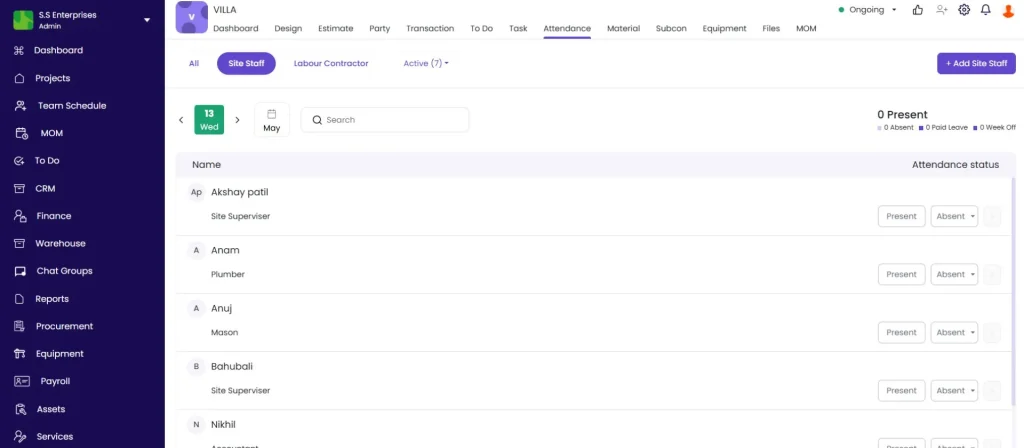
Step 1: Open Project Attendance
Open the project and click the Attendance tab, then select Site Staff.
Step 2: Mark Attendance Status
Click the day cell for each staff member and mark as Present or Absent.
Step 3: Assign Tasks (Optional)
After marking a worker Present, click + Add Task to record which task they worked on that day. This links the attendance entry to project task tracking and feeds into the task’s Labour resources tab.
- Select the task by checking the checkbox and click Next
- Enter No. of Workers assigned to this task
- Enter Work Hours for this task
- Click Save
Repeat + Add Task to split the worker’s time across multiple tasks in the same day.
⚠️ Total work hours entered across all tasks cannot exceed the worker’s total workforce hours for that day. The system shows a validation error if this limit is exceeded.
Part 3 — Labour Contractor Attendance (Project Level)
Step 1: Add a Labour Contractor to the Project
Open the project, click the Attendance tab, select Labour Contractor, and click + New Labour Contractor.
- Search and select the labour contractor party
- Click Add Workforce and select workers from the contractor’s workforce list using the checkboxes
- Click Save, then Done
The contractor and their workers are now available for daily attendance marking on this project.
Step 2: Mark Daily Attendance
For each day, click the attendance cell for the contractor and enter the number of workers present (e.g. 4 or 6). Mark each as Present.
Step 3: Assign Tasks
Click + Add Task to record where workers were deployed:
- Select the task and click Next
- Enter No. of Workers assigned to this task (e.g. 2 out of 6 total)
- Enter Work Hours (e.g. 8)
- Click Save
Add multiple tasks to split the workforce across different work areas in the same day.
Viewing Individual Worker Details
Click the contractor row to expand and see individual workers:
| Column | What It Shows |
|---|---|
| Worker Name | Name of the individual worker |
| Daily Salary | Rate per shift |
| Present Count | Number of days marked Present this month |
| Absent Count | Number of days marked Absent this month |
| PL and WO Count | Paid Leave and Week Off count |
| Amount | Total salary amount for the month |
A Remove from Project option is available per worker to remove them from this project’s attendance roster.
Cash Labour
Workers who are unnamed daily labour (not registered individuals) appear as Cash Labour (N Workforce) — tracked by headcount count rather than by name.
Use Cash Labour for unregistered daily workers paid on a cash basis. For named workers with individual records, add them using Add Workforce in Step 1.
Part 4 — Salary Expenses
Salary expenses are generated automatically from attendance entries. No manual transaction entry is needed.
Where to View Salary Expenses
From a Project: Go to the project’s Transaction tab. Salary Expense entries for that month appear in the transaction list.
From the Party Ledger: Go to the project’s Party tab, click the staff member’s name, and open their ledger:
| Entry | Example |
|---|---|
| Monthly salary entries | “March Salary Rs 22,000 — Unpaid” |
| Previous months | January, February entries listed separately |
| Status | Unpaid, Partially Paid, or Paid |
The party ledger header also shows:
- Party Received: Total payments made to the staff member
- Staff: Total salary due
- Outstanding balance
Salary Expense Generation Rules
| Scenario | Number of Salary Expenses Created |
|---|---|
| Attendance in 1 project this month | 1 Salary Expense |
| Attendance in 3 projects this month | 3 Salary Expenses (one per project) |
| Attendance at company level this month | 1 Salary Expense at company level |
| 3 projects plus company level | 4 Salary Expenses for the month |
Each expense appears in the respective project’s Transaction tab and in the staff member’s overall party ledger.
Part 5 — Downloading Attendance and Salary Reports
Project-Level Report
- In the project Attendance tab, click the Download or Report icon
- Select the Report Type: Attendance or Salary
- Set the Date Range (e.g. This Month, or a custom range)
- Click Download PDF
Company-Level Report
- From the left sidebar, go to Reports, then click Attendance and Salary
- Select the staff member from the dropdown
- Set the date range
- Click Download PDF or Download Excel
For full guidance on all 7 attendance and salary report types, see How to Use Attendance and Salary Reports in Onsite.
Tips
- Mark attendance daily. Salary expense calculations are based on what is marked. Missed entries mean under-reported costs and underpaid staff.
- Task assignment in attendance is optional but valuable. It feeds into the Resources, Labour section on each project task and shows actual labour hours used vs planned.
- Splitting workers across tasks helps track labour cost per activity. Enter the task count and hours for each task on the same day to build granular labour cost data.
- Four salary expenses for one month is correct and expected when a staff member works across 3 projects and at company level. Each is a separate financial entry in the respective context.
- Cash Labour is for unnamed daily workers tracked by headcount. For named workers with individual salary profiles, use Add Workforce to register them properly.
- Check the Party Ledger regularly to see the full salary history and outstanding balance for any staff member. The Unpaid balance in the ledger is what needs to be settled via a Payment Out.
- Overtime entered on the same day it occurs avoids the need for backdated corrections. Mark it in the daily attendance detail before clicking Save.
If Something Goes Wrong
| Problem | Likely Cause | What to Do |
|---|---|---|
| Staff member not showing in attendance grid | Not added in Payroll or not assigned to this project | Add them in Payroll under Office Staff or Site Staff and assign to the project |
| Labour contractor not in dropdown | Not added as a party | Add the party first, then link to the project via the + New Labour Contractor option |
| Workforce not showing after adding a contractor | Workforce not added to the contractor | Click + Add Workforce and select the workers from the contractor’s workforce list |
| Work hours validation error | Task hours exceed total workforce hours for the day | Reduce the task hours — total across all tasks cannot exceed daily workforce hours |
| Salary expense not appearing in Transaction tab | Attendance not saved or it is not yet month-end | Check the attendance grid and re-save the entry. Salary expenses generate once per month. |
| Salary expense amount looks wrong | Shift value or allowance entered incorrectly | Open the daily attendance detail and correct the shift value or allowance amount |
| Cannot download attendance report | No attendance marked for the selected date range | Mark attendance first or widen the date range |
| Party ledger shows more salary entries than expected | Attendance was marked in multiple projects | This is correct — one salary expense per project per month. Confirm which projects attendance was marked in. |
| Staff member was not paid for a day they worked | Attendance not marked for that date | Open the attendance grid, navigate to the correct date, and mark Present |