
Construction Accounting Software | Trusted by 10,000+ Companies
Real-time project profitability for construction teams.
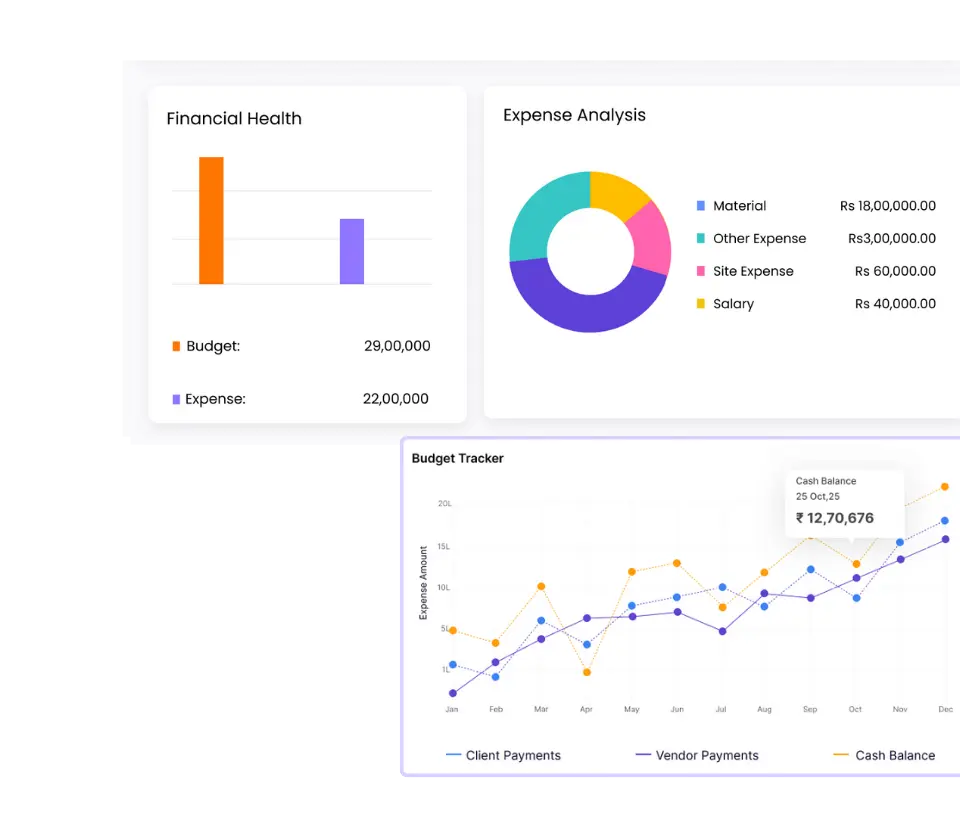
Complete construction financial management software for contractors and builders. Monitor budget vs actual, track project costs in real-time, and protect profit margins with integrated P&L reporting and cost control.

Budget vs Actual in real time
Faster billing & better cashflow
Track cost leakage across projects
Trusted by 10,000+ Construction Companies Worldwide
Onsite construction accounting software is used by contractors, builders, EPC firms, and interior companies for real-time project costing,
budget tracking, and financial reporting from a single cloud-based platform.

Built for Construction Teams That Need Financial Control
Designed for construction teams that need real-time visibility into project-wise profitability and costs.
01
Developers & Contractors
Get real-time visibility into project profit margins, running costs, and billed vs unbilled amounts. Track job costing across multiple projects simultaneously and identify cost overruns before they impact margins. Compare budget vs actual at activity level and control subcontractor bills, material costs, and labour expenses. Make data-driven decisions to protect profitability on every project.
02
Infra & EPC Firms
Monitor high-value cost heads like materials, subcontractors, labour, and equipment across long-duration infrastructure projects. Track WIP reports, identify budget deviations early, and control large-scale overruns with real-time expense tracking. Manage thousands of cost items across multi-year projects with complete financial visibility and variance analysis.
03
Interior & Industrial Projects
Track profitability across multiple short-cycle or parallel projects simultaneously. Monitor project-wise P&L in real-time, automate billing cycles, and maintain financial control across 10, 20, or 50+ concurrent projects. Never lose sight of margins in fast-paced, high-volume execution environments where cost control must happen daily.
How Onsite Financial Management Software Works?
Track every rupee from budget creation to final profit. Onsite links BOQs, procurement, labour costs, and billing in one platform, eliminating manual reconciliation and cost leakage.
Approval Workflows & RA Billing
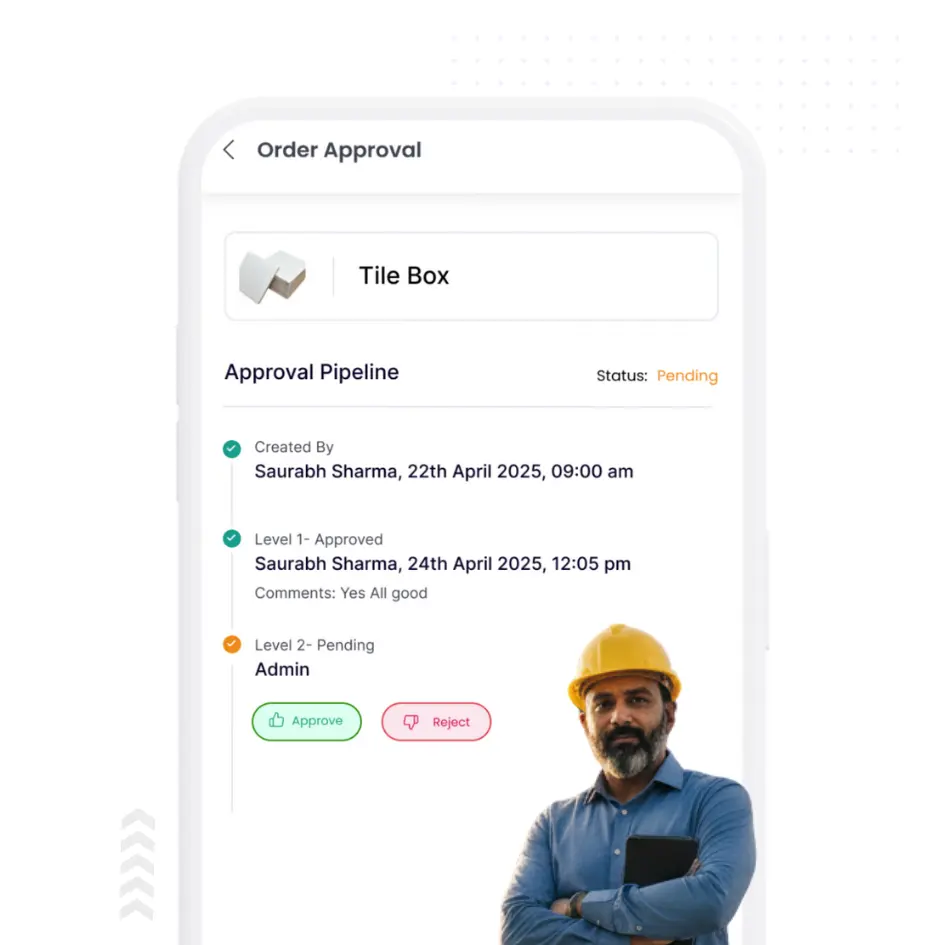
Multi-level approval workflows control material requests, purchase orders, vendor bills, and expenses based on amount thresholds and roles. Generate RA bills from approved progress reports with automatic retention and advance adjustments. Create GST-compliant client invoices with quantity reconciliation and tax calculations. Track billing status, approvals, and payment due dates centrally. Every invoice links to BOQ items and completed work, eliminating disputes.
Live P&L & Budget vs Actual Analytics
View project P&L updated continuously as transactions occur. Compare budget vs actual at project, tower, activity, or cost category levels. Analyze variance by material, labour, subcontractor, equipment, and overheads to spot leakage instantly. Monitor cashflow with receivables aging and payables tracking. Access 50+ reports covering WIP analysis, cost ratios, and vendor performance. Export financial statements without waiting for month-end closing.
BOQ-Based Budget Setup
Set up project budgets with BOQ mapping and activity-wise cost allocation. Define material budgets, labour costs, subcontractor scopes, equipment hire, and overheads at line-item level. Link budget heads to BOQ quantities for automatic variance tracking. Configure multi-level approval hierarchies before execution begins. Budgeting becomes a live control tool, not a one-time exercise.
Real-Time Expense Recording
Every purchase order, GRN, vendor bill, labour attendance, and subcontractor payment flows into project cost ledgers automatically. Material consumption updates inventory and project costs simultaneously. Labour attendance calculates wages and allocates to tasks. Subcontractor billing links to milestone completion. Equipment logs feed hire charges. Site petty cash gets approved through mobile. All transactions carry project tags for accurate activity-level cost visibility.
What Happens Without Digital Real-Time Financial Control
Materials, labour, and subcontractors form 60-80% of project costs. Without live tracking, profit margins shrink silently with no early warning.
Most contractors rely on Tally or Excel where BOQs are made once and never tracked against actual spending, leading to 15-30% cost overruns.
Budget Deviations Go Unnoticed
BOQs sit as static PDFs while site expenses flow untracked. Material consumption, labour costs, and subcontractor bills exceed planned amounts, but deviations surface only at month end when margins have already eroded.
Billing Cycles Delay Collections
RA bill generation takes days because progress tracking and billing systems stay disconnected. Retention tracking, advance adjustments, and milestone billing happen manually, choking cashflow and delaying payments.
Profit Known
Too Late
Tally tracks company accounts but cannot show project-wise profitability. You cannot tell which projects make money and which burn cash until final reconciliation when corrective action is impossible.
Cost Leakage Drains Profits
Without project-wise allocation, fuel costs, petty cash, equipment hire, and overheads get misallocated or lost completely. Duplicate vendor bills clear approvals. Site expenses recorded on WhatsApp never reach your accounting system.
Core Features of Onsite Construction Budgeting &
Finance Management Software
Manage every aspect of construction finances from BOQ-based budgeting to real-time profitability tracking.
Control costs, automate billing, and monitor project margins with complete transparency.
Budgeting & Planning
Create detailed BOQ-linked project budgets with activity-wise cost breakdowns covering material, labour, subcontractor scope, equipment hire, overheads, and indirect costs before execution begins. Track every expense using cost codes mapped to trades, activities, or project phases, and monitor planned vs actual spending continuously as site transactions flow in. Identify cost variances at category or activity level and receive automated alerts when costs exceed budget thresholds, enabling corrective action before overruns impact margins.
Create project budgets with full cost breakups
Track budget at item level (materials, labour, subcontractors)
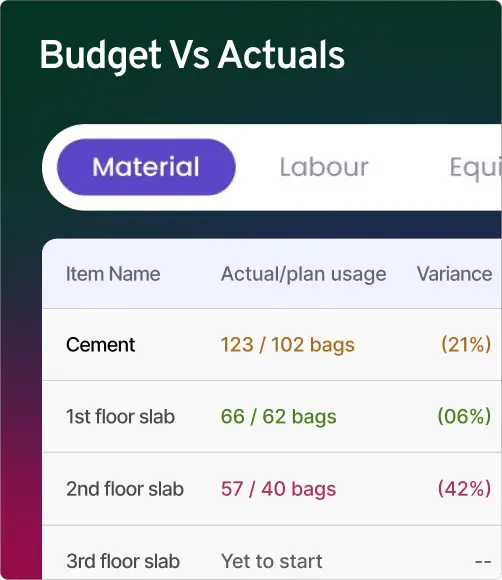
Manage planned vs actual costs with clear variance reports
Cost Control & Approvals
Capture every PO, GRN, vendor bill, labour payment, and subcontractor expense with automatic project allocation, linked directly to BOQ items and budget heads for accurate job costing. Configure multi-level approval workflows by amount thresholds, expense categories, and roles to control material requests, POs, bills, and payments. Maintain audit-ready trails with approval history, cost allocations, budget revisions, and compliance reports.
Billing & Cashflow
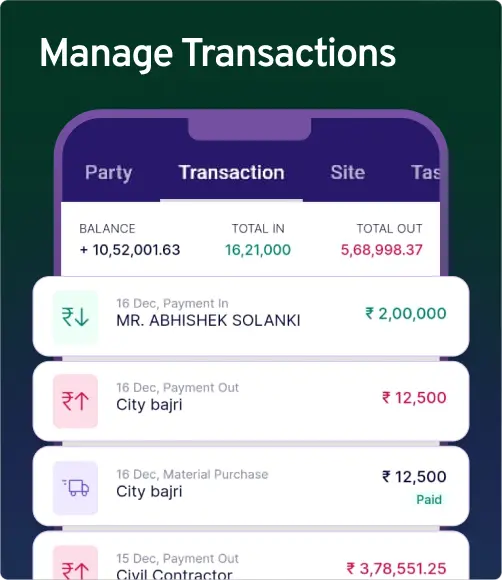
Auto-generate RA bills directly from approved site progress, calculating work done using BOQ quantities and rates, with retention, advance adjustments, and GST-compliant invoicing. Track receivables project-wise and client-wise with pending invoices, due dates, aging, partial payments, retention, and unbilled work, along with automated payment reminders. Maintain a clear billing pipeline from draft to collection and reconcile payments against invoices to keep cashflow status, advance adjustments, and retention releases updated.
Generate client bills with proper documentation
Track receivables and pending payments
Maintain clear billing status across projects
Reports & Profitability
Access live budget vs actual dashboards to track planned budgets against actual costs at project, tower, activity, and cost category level, helping identify overruns as execution progresses. Generate project-wise P&L reports showing billed revenue, actual costs across categories, and net margins with drill-down visibility up to activity level to spot leakage points. Consolidate company-level financial analytics with consolidated P&L, WIP analysis, cost ratios, vendor performance, budget utilization, and cashflow forecasting, with exports in PDF or Excel.
Additional Features That Strengthen Cost & Cashflow Control
Onsite construction financial management software connects BOQ, costing, payment approvals, and billing workflows so finance decisions stay accurate and audit-ready.
Track project-level cost movement, payment pipeline, and billing progress without manual reconciliation or Excel dependency.
Identify Cost Leakages Early
Spot cost overruns early through category-wise variance tracking and budget threshold alerts. Catch leakage before it becomes a margin loss or approval dispute.
Task-Level Analytics
Track cost and progress at task level for deeper commercial visibility. Identify which activities, trades, or packages are driving overruns and impacting project profitability.
Vendor Payment Request
Manage vendor payment requests linked to purchase orders, GRNs, and approved bills. Maintain full payment history with clear pending approvals and payable visibility.
Build Budgets from BOQs or Templates
Create project budgets directly from BOQ line items or predefined templates. Allocate material, labour, subcontractor, and overhead budgets in advance, so costing starts structured from day one.
Project-Wise Costing
Capture every purchase, bill, labour payment, and subcontractor expense with project tagging. Maintain clean job costing across sites without manual reconciliation or missing entries.
Progress-Based Comparison
Compare planned vs actual cost based on execution progress rather than month-end assumptions. Track how spending aligns with work completion and prevent overbilling or underbilling.
Payment Request from Site
Allow site teams to raise payment requests directly against work executed or material received. Ensure finance teams approve only validated requests backed by site-level documentation.
Integrated Billing
Generate RA bills and invoices directly from approved progress and BOQ rates. Maintain GST-compliant billing workflows with retention, advances, and running bill adjustments tracked properly.
Petty Expense Tracking
Track petty cash and site-level expenses with category tagging and supporting proof. Maintain clean audit trails for small purchases without losing control over project cost movement.
What Construction Companies Say About
Our Financial Management Software
Read our user reviews and see how onsite construction management software has transformed these construction businesses.
Mr. Anvesh, Founder
Bhavya Developers, India
Tracking overall expenses and managing residential projects used to be tough. Onsite ERP makes it simple with BOQ-linked budgeting, real-time DPRs, and integrated financial reports—all in one platform.
Mr. Manish, Founding Member
Reidus Infra, India
With Onsite ERP, giving clients complete transparency is now effortless. Features like DPRs with photos, BOQ-based planning, and real-time dashboards help us share accurate progress and maintain trust on every building project.
Mr Sharad Mahalunkar, CEO
Shivam Developers, India
Handling road, highway, and solar projects needs precision and Onsite ERP delivers. With BOQ-based cost tracking, DPR automation, and mobile-to-ERP connectivity, we stay on schedule and in control across all sites.
Mr. Ali Afzal, Project Head
Dfine Homes, India
For a team handling interiors and building projects, Onsite ERP has been a game-changer. From digital DPRs to BOQ-linked planning, it keeps every task organized and ensures smooth coordination between site and office.
Mr. Hemant Patel, Founder
HEM Engineers, India
Onsite ERP helps us manage electrical transmission projects with ease. From BOQ-based planning to real-time cost tracking and DPR updates, it gives us complete control over project management and cost control
Mr. Vikram, CEO
Cfolios Design & Construction, India
Onsite ERP changed the way we manage projects. BOQ-based planning, real-time DPR tracking, and mobile-to-ERP connectivity make construction project management seamless for our building and interior works.

Bring real control to your construction finances
Onsite helps contractors keep track of their construction finances in a clear and accurate way. It cuts down on mistakes made by hand, speeds up the approval process, and gives you full visibility from budgeting to invoicing. With Onsite, contractors don’t have to do as much paperwork and can focus more on making sure jobs are finished on time and for a profit.
FAQs
Is this accounting software or project finance software?
Onsite is construction-specific financial management software. It includes accounting capabilities but goes beyond traditional accounting by integrating project budgets, BOQs, procurement, progress tracking, and billing into one system. Think of it as accounting software that understands construction workflows.
Can I track profitability per project, per tower, per floor?
Yes. Onsite supports multi-level cost allocation. You can track finances at the company level, project level, tower/building level, floor level, and even activity level. This gives you granular visibility into where money is being spent and which sections are profitable.
Can my CA/accountant use it easily?
Yes. Onsite is designed for both construction teams and finance professionals. Your accountant can access project-wise ledgers, trial balances, GST reports, and financial statements without needing to learn construction terminology. We also support Tally and QuickBooks integration for final book closing.
Can I control approvals for expenses and bills?
Yes. Onsite supports multi-level approval workflows. You can define who needs to approve purchase orders, vendor bills, labour payments, and budget revisions based on amount thresholds and project hierarchies. Nothing gets processed without proper authorization.
Can Onsite integrate with my existing accounting software?
Yes, Onsite construction financial management software integrates with popular accounting platforms like QuickBooks and Tally. You can also use Onsite as a standalone construction accounting software with complete financial management capabilities
What is budget vs actual tracking in construction?
Budget vs actual tracking compares your planned project budget against actual expenses in real-time. Our construction budget tracking software highlights cost variances by category, helping you identify overruns early and take corrective action to protect profit margins.
How much does construction financial management software cost?
Visit our pricing page for detailed plans. We offer flexible pricing based on the number of users and projects, with all financial management features included in every plan.
Can Onsite track expenses in real time?
Yes. Onsite allows users to record expenses directly from the site as they occur. It automatically updates project budgets, so managers can instantly see where spending stands and receive notifications if any activity exceeds the planned cost.