
Project Budget Tracking with Real-Time Budget Monitoring
Often when projects are not planned accurately, it leads to bearing huge loss at construction projects. Without clear project cost tracking, teams often discover cost overruns too late, leaving budgets out of control. Cost overruns are a regular problem in the construction business. A budget overrun can lead to many problems like project timeframes, reduce profits, and ruin relationships with clients. This can happen mainly because of delays, or bad planning. That’s why more and more contractors and owners are using real-time budget monitoring to keep track of their money from the very beginning. A strong construction cost management workflow gives visibility into daily spend and prevents surprises
What is Real-Time Project Budget Tracking?
Real-time budget monitoring is the process of tracking project cost, its expenses accurately. With the help of construction management software like Onsite, you can get integrated financial data, purchase orders, billing, and material usage to get accurate expenses. Instead of waiting for monthly reports, site managers and business owners can access up-to-date financial information at any moment and take quick action if anything looks off-track.
Why Cost Overruns Happen in Construction?
Many teams track costs with static methods that lack real-time updates. In contrast, project cost management software lets supervisors see expenditures as they happen. Without integrated project monitoring, cost deviations may not be flagged until it’s too late.
Why Traditional Cost Tracking Fails?
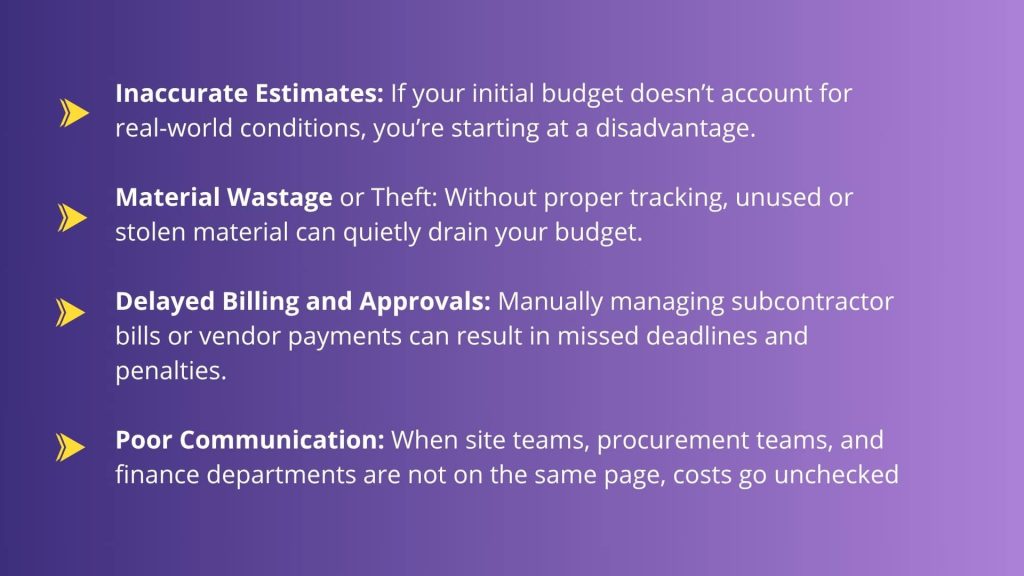
Manual tracking can fall apart when your sites are having too active environments. Too much is happening at the site that leads to days in updates, updates arriving late, everyone maintain different reports, the data of site & office doesn’t align, and the list goes on and on. The fails in tracking can be seen by the site team earlier than the management. Cost reviews become backward-looking instead of preventive. This gap between spending and visibility is where losses begin.
How Project Budget Tracking with Onsite Helps
1. Instant Visibility into Budget vs. Actuals
With Onsite, your financial information is just a click away. You can instantly get to know the budget vs actual data which can help you clearly see the problems as well as in making better decisions for the future. You can analyze how to stay within budget and what steps should be taken for that. Monitoring project budget versus actual helps teams stay on schedule and protect margins.
2. Track Material Costs and Usage
With the help of Onsite’s construction management software, you can get real-time tracking of your materials. You can get to know the stock available at a warehouse, stock at site, material being used at a site, how much more material is needed at a site, and so on. Everything related to material can be tracked in real-time which helps in saving material wastage and cost overruns. Dashboards powered by project cost management and project tracking tools give early warning signs of overspend. Visual indicators from construction tracking software help teams digest complex data quickly.
3. Approve Bills with Confidence
When you can match bills to actual usage and purchase orders in real-time, approvals become faster and more reliable, reducing the risk of overpayments. Use built-in project tracking tools to spot variance early and adjust before overruns occur
4. Reports and Analysis
You can generate reports and analyze data on company level as well as on project level. You can get clear transparency of the expenses that have been happening, and you can be answerable to stakeholders. Nothing goes missing with Onsite’s reports and analysis. Real-time budget monitoring relies on connected construction project management tools so time and cost data are always current and reliable.
Cost Metrics That Deserve Regular Attention
Not all numbers are equally useful. A few key indicators provide clarity. The planned vs actual cost lets you see through the variance. These cost variance makes you aware of the areas that have problems and that is eating up your profits. Burn rates can give you clear picture of where the budged is being consumed. This can help you reveal the real problems and can influence your future decisions. These metrics turn financial data into guidance rather than reports.
Manual Tracking Compared With Real-Time Monitoring
| Area | Manual Approach | Real-Time Monitoring |
|---|---|---|
| Cost updates | Delayed | Immediate |
| Link to BOQ | Manual matching | Direct |
| Overspend alerts | None | Automatic |
| Site expense capture | After the fact | Ongoing |
| Response timing | Reactive | Early intervention |
Best Practices to Keep Budgets Under Control
Be careful when making budgets before work starts. Break down costs per activity so they show how the task will actually be done. Write down your expenses as soon as they happen, not weeks later. Look at deviations often, not only at big events. Don’t ignore early warnings; see them as opportunity to change course.
Cost control works best when it is a regular part of doing business instead of something that is done once in a while.
Conclusion
Projects often bear the capacity of giving you huge losses if planned and executed wrong. Every single transaction and every penny is important which is why Onsite brings clear transparency and real-time budget monitoring so that nothing goes missing. If you want to keep your projects profitable and your clients happy, it’s time to ditch the spreadsheets and bring real-time budget tracking into your workflow.Stop guessing and start managing with construction project management and cost tracking built into a single workflow. Real-time insights help you prevent overruns before they affect your bottom line.
Want to make your budgeting game stronger?
FAQs
1. What does real-time budget monitoring mean in construction project management?
Real-time budget monitoring refers to keeping track of project costs and spending as they occur, using tools like project cost tracking, so you can spot problems before they turn into overruns.
2. How can project cost management software prevent cost overruns?
Project cost management software helps teams monitor expenditures against the project budget, giving early visibility into rising costs so corrective action can be taken.
3. Why is construction cost management important for preventing overspending?
Construction cost management ensures spending is aligned with plans and controls like project cost control, reducing the risk of surprises and budget overrun.
4. What role does construction project tracking software play in budget monitoring?
Construction project tracking software lets teams see daily progress and costs, linking work done to money spent and improving overall project tracking and budget visibility.
5. How does project budget tracking help avoid cost overruns?
Project budget tracking continuously compares actual spend to the planned project budget, helping teams adjust resources or schedules before costs exceed limits.
6. Can project monitoring tools improve financial control on construction sites?
Yes. Project monitoring tools show real-time information on work and expenses, making it easier to catch cost deviations and support better construction project management decisions.
7. What is the difference between cost control and cost tracking in construction?
Cost control focuses on making sure spend stays within limits, while cost tracking—such as project cost tracking—logs where money is going so cost control decisions are backed by accurate data.
8. How do construction cost management software solutions support field teams?
Construction cost management software lets field and office teams share data, track expenses, and monitor budgets collaboratively so everyone stays aligned on financial goals.
