
Subcontractor Management Software for Construction
Control Subcontractor Scope, Execution & Billing in One System
Subcontractors handle 40-60% of project execution, yet most payments happen without verified progress. Track work orders, executed quantities, and milestone progress. Approve bills only after verified completion. Control retention and prevent payment disputes with Onsite construction subcontractor management software

Verify bills against executed quantities
Track retention deductions automatically
Prevent scope creep and overbilling
Trusted by leading construction companies
for subcontractor management
Construction companies worldwide control subcontractor payments, eliminate billing disputes, and recover retention automatically with Onsite subconcontractor management software.

Built for contractors, developers, and EPC firms that need structured control over subcontractor work orders, progress validation, and milestone-based billing.
01
Developers & Contractors
Control subcontractor work orders, executed quantities, and billing across multiple projects. Verify every bill against actual progress before approval. Reduce disputes and prevent cost leakages through quantity-based payment validation.
02
Infra & EPC Firms
Manage milestone-based subcontracting across long-duration infrastructure projects. Track executed quantities, validate progress at each stage, and approve bills only when work completion aligns with contract scope and defined milestones.
03
Interior & Industrial Projects
Handle scope-specific subcontracting with frequent coordination needs. Ensure timely execution, accurate progressive billing, and proper retention tracking to avoid payment conflicts and project delays.
From Work Orders to Payment Control, See How Onsite Subcontractor Management Software Works
Connect subcontractor scope, executed quantities, progressive billing, and retention tracking. Payments align with actual site progress, not assumptions.
Digital Work Orders with Budget Control
Create scope-based work orders linked to agreed quantities, rates, and project budgets. Define work scope, BOQ items, and payment terms before execution begins. Prevent scope creep and verbal commitments that cause billing disputes later. For teams working with multiple crews, a subcontractor management software lets you keep every job visible and on schedule. This helps you keep a transparent record of the work.
Progress & Quantity-Based Tracking
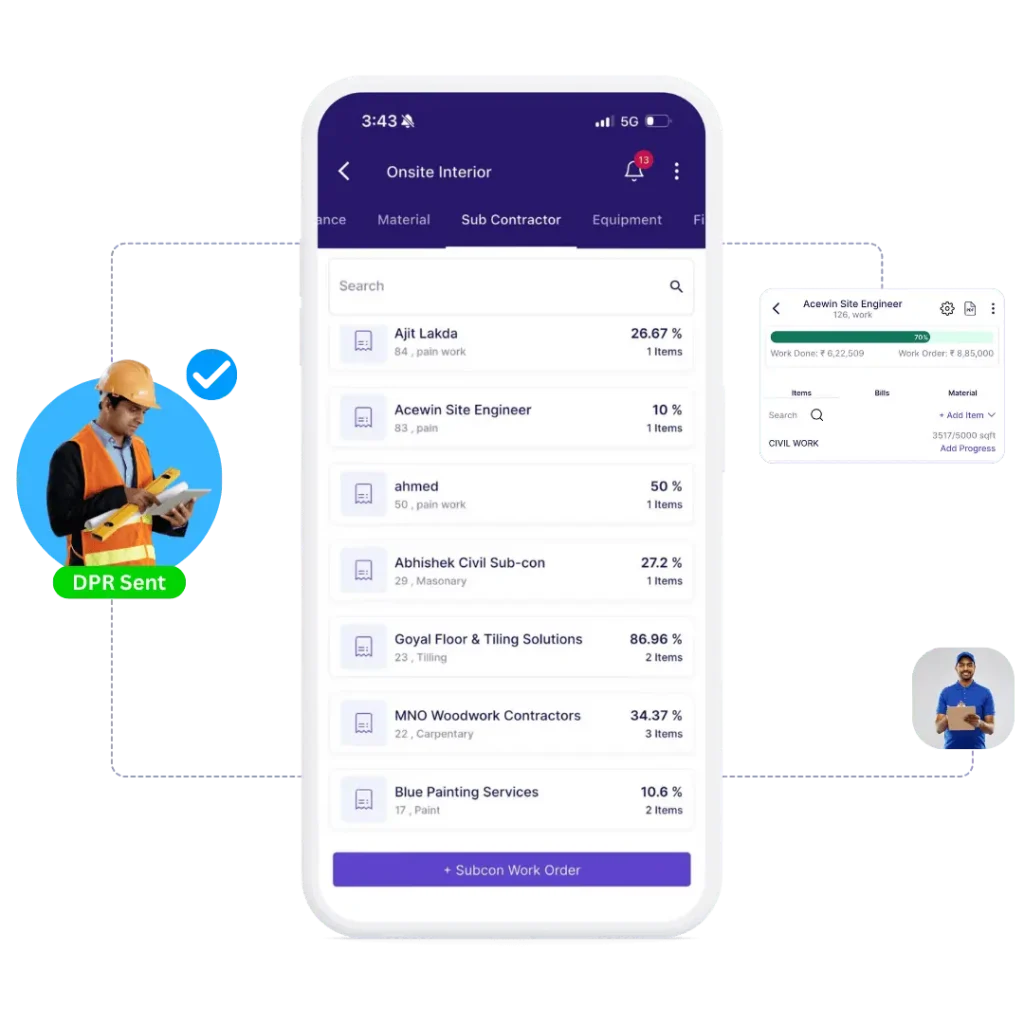
Track subcontractor progress against assigned quantities and milestone completion. Record executed work daily or per milestone. Validate bills only against approved execution to prevent overbilling and unauthorized scope additions. Teams on the field can upload photos, mark completed tasks and raise issues on the go. See what’s done, what’s pending, and who’s responsible, all in one dashboard.
Progressive Billing & Retention Management
Generate running bills with automatic retention deduction based on contract terms. Track retention amounts per subcontractor and per project. Release retention as milestones complete according to contractual schedules without manual calculations. Forget manual calculations. Onsite auto-calculates bills based on completed work and tracks any material or labor deductions transparently.
Approval Workflows & Accountability
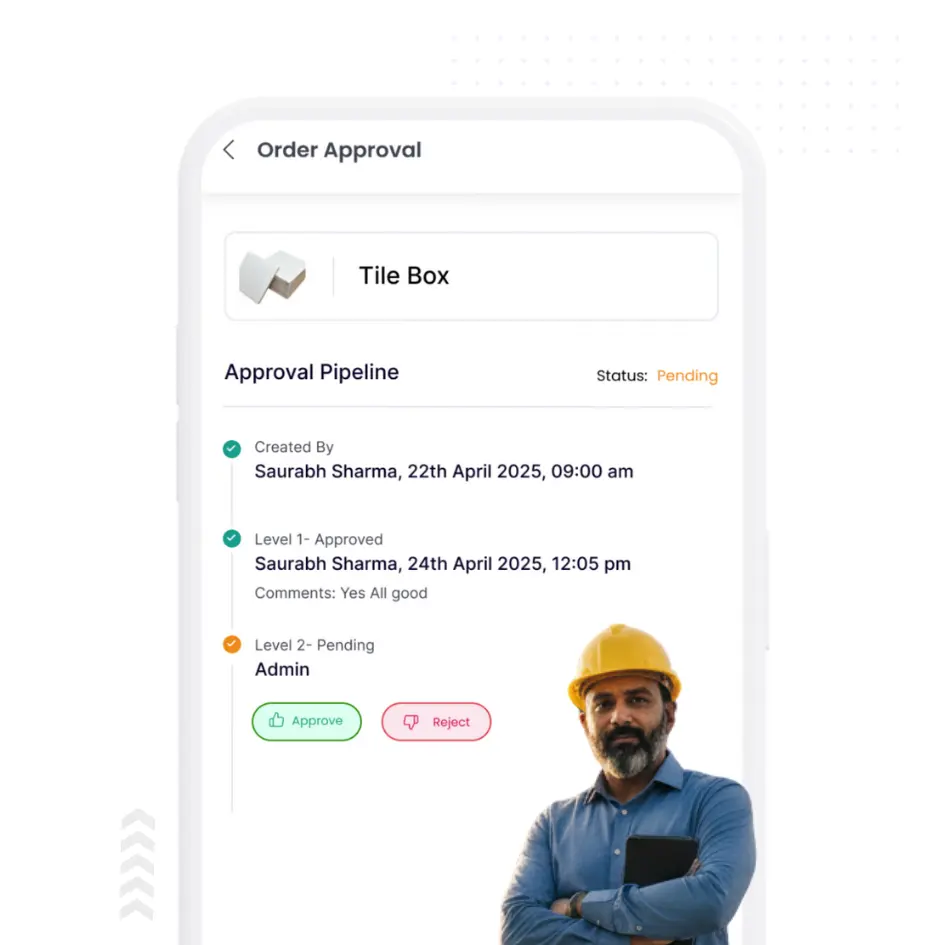
Configure multi-level approval hierarchies for subcontractor bills based on amount thresholds or project roles. Review every bill against work progress, executed quantities, and contract scope before payment approval. Maintain complete audit trails for transparency and compliance. With this subcontractor management software, you can keep track of every activity that a subcontractor is doing. From material used to everyday progress, you can look deeply into productivity and activities.
Why Subcontractor Control Must Be Digital
Subcontractors handle 40-60% of project execution, yet most companies track their work through verbal commitments and Excel sheets.
Without structured control systems, overbilling, retention loss, and payment disputes become inevitable.
Informal Work Orders
Without digital work orders, subcontractor engagements start with verbal agreements or informal documents. Scope definitions stay vague. Quantities, rates, and timelines remain undocumented. When billing begins, disputes arise over what was agreed versus what gets claimed. Scope creep happens silently as additional work gets added without approvals or budget revisions.
Unverified Progress Billing
Manual progress tracking cannot validate executed quantities against assigned work. Subcontractors submit bills based on time elapsed rather than measurable completion. Approval teams lack visibility into actual site progress. Bills get processed without quantity verification, leading to payments that exceed completed work by 10-20% across projects.
Retention Tracking Failures
Spreadsheet-based retention management results in inconsistent deductions and missed releases. Retention percentages get calculated manually with frequent errors. Release schedules disappear in email chains. When projects close, recovering retention becomes contentious because documentation is incomplete or disputed, causing cashflow strain and relationship damage.
No Performance Visibility
Without centralized tracking, you cannot identify which subcontractors deliver quality work on time and which ones consistently overbill or delay. Performance data remains anecdotal and scattered across project teams. Future subcontractor selection relies on memory and relationships rather than execution records, productivity metrics, and billing accuracy data.
Why you should never use excel & whatsapp for subcontractor management
Spreadsheets can’t scale to mobile use, real-time tracking or team updates — features you get with a work order app or mobile work order app. Let’s face it: Excel wasn’t built for construction.
You have to do manual data entry in Excel that leads to errors and missed updates.
No transparency in communication. The information gets buried in messages or spreadsheets.
Lack of accountability, especially when multiple subcontractors are involved.
Core Features of Onsite Subcontractor Management Software
Control subcontractor scope, execution, billing, and payments at every stage with digital work orders, milestone tracking, retention management, and approval workflows.
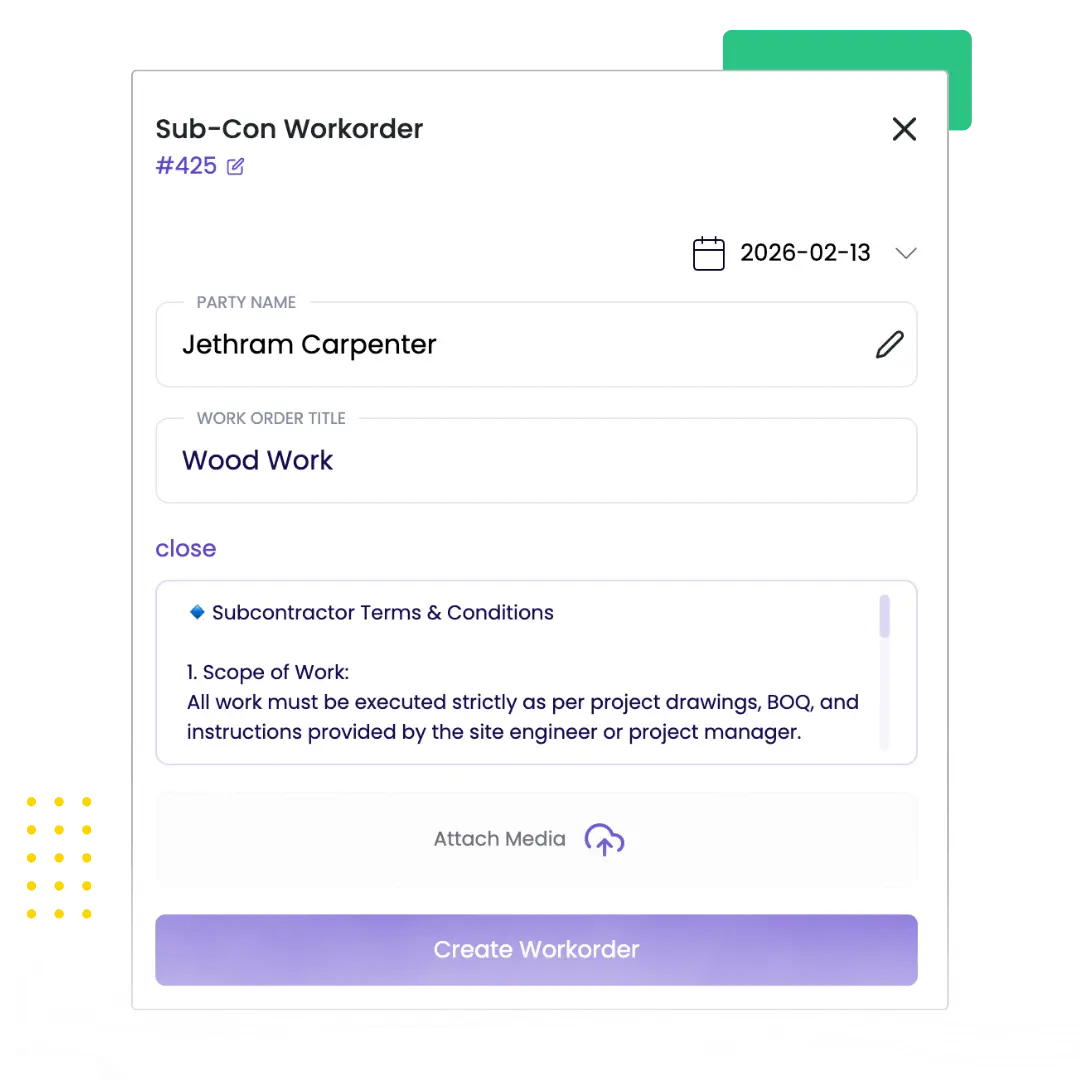
Work Order Creation & Scope Control
Define subcontractor scope with digital work orders linked to BOQ line items, agreed quantities, rates, and project budgets before work begins. Create detailed scope documents covering materials, labour, equipment requirements, quality standards, and completion timelines to eliminate verbal commitments. Map work orders to budget allocations and track committed costs against available budget in real time, preventing scope additions without change order approvals and budget revisions.
Create scope-based work orders with clear deliverables
Link work orders to BOQ items and budget allocations
Define quantities, rates, timelines, and quality requirements
Progress Tracking & Milestone Validation
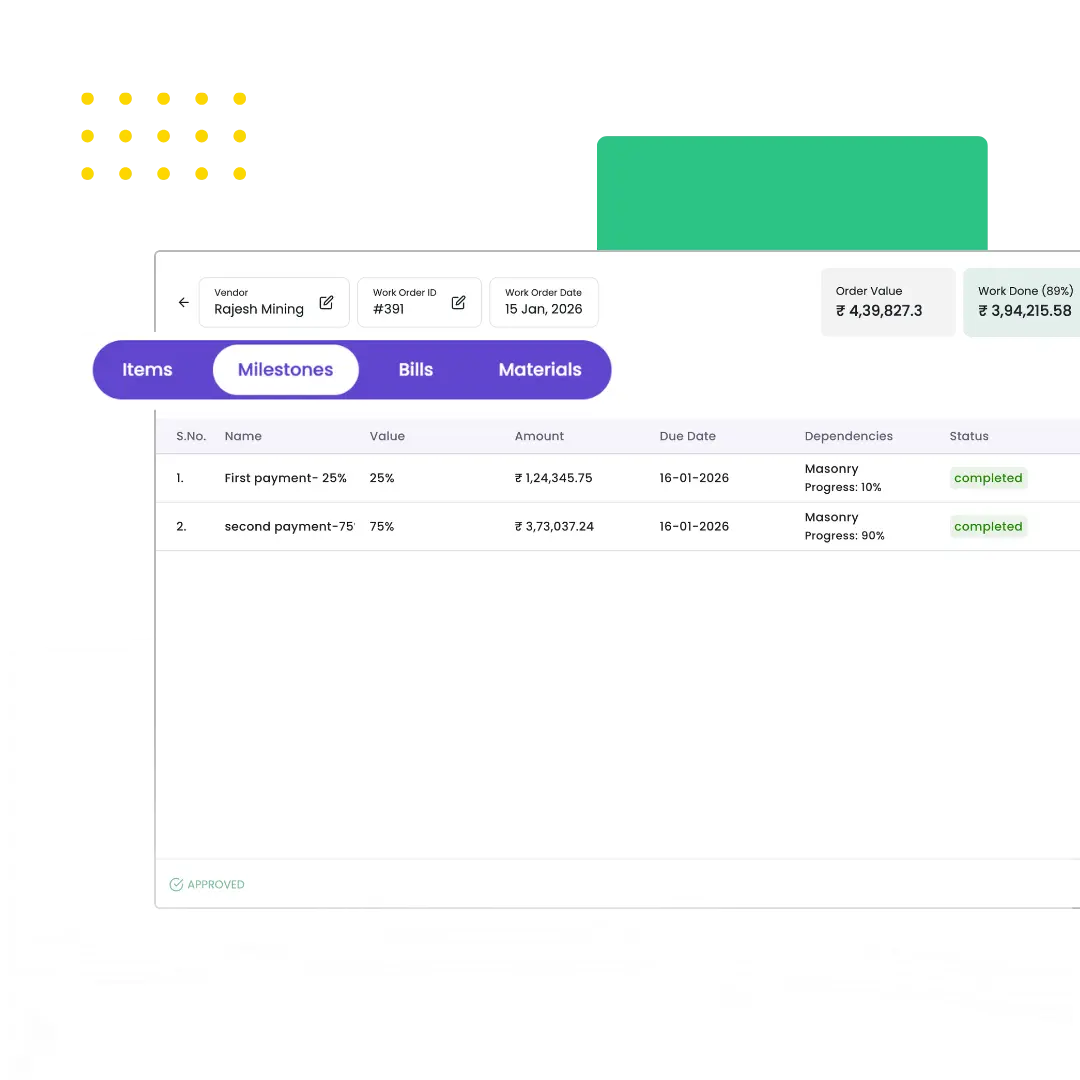
Record subcontractor progress daily or per milestone with executed quantity tracking against assigned work orders and contract scope. Validate milestone completion through site verification, photo documentation, and measurement records before approving progress for billing. Track work execution at activity level across multiple subcontractors and projects, identifying delays, scope deviations, and quality issues before they impact timelines or trigger payment disputes.
Progressive Billing & Retention Management
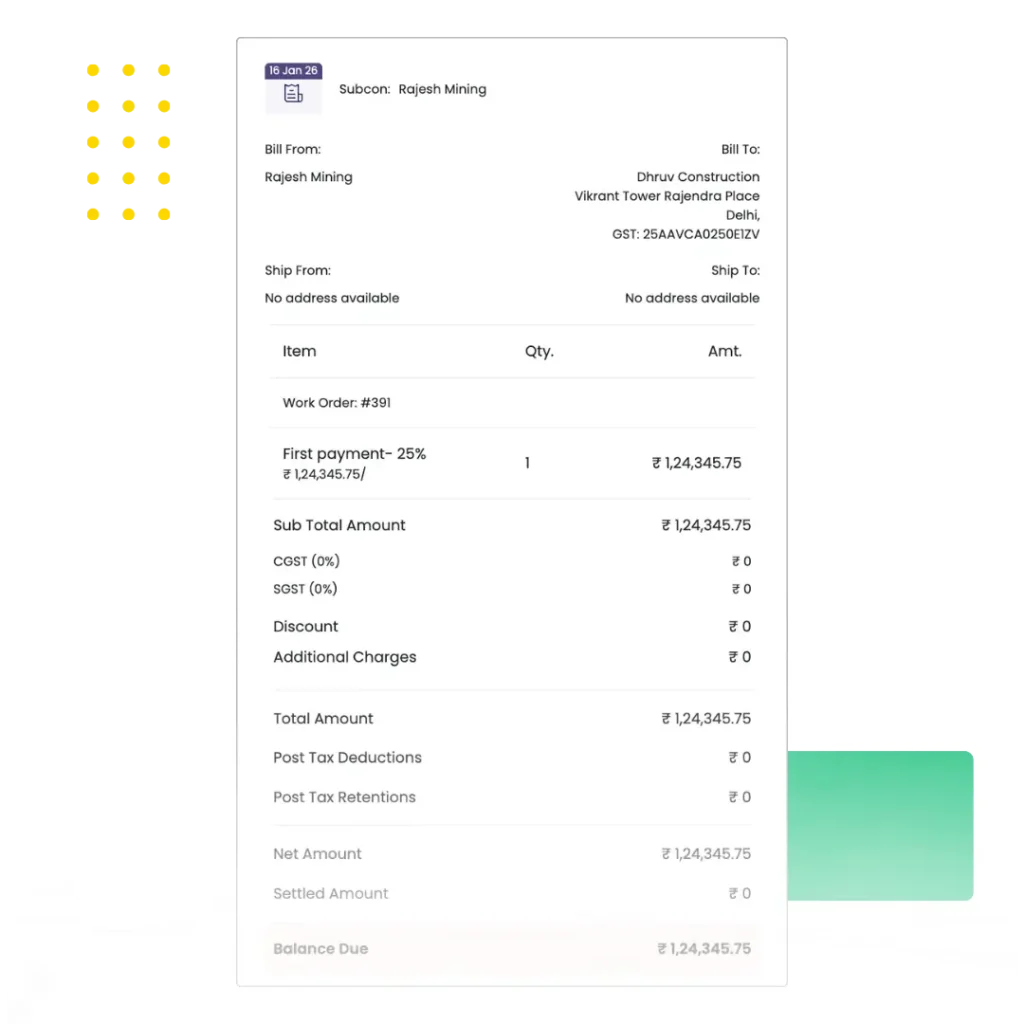
Generate running bills automatically from approved progress with BOQ-based quantity and rate calculations, applying retention percentages per contract terms. Track retention deductions bill-wise and subcontractor-wise with complete visibility into accumulated retention, release schedules, and contractual milestones. Release retention automatically as milestones complete or manually based on quality compliance, defect rectification, and final handover protocols without spreadsheet calculations or disputed deductions.
Generate client bills with proper documentation
Track receivables and pending payments
Maintain clear billing status across projects
Approval Workflows & Payment Analytics
Configure multi-level approval hierarchies for subcontractor bills based on amount thresholds, project roles, or budget impact, ensuring every payment request gets reviewed against work progress, executed quantities, and contract compliance. Maintain audit trails showing approval history, bill modifications, payment schedules, and retention adjustments for complete transparency and regulatory compliance. Access performance analytics tracking subcontractor billing patterns, on-time completion rates, quality compliance, payment cycles, and productivity benchmarks to evaluate reliability for future assignments.
How Does Onsite Simplify RA Billing Process in
Subcontractor Management
01
Centralized BOQ Management
Excel sheets don’t notify crews, lack workflow control, and make tracking RA bills harder compared to a work order and inventory management software setup where every job is logged. With Onsite, generating, uploading, and managing BOQ is way easier than ever before. It stays secure in the app under the BOQ section. Onsite turns BOQs into structured tasks within a task management system, helping you assign, track, and record work efficiently. You can have access to them anytime, anywhere. If there is any mistake in a BOQ, you can even edit or delete it.
02
Real-Time Progress Tracking
In Onsite, when you click on a particular workorder, you can see all the material present, bills made, and material used by the subcontractor. You can also check the work progress updated by Subcontractor every day. By clicking on an item, you can see a chat box to ask questions and update progress. Teams on the field can upload photos, mark completed tasks, and raise issues on the go. See what’s done, what’s pending, and who’s responsible, all in one dashboard. RA bills can also be generated directly from verified work entries.
03
Error-Free RA Billing
It is easy to generate bills with the app based on progress data. You can generate bills of the materials used at the site just by one click. RA bills are auto-calculated and formatted. This helps in reducing errors and disputes.
04
Payment Tracking
With the transaction section or subcontractor section, you can track payment status, record partial payments, and maintain retention records. With this you can easily manage paid, pending, and retention amounts. You can also get insights on payment activities. From a BOQ to a final RA submission, a unified billing management software ensures RA bills match work progress and reduces disputes.
What Construction Companies Say About
Our Subcontractor Management Software
Read our user reviews and see how onsite construction subcontractor management software has transformed these construction businesses.
We were paying subcontractors based on time, not actual work completed. Onsite makes site engineers record executed quantities before bills get processed. This simple change prevented 12-15% overbilling on our infrastructure projects.
Mr. Anvesh, Founder
Bhavya Developers, Building Construction Company, India
Additional Features That Strengthen Subcontractor Control
Onsite subcontractor management software connects work orders, progress validation, bill approvals, and retention tracking so payment decisions stay accurate and dispute-free. Track subcontractor execution, payment pipeline, and retention recovery without manual reconciliation or Excel dependency.
Bill-Wise Retention Tracking
Maintain detailed retention records for every progressive bill with accumulated deduction amounts, release schedules, and contractual milestone linkage. Track retention balances per subcontractor and per project to ensure accurate recovery without disputes or missing deductions.
Work Order Amendments
Manage work order revisions with version control and approval trails when scope, quantities, rates, or timelines change mid-execution. Maintain complete history of original work orders, approved amendments, and current active versions for audit compliance and dispute resolution.
Payment Schedule Management
Define and track milestone-based payment schedules with advance amounts, running bill cycles, and final settlement terms. Monitor upcoming payment obligations and maintain clear visibility into committed versus released payments across all active subcontractors.
Quality Inspection Integration
Link quality inspection results to subcontractor progress validation and bill approvals. Hold payments for work failing quality standards until defects get rectified. Release retention only after final quality sign-off and handover completion.
Subcontractor Document Repository
Centralize all subcontractor documents including contracts, work orders, insurance certificates, safety compliance records, and tax documentation. Access complete subcontractor files during bill approval, retention release, or performance evaluation without searching through emails.
Comparative Subcontractor Analysis
Compare multiple subcontractors on cost efficiency, execution speed, quality performance, and billing accuracy. Identify best performers for specific work types and make data-driven decisions for subcontractor selection on future projects.
Scope Change Management
Track scope variations and change orders with approval workflows and budget impact analysis. Document additional work requests, revised quantities, and rate adjustments before execution begins. Link scope changes to work order revisions and updated budgets to prevent unauthorized additions.
Multi-Project Subcontractor Tracking
Monitor subcontractor performance across multiple active projects from one centralized dashboard. View assigned work, progress status, pending bills, and outstanding payments for each subcontractor across your entire project portfolio without switching between systems.
Subcontractor Performance Analytics
Analyze subcontractor reliability using execution metrics like on-time completion rates, quality compliance scores, billing accuracy, and milestone adherence. Use historical data to evaluate performance trends and make informed decisions for future project assignments and rate negotiations.
4 Tips to manage subcontractors more efficiently
Subcontractors are the important individuals at a construction site. They give contractors and builders a path to avoid micromanagement. Managing subcontractors becomes a necessary task if you want to ensure productivity on your project. Subcontractor management basically involves handling subcontractors. They are responsible for handling the tasks assigned to them and making sure that the task is completed on time. Contractors and builders often feel troubled while managing subcontractors. You can manage them efficiently now. Read the following 5 tips and find solutions to the problems you face.
Set Clear Goals
While handling subcontractors, it is necessary to set goals for them. You need to clear timelines and assign work properly so that they have clear goals set for themselves. When you clear the goals, it also provides clear communication and transparency with subcontractors.
Address Issues Properly
At a construction site, it is common to have different kinds of problems like weather, labour disputes, etc. You need to address them quickly and professionally. It helps in avoiding major disruption. For weather, you need to make a clear plan and consider every factor.
Maintain documentation
When subcontractors are given a task, they make progress in it every day. You can ask for a Daily Progress Report from them so that you can keep track of progress and also you can have a documented record for future reference. You can also make a document for them where you can justify scope of work.
Transparency in Communication
When you assign a subcontractor a task then you have to make sure that the message is clear. Set timelines for them and mention scope of work so that there is no misunderstanding. Keep in contact with the subcontractor so that he can give you real-time updates.

Stop Paying for Promises, Start Paying for Progress. Bring Real Control with our Subcontractor Management Software
Stop losing money to overbilling and missed retention. Onsite connects work orders, progress tracking, and payment approvals so every subcontractor bill gets validated against actual execution. Eliminate disputes, recover retention on schedule, and maintain complete audit trails without manual reconciliation. Check pricing or schedule a free demo today!
FAQs
What is subcontractor management software in construction?
Subcontractor management software is a digital system that helps construction companies manage work orders, progress tracking, billing validation, and retention recovery in one platform. Onsite acts as a centralized subcontractor management platform that ensures payments align with verified work completion, not verbal commitments or time estimates.
How is Onsite different from Excel or WhatsApp for managing subcontractors?
Excel and WhatsApp cannot validate bills against executed quantities or track retention automatically. Onsite links digital work orders to progress milestones and bill approvals, preventing overbilling and retention loss. Every transaction carries audit trails showing who approved what and when, which spreadsheets cannot provide.
Why do construction companies need subcontractor management and approval platforms?
Without structured control, subcontractor bills exceed completed work by 10-20% and retention tracking fails completely. Onsite ensures bills get approved only after progress verification, retention deductions happen automatically per contract terms, and payment decisions rely on site data instead of assumptions.
How does Onsite prevent subcontractor overbilling?
Onsite links every subcontractor bill to assigned work orders, executed quantities, and milestone completion. Bills cannot clear approvals unless progress gets recorded and validated against contract scope. This creates the strongest control against overbilling in any subcontractor management software.
Can I manage multiple subcontractors across different projects?
Yes. Onsite construction management software tracks work orders, progress status, billing history, and retention balances across all subcontractors and projects simultaneously. View subcontractor performance project-wise or consolidated across your entire portfolio from one dashboard.
How does retention tracking work in Onsite?
Onsite calculates retention automatically while processing progressive bills based on contract percentages. Retention amounts get tracked bill-wise and subcontractor-wise with complete visibility into accumulated balances, release schedules, and milestone linkage. Release happens automatically as contractual conditions get met or manually after quality sign-off.
Does Onsite support approval workflows for subcontractor bills?
Yes. Configure multi-level approval hierarchies where subcontractor bills get reviewed against work progress, executed quantities, and budget limits before payment approval. This ensures accountability and creates audit-ready records essential for professional subcontractor management platforms.
Can subcontractor work orders be linked to project budgets?
Absolutely. Every work order in Onsite maps to project budgets with committed cost tracking. Monitor how subcontractor assignments impact available budgets and prevent scope additions without proper change orders and budget revisions. This budget linkage is critical for cost control.
How do I monitor subcontractors on site with Onsite?
Site teams record daily progress or milestone completion directly in the mobile app with executed quantity tracking, photo documentation, and location stamps. Office teams view real-time progress updates and validate work before approving bills. Complete visibility from site to payment approval.
Can I track subcontractor performance over time?
Yes. Onsite provides analytics on completed quantities, billing accuracy, on-time delivery rates, quality compliance, and payment cycles per subcontractor. Use historical execution data to evaluate reliability and make informed decisions for future project assignments instead of relying on memory.
Does Onsite reduce billing disputes with subcontractors?
Yes. Every bill connects to tracked quantities, milestone verification, and audit trails showing approval history and progress documentation. Disputes reduce dramatically because payments get backed by site records, not verbal agreements or time assumptions.
What is the difference between subcontractor management software and construction project management software?
Construction project management software covers planning, scheduling, and overall coordination. Subcontractor management software focuses specifically on work order control, progress validation, bill verification, and retention tracking for subcontracted work. Onsite provides both capabilities in one integrated construction management platform.
Is Onsite construction management software available in India?
Yes. Onsite is used by contractors, developers, and EPC firms across India for managing subcontractors, materials, labour, and finances. The platform supports Indian construction workflows including GST-compliant billing, retention as per contract norms, and multi-project tracking.
How do I manage subcontractors on a construction site effectively?
Effective subcontractor management requires digital work orders defining scope clearly, daily progress tracking against assigned quantities, bill validation before payment approval, and retention tracking per contract terms. Onsite provides all these capabilities in one mobile and web platform accessible from site and office.
Can Onsite handle scope changes and variations?
Yes. Track scope variations and change orders with approval workflows, budget impact analysis, and work order amendments. Document additional work requests, revised quantities, and rate changes before execution to prevent unauthorized scope additions and billing disputes.