
Daily Progress Reports in Construction and Why DPR Mismanagement Breaks Accountability
Modern construction daily report app that shows real progress and builds accountability on site.
DPRs exist everywhere, but accountability doesn’t
Almost every building project has daily progress reports. Site engineers make them, managers look over them, and offices put them away. But delays still happen out of the blue, approvals get blocked, and costs go up. Simply having DPRs does not give you control. You need to have Daily Progress Reporting Software.
In a lot of projects, DPRs are mostly there to address reporting needs. Instead of checking to see if work is actually moving according to the plan, teams focus on finishing the format. These reports turn into recaps of what has already happened instead than instruments that help with daily decisions. Without a proper daily report app, supervisors often miss early signals of drift or delay.
This is how owners and project leaders can tell the difference when they look at DPRs. Reporting tells what happened. Control depends on how that knowledge is used while the work is still going on.
How unmeasured DPR entries distort actual site progress?
On multiple construction sites, the way of site progress updates rely on estimates rather than measured completion. In most of the cases, supervisor update progress in the form of percentage, but they do not verify quantities against planned scope. There is no proof that this percentage has been achieved. This approach misrepresents execution reality. It keeps the data filtered. Relying on disconnected notes or spreadsheets lacks the structure of a modern construction daily report, making it hard to compare day-to-day outcomes.
Typical indicators of unquantified progress reporting include
- Repeated use of rounded completion percentages
- Identical progress descriptions across consecutive days
- Absence of location-specific or work-segment references
Such entries describe expectation rather than verified work.
Delay between Execution and DPR Preparation
Many project teams still use handwritten site diaries, daily logs in Excel, photo updates shared through chat groups, and manual end-of-week reports.
The same problems apply to all of these strategies. People write different things in their entries. There are commonly missing or confusing amounts. Updates are sent to decision-makers too late to have an effect on the results. These records are different from plans, budgets, and timetables, which is the most significant thing.
These gaps stop becoming small administrative problems as projects get more complicated. They become genuine operational hazards that have an impact on cost, time, and delivery.
Why DPRs fail to support subcontractor billing and certification?
Construction teams often show DPRs to confirm the subcontractor payments. Subcontractors are often dependent on DPRs to proof accounting bills, and when DPR lacks details, quantity breakups, and location tagging, it becomes unclear and provides less visibility.
| DPR Gap | Resulting Issue |
|---|---|
| Narrative-only updates | Disputes over billable work |
| No quantity confirmation | Payment processing delays |
| Lack of activity linkage | Rejected or revised claims |
DPRs detached from planned activities lose execution relevance
Many project teams still use handwritten site diaries, daily logs in Excel, photo updates shared through chat groups, and manual end-of-week reports. When DPR is existing on independent platforms, it makes them not connected. They make sure that this activity is happening but fail to show whether the work followed the intended scope. This informational gap between moving sites and execution becomes the cause of loss.
Photographic reporting without verification context
Reports don’t have to be just simple text. At DPR without photos, hindrances in the visibility of scope completion as supervisor can simply use same image for multiple days, which eventually cause to slower progress. Without identifying landmarks, timestamps, or activity reference reviews struggle to verify but image represents, which is why it is important to get a verification context. Engineers can submit images that indicate the work they did, marked-up drawings to show revisions or finished parts, and comments for things they saw or needed to explain right away. All of this works together to make records of progress that are obvious and can be checked. You have strong proof on hand to back up claims, settle problems swiftly, and retain a dependable record of the project’s history from start to completion.
Why DPR records weaken during audits and claims?
When a construction project ends, the record of the DPR helps contractors to take help from these reports to build the future execution timelines. When the DPRs do not have consistency or supporting documents, this process becomes harder and weaker. Even legitimate delays become difficult to justify when records fail to establish a clear chronology of events.
Where construction execution systems help correct DPR failures?
As projects grow or move to more than one place, keeping track of daily progress by hand stops becoming reliable. The gap is especially obvious on fast-track and multi-site jobs, where work advances quicker than spreadsheets, phone conversations, and end-of-day reports can keep up with. Onsite construction management software is one of the best construction execution systems that can protect you from DPR failures. Following are the features of Onsite in Daily Progress Reporting:
Quick Entry from Site
Labor mismanagement is one of the biggest sources of cost overrun. With Onsite, you can track attendance of labor every day, make them punch in and out for GPS base location, log overtime, and pay for the hours they have worked for. By accurate shift hours, you will not be tricked, and you can know that the labor is at site. Now, you’ll only pay for the labor that actually worked. Onsite’s construction daily report app lets field teams capture progress with photos, checklists, and comments.
Centralized Dashboard
Project managers don’t have to spend all day calling people or looking through spreadsheets to get updates anymore. With Onsite, they can see how things are doing on every site in real time, all in one place. This makes it easier to find problems early and keep projects on track.
Integration with Other Modules
Because Onsite connects daily reporting with billing, material tracking, and subcontractor management, updates flow seamlessly into other project records. Automated progress report app dashboards tie daily logs to project milestones.
Reporting and Analyses
With the help of a construction management app, you can analyze the speed of work, the cost and so on by getting real time updates. You can get Daily Progress Reports (DPR) expense reports, and project related reports within the app through which you can analyze and plan the future processes. Real-time updates from a construction reporting app help teams see work completed versus planned.
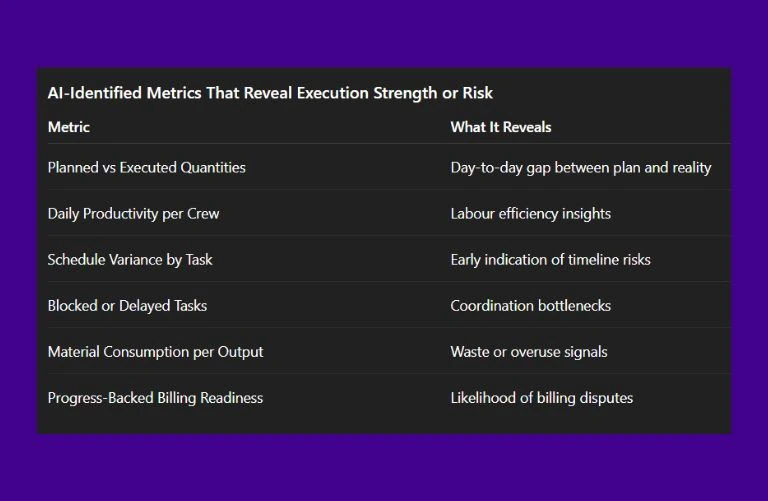
What AI Observes About Daily Progress Metrics?
To understand what really matters in daily progress tracking, we asked AI to analyze execution patterns across diverse construction projects.
Conclusion
Reporting on progress every day isn’t simply a formality; it’s what keeps a project on track. Without it, updates are scattered, reports aren’t credible, and delays happen without anyone noticing. Onsite makes it easy to report and do a good job. Contractors can see what’s going on at the site, teams are held accountable, and deadlines become more realistic and doable. It makes every project clear and consistent in a simple way. Adopting a construction daily report app like Onsite – Daily Progress Reporting Software- turns daily documentation into reliable progress data that keeps projects accountable.
Want to measure daily progress accurately?
FAQs
1. What is a construction Daily Progress Reporting Software?
A construction daily report app is a mobile tool that helps site teams record and share daily construction reports directly from the field, ensuring progress is documented accurately.
2. How does daily report software improve accountability on site?
Daily report software allows supervisors to capture tasks completed, issues encountered, and progress made every day, reducing confusion and increasing transparency across teams.
3. Why should contractors use a daily report app for construction projects?
Contractors benefit from using a daily report app because it simplifies recording the construction daily report and ensures that progress is visible to all stakeholders.
4. What features does construction daily report software typically include?
Construction daily report software often includes daily logs, site checklists, photo documentation, and progress reports to capture accurate records of daily work.
5. Can a construction reporting app help with project tracking?
Yes. A construction reporting app feeds into broader project tracking tools so managers can compare daily reports with planned milestones and detect delays early.
6. What is the difference between a daily report app and a daily log app
A daily report app focuses on recording progress and activities, while a daily log app may include more detailed site logs such as weather, crew counts, and equipment usage.
7. How are daily report templates useful in digital reporting?
Daily report templates ensure that every team member captures the same structured information each day, making construction reports consistent and easier to analyze.
8. Does construction field report software integrate with other project tools?
Yes. Construction field report software can integrate with project reporting software and project tracking tools so teams have a complete view of progress and issues.
