
How Workforce Deployment Gaps Cause Delays in Construction?
Cranes and concrete frequently get the most attention in construction. But the real work is done by the labor, masons, electricians, and site supervisors. Deadlines slip and budgets grow quickly if you can’t manage your workers efficiently. That’s when Construction Workforce Management Software comes in. Without structured construction workforce management software, allocating skilled workers to the right site becomes guesswork. It gives you a clear, real-time perspective of who’s on site, where they’re working, and what they’re doing, which helps you keep teams on task and projects on schedule. We have the best solution for you – Onsite. A connected workforce management system helps teams plan labor effectively across multiple projects.
What Workforce Management Actually Means on a Construction Site?
Managing a construction crew isn’t simply about paying them. It is about managing how work is planned, done, followed up on, and reviewed every day.
In practical terms, this involves
- knowing how many people are needed before work starts
- ensuring the right skills reach the right site
- keeping track of who shows up each day
- checking to see if the workers are making genuine progress.
- It also means that wages are based on records instead of guesses.
When any portion of this chain is absent, work becomes less predictable. Costs go up, productivity goes down, and fights are more likely to happen. Manual scheduling limits visibility and makes workforce planning unreliable as project demands change.
Everyday Labor Problems Contractors Face
Attendance Exists on Paper, Not in Reality
The usual way of marking attendance at any construction site is marking attendance once in the morning and forgotten. The time between morning to evening is something that goes unnoticed. Workers leave early, or they sit ideal, but the record shows their full day’s presence. This slows down the progress and makes less utilization of manpower.
The Wrong Workers Reach the Wrong Site
One place doesn’t have enough staff, while another has too many and doesn’t need them. These imbalances are missed until delays are already happening because there is no clear, central vision. At that point, moving people around becomes a response rather than a deliberate action.
Labour Cost Keeps Rising Without Matching Output
Without any increase in the project progress, the labor cost keeps on rising unnecessarily. This happens because of the lack of transparency on the activities of labor which later on also leaves everyone with no accountability.
Wage Disputes Are Frequent
At the end of the month, there are often arguments over paper attendance and vocal confirmations. Contractors lose time, money, and credibility when they try to fix problems that could have been prevented if the records had been clearer.
Why Manual Labour Tracking Breaks Under Pressure
Many teams start with simple systems. A site register. A WhatsApp update. An Excel sheet shared at the end of the week.
These methods might work for one site. They begin to fail when:
- projects increase,
- teams rotate frequently,
- deadlines tighten,
- and decisions need to be made daily.
Manual tracking cannot keep up with live execution. Information arrives late, errors accumulate, and managers react instead of plan.
What is Construction Workforce Management Software?
Construction Workforce Management Software helps you manage people in your construction company and projects. From supervisor and labor to backhand and office team, every person can be managed here. Their attendance, tasks, and accountability will help you manage manpower efficiently. With workforce planning software, teams can forecast labor needs before shortages arise.
How Onsite’s Construction Workforce Management Software helps?
1. Real-Time Attendance with GPS Tagging
Onsite functions as a construction workforce management platform built for real site conditions. GPS-Based Attendance is right now one of the smartest trends to adopt in workforce management. With GPS-Based Attendance, you can know that the workforce was actually at a site to work and at what time they arrived. With their punch out entry you can know at what time they left. This will give you the accuracy of their working hours, on the basis of which you can pay an accurate amount of their work. It helps in best utilization of workforce and also contributes in saving the project cost.
2. Manpower Allocation Across Projects
Onsite – construction management software – gives you a clear picture of where your workers are, whether you’re doing one project or ten. You can move workers from one site to another in minutes if one is overstaffed and the other is short-handed. No frantic calls or confusion.
3. Daily Productivity Tracking
You can track how much work has been done by a particular person. You can also check their attendance and how many hours they have worked. This gives you a clear picture of labor productivity. Onsite’s task-wise progress updates let you see what your team has accomplished each day, with photos, notes, or even voice updates, so you can spot delays early and take action. The system supports construction labor management software workflows, keeping labor records organized.
4. Payroll Made Easy
The automated solutions in payroll help on a crucial level. Oftentimes when you are doing manual work it is evident to have mistakes. A small mistake can influence total workforce cost and can consume a lot of your time. This is the reason why automated payroll becomes important. It helps companies to avoid errors and delays. It helps in ensuring the payroll is calculated accurately and quickly. You can even quickly generate payslip and share it from anywhere.
5. Labor Cost Insights
You can easily get reports on how much has been spent on the workforce. It can be a daily basis calculation, or project basis. You can choose the timeline and get transparency on how much is being spent on this particular section of your construction project.
How Different Teams Experience Better Workforce Control?
Site engineers spend less time keeping records up to date and more time paying attention to the job that is going on right in front of them.
Project managers can spot staffing gaps and make changes to deployments before they cause delays.
Instead of chasing confirmations, accounts teams use reliable attendance data to process wages.
Business owners may be sure that the cost of labor is based on the job that was really done on site.
One reliable source of labor data helps with planning, carrying out, and paying for work without having to do it again or again.
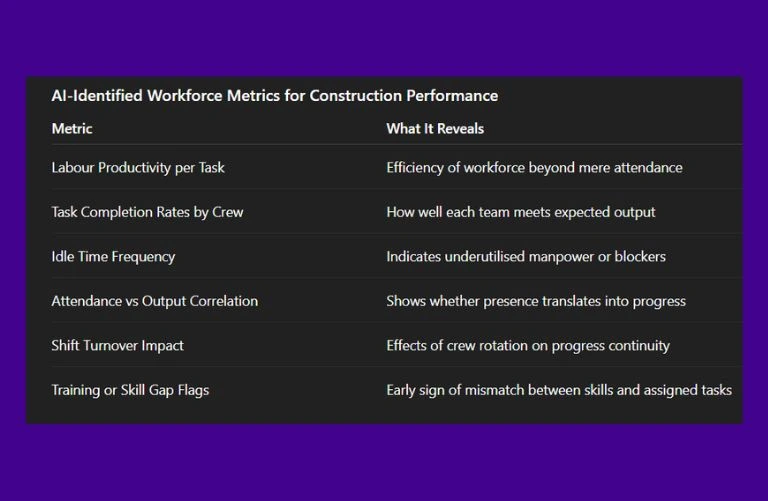
What AI Observes About Workforce Management Metrics?
To understand which workforce performance indicators truly reflect site execution health, we asked AI to analyze common patterns across construction projects.
Conclusion
In construction, it’s not enough to have a lot of workers; you also need to have the right people in the right place at the right time. You can do it with construction workforce management software, which helps you finish tasks faster, work smarter, and help you save up to 15% on your project costs. Onsite does exactly that. With construction workforce management software, contractors can confidently place the right people on the right job, at the right time.
Want to get transparency in managing workforce?
FAQs
What is construction workforce management software?
Construction workforce management software helps contractors plan and manage labour resources, assign teams to the right sites, and track workforce performance.
How does construction workforce management help on busy jobsites?
Construction workforce management gives visibility into crew assignments and schedules, ensuring the right workers are deployed where they are needed most.
Why is workforce planning important in construction?
Workforce planning helps forecast labor needs, balance team availability and site demand, and reduce idle time through structured assignments.
Can workforce planning software improve labor utilization?
Yes. Workforce planning software enables teams to map skills, availability, and site priorities so labor is scheduled effectively, and project delays are reduced.
What role does a workforce scheduling software play in field operations?
Workforce scheduling software allows supervisors to assign daily tasks, update crew movements, and adjust schedules quickly when project needs change.
Does construction labor management software support time tracking and accountability?
Construction labor management software often integrates with employee time tracking apps so supervisors can monitor hours, attendance, and progress on each site.
What benefits does a workforce management app provide for field teams?
A workforce management app lets crews view assignments, update task status, and communicate changes in real-time, improving coordination across sites.
How do workforce planning tools help reduce labor costs?
Workforce planning tools make it easier to allocate the right number of workers to tasks, avoiding overstaffing or underutilization and helping control labor expenditures.
Is a labor management system suitable for both small and large construction companies?
Yes. A labor management system scales to fit small crews on one site or large teams across multiple projects, keeping workforce data consistent and accessible.
How does construction workforce management software improve daily coordination?
By combining scheduling, planning, and tracking in one platform, construction workforce management software streamlines communication and ensures every worker knows their role for the day.
